
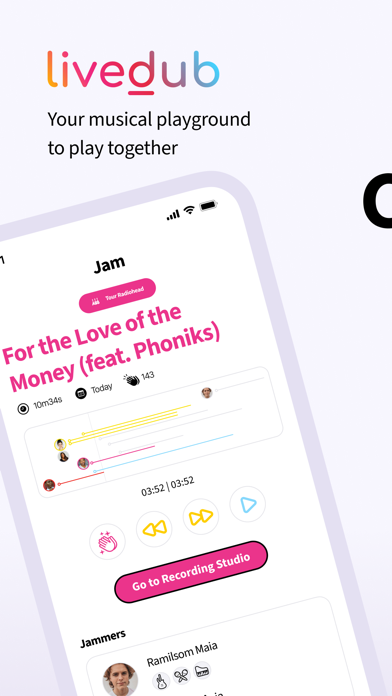

Making music on a smartphone used to mean wrestling with sluggish virtual instruments and clunky timeline editors. Livedub challenges that reputation by turning your iPhone into an intuitive pocket studio backed by responsive artificial intelligence. As mobile processors grow more capable, apps like this are finally bridging the gap between casual doodling and real collaborative creation.
Getting your hands on pre-release software is the best way to shape the roadmap of an upcoming release before it hits the wider App Store. We spent the last week pushing the newest beta build through its paces on an iPhone 15 Pro. Here is our comprehensive look at what makes Livedub worth downloading right now.
Livedub — Quick Specifications
Developer: Livedub
About Livedub
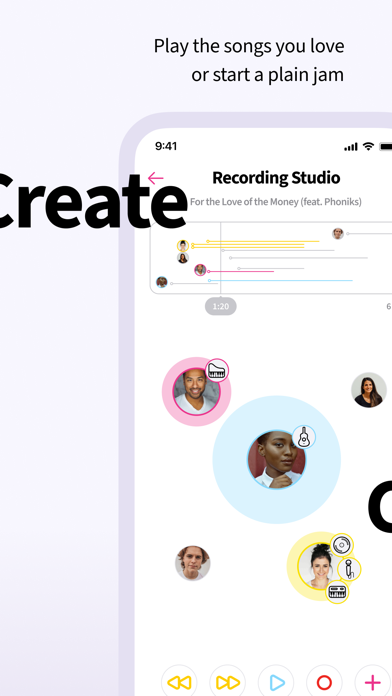
Developed by the team at Livedub, the app positions itself as an all-in-one hub for spontaneous musical creation and social sharing. Players and creators enter a streamlined environment designed to minimize technical friction while maximizing creative output. Instead of hunting through endless menus, you are greeted with a clean interface that puts core recording and mixing tools front and center.
The core premise centers around rapid jam creation from scratch, letting you sketch out musical ideas on the fly. Once a beat or melody takes shape, you can instantly broadcast your work to a growing global community of independent musicians. The software handles the heavy lifting behind the scenes, ensuring your tracks sound polished even if you recorded them on a crowded commuter train.
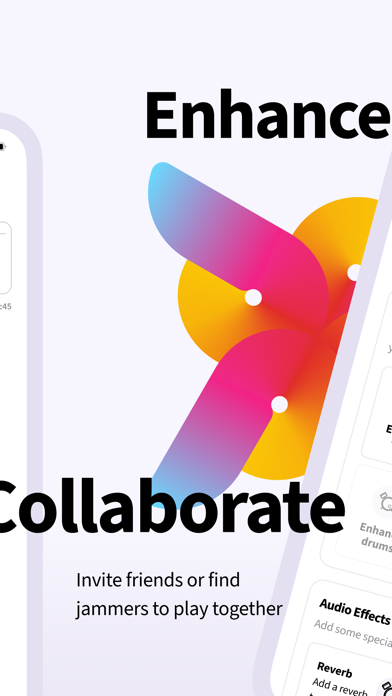
Beyond solo sessions, the platform includes dedicated multiplayer features and a unique Tours system. This travel-inspired mode connects you with diverse global talents, allowing you to jam across borders and discover unexpected musical horizons. The developer background points toward a strong focus on community-driven features, with iterative updates dropping regularly via Apple's beta ecosystem.
Standout Features & What's New in this Build
This particular TestFlight build introduces several foundational improvements over previous internal iterations. The developers have optimized the audio engine to minimize latency during live sessions. Here are the standout features currently available to testers in the latest package:
- Pocket Studio Workflow: Transform your iPhone into a fully functional recording setup without needing external audio interfaces or microphones.
- AI-Assisted Jams: Leverage smart algorithms that help flesh out your raw musical ideas, harmonizing tracks and smoothing out timing quirks automatically.
- Global Tours Feature: Connect directly with musicians worldwide through structured collaborative sessions that expand your creative horizons.
- Community Sharing: Publish your finished creations instantly to a worldwide feed where other users can listen, react, and collaborate.
Hands-On Impressions: Performance, Battery, and Thermals
Running audio-heavy applications on mobile hardware can quickly expose thermal management flaws, but Livedub handles resource allocation remarkably well. On our iPhone 15 Pro test device, touch responsiveness remained crisp and immediate, matching the fluid feedback of the 120Hz ProMotion display. Even during prolonged multi-track recording sessions, the app maintained stable frame pacing without stuttering the audio playback buffer.
Battery drain is always a concern when using generative AI tools and live audio streaming simultaneously. We noticed a moderate drop in battery percentage over an hour of continuous use, which is entirely expected for processing-heavy audio software. Thermal output stayed minimal, with the back of the chassis barely registering a warm touch after extensive jam sessions.
"Our goal was to eliminate the gear barrier entirely, letting anyone with an iPhone capture a lightning-in-a-bottle musical moment without dragging around a backpack full of cables and hardware." — Livedub Development Team
System Requirements & Requested Permissions
To run this beta build without running into unexpected performance bottlenecks, you will need a compatible Apple device running iOS 15.0 or later. While the app scales down gracefully to older A-series processors, modern silicon delivers a noticeably smoother experience when running multiple audio layers. Make sure your operating system is up to date before grabbing the installation package.
Upon launching the app for the first time, you will encounter a few standard permission prompts. Local Network access is requested to facilitate seamless multiplayer jam sessions with nearby users. Push Notifications keep you informed when friends invite you to a tour or interact with your shared tracks.
Pros & Cons: Beta Impressions
✓ The Highs (What We Love)
- Low Audio Latency: Real-time input feels surprisingly snappy with minimal monitoring delay.
- Intuitive UI: Clean layout makes building tracks approachable for absolute beginners.
- Smart AI Helpers: Helpful accompaniment tools elevate simple melodies into full arrangements.
✕ Beta Caveats (Room for Polish)
- Server Stability: Occasional dropped connections during peak global tour hours.
- Battery Impact: Extended AI processing sessions will drain your battery faster than normal.
- Feature Gaps: Some advanced export options are still missing from this early build.
Current TestFlight Slot Situation & Availability
Apple enforces a strict limit of 10,000 external testers for any given TestFlight beta application. Because interest in mobile music production tools runs high on platforms like Codewing, these slots tend to fill up rapidly after an update drops. If you tap the link and discover the program is currently full, do not panic.
Developers frequently prune inactive testers who haven't installed recent builds, which opens up new seats over time. Checking back during off-peak hours is often an effective strategy for securing an open slot. Bookmark this page and keep your TestFlight app ready for the next wave of expansions.
Step-by-Step TestFlight Installation Guide
Installing a beta app via Apple's official testing framework is a straightforward process that takes less than two minutes. Follow these five simple steps to get Livedub running on your iOS device right now:
1. Open the App Store and download Apple's official TestFlight application if you haven't already installed it on your device.
2. Tap the official TestFlight invitation link provided at the bottom of this Codewing review page to open the setup prompt.
3. Accept the beta invitation agreement in your browser, which will automatically redirect you directly into the TestFlight app interface.
4. Tap the Install button to download and configure the Livedub beta build alongside your standard applications.
5. Open the app, test out the features, and use the built-in feedback tool in TestFlight to report any bugs directly to the development team.
Frequently Asked Questions
Is Livedub safe to install via TestFlight?
Yes, testing apps through Apple's official TestFlight platform is completely secure. Every build goes through automated Apple compliance checks and runs inside a secure iOS sandbox environment.
What should I do if the Livedub beta is full?
If you encounter a message stating the tester limit has been reached, check back periodically. Developers regularly free up capacity by removing inactive users from the roster.
Will installing this beta overwrite my App Store version or delete save data?
TestFlight builds generally install as standalone preview packages or safely upgrade existing developer builds without harming your primary App Store app data.
How long do TestFlight beta invitations and builds last?
Each individual TestFlight build remains active for 90 days from the date it was uploaded, after which the app will stop opening until you update to a newer release.
Are in-app purchases free during TestFlight beta testing?
Any digital goods or subscription features encountered during the beta testing phase use Apple's simulated sandbox billing system, meaning you will never be charged real money.
Final Editorial Verdict
Livedub successfully lowers the barrier to entry for mobile music creation, offering an engaging space for spontaneous collaboration and AI-assisted jamming. While minor network hiccups remind you that this is still pre-release software, the core experience is stable and remarkably fun. We award this beta build a solid 8.5 out of 10 for accessibility and creative potential.
Developer Support & Official Resources
Stay updated on patch notes, maintenance windows, and feature roadmaps directly from the official developer channels.
Never miss an opening for Livedub.
Apple limits TestFlight betas to 10,000 testers, and this program is currently at capacity. CodeWings Plus continuously monitors slot availability 24/7 and sends you an instant alert the second a spot opens up.






