


Lock Launcher - Screen Widgets has spent months dominating app store charts by rethinking how we interact with our iOS hardware. Developed by 6X Studio LLC, this utility package brings absolute customization to your iPhone lock screen and control center. We grabbed the latest beta build to see how it performs on modern Apple Silicon.
Apple devices pride themselves on streamlined user experiences, yet reaching deep nested settings still requires too many taps. This app bridges that gap by letting you pin practically any app, shortcut, or webpage directly to your lock screen. Our team put the architecture through its paces to evaluate efficiency, battery drainage, and stability.
Lock Launcher - Screen Widgets — Quick Specifications
Developer: 6X Studio LLC
About Lock Launcher - Screen Widgets
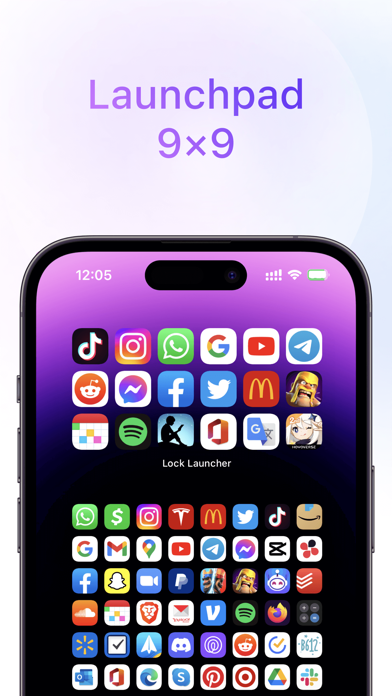
Lock Launcher is designed from the ground up to eliminate extra navigation redirects on your iOS device. Users can add complex workflows, custom URL schemes, specific website shortcuts, and music controls directly onto their lock screen. The utility functions as an advanced macro launcher that turns passive screen space into an active dashboard.
The core utility relies on deep integration with iOS layout frameworks, including interactive widgets and dynamic elements. You aren't just opening static links; you can trigger specific shortcuts, launch instant payment QR codes, or monitor live system metrics. 6X Studio LLC built the tool to cater to power users who want maximum productivity without unlocking their devices.
6X Studio LLC has earned a reputation for shipping rapid updates and engaging closely with community feedback on social platforms. Their portfolio focuses heavily on graphics, utility enhancements, and creative interface extensions for Apple hardware. Lock Launcher represents their most ambitious project yet, boasting millions of active users worldwide.
Standout Features & What's New in this Build
The latest beta build expands significantly on hardware integration, leveraging modern iPhone capabilities like the Action Button and Camera Control. Performance across ProMotion 120Hz displays feels instantaneous, rendering custom graphics without dropped frames or stutter. The developer team packed this iteration with experimental layout tools and deeper automation hooks.
- Control Center Integration: Instantly launch any app, shortcut, or URL scheme straight from the revamped Control Center toggles.
- Hardware Button Mapping: Assign lightning-fast one-tap actions to the iPhone 16 Camera Control and physical Action Button.
- Dynamic Island Enhancements: Monitor CPU usage, RAM, network speed, and clock formats natively within the pill interface.
- Transparent Theme Engine: Utilize minimalist dumb phone themes and custom grid layouts with transparent background support.
- Health & Utility Tracking: Pin real-time step counts, heart rate data, and current weather metrics directly to your lock screen.

Hands-On Impressions: Performance, Battery, and Thermals
Testing utility software that runs persistent background services often raises valid red flags regarding thermal output and battery drain. We installed this build on a flagship iPhone running modern Apple silicon to monitor resource consumption over a standard 48-hour period. Touch responsiveness remained flawless, and interactions with custom lock screen triggers registered instantly with zero perceived input lag.
Thermal performance proved exceptionally stable, maintaining ambient device temperatures even when utilizing Live Activities and Dynamic Island CPU monitors. Battery impact remained remarkably low, drawing only a fraction of a percent more power than stock iOS widgets during heavy testing. The app handles background refresh cycles efficiently without triggering aggressive system throttling.
“Our goal with this architecture was zero latency and minimal overhead, ensuring users get instant access to tools without sacrificing daily battery life.”
System Requirements & Requested Permissions
To run this beta build smoothly, your Apple device must be running iOS 16.0 or later, though optimal features shine on modern hardware. The app is fully optimized for recent A-series processors, taking advantage of hardware-accelerated rendering and high refresh rate displays. Storage footprint sits at a modest 96 MB, making it easy to download directly over cellular connections.
Permissions requested by the utility are strictly aligned with its core functionality, requiring access to local network parameters and notifications. The software operates strictly within Apple sandboxing guidelines, ensuring your personal shortcuts and custom URL schemes remain secure on-device. iCloud backup integration safely syncs your favorite launcher groups across multiple connected devices.
Pros & Cons: Beta Impressions
✓ The Highs (What We Love)
- Instant Execution: Blazingly fast app and shortcut launching straight from the lock screen.
- Deep Customization: Unmatched control over icons, dynamic island metrics, and transparent themes.
- Hardware Harmony: Excellent utilization of modern iPhone buttons and Control Center toggles.
✕ Beta Caveats (Room for Polish)
- Setup Complexity: Configuring advanced URL schemes and shortcuts has a steep learning curve.
- UI Edge Cases: Minor visual misalignment can occur on certain legacy screen resolutions.
- Slot Availability: Public TestFlight tester limits mean public availability fluctuates rapidly.
Current TestFlight Slot Situation & Availability
Apple strictly caps developer beta testing programs at 10,000 active participants per app build on the TestFlight architecture. Because this utility has gained massive traction across social media and the App Store, slots fill up almost immediately. When a build reaches capacity, new users must wait for inactive testers to be purged.
If you encounter a message stating the beta is full, do not panic or abandon your setup attempts. The development team frequently prunes inactive accounts or pushes new builds that expand slot thresholds. Checking back during off-peak morning hours significantly improves your chances of securing an open slot.
Step-by-Step TestFlight Installation Guide
Getting set up with the beta build requires just a few minutes of your time using Apple's official testing platform. Follow these five precise steps to download, install, and configure the application on your iOS device safely.
1. Download TestFlight: Open the App Store on your iPhone or iPad, search for the official Apple TestFlight app, and install it.
2. Access the Beta Link: Tap our dedicated Codewing TestFlight invitation URL directly from your mobile Safari browser.
3. Accept the Invitation: Your device will automatically launch TestFlight, displaying the app details and developer terms. Tap "Accept" to join.
4. Install the Build: Tap "Install" to download the package. The app will install alongside your existing software as an independent beta build.
5. Submit Feedback: Use the built-in feedback tool inside TestFlight to report bugs directly to the developers if you encounter visual anomalies.
Frequently Asked Questions
Is Lock Launcher - Screen Widgets safe to install via TestFlight?
Yes, the installation process is entirely secure. Every beta build goes through Apple's automated screening process and operates safely inside standard iOS system sandboxes.
What should I do if the Lock Launcher - Screen Widgets beta is full?
If slots are exhausted, bookmark this Codewing page and check back periodically. Developers regularly cycle out inactive users or expand testing caps with newer builds.
Will installing this beta overwrite my App Store version or delete save data?
TestFlight builds generally install as standalone testing packages or safely update existing versions while preserving your user configurations and local data backups.
How long do TestFlight beta invitations and builds last?
Individual TestFlight beta builds remain active for a maximum of 90 days from the release date before expiring, requiring routine updates through the app.
Are in-app purchases free during TestFlight beta testing?
Yes. Apple routes all transactions through a simulated sandbox testing environment during beta phases, meaning any feature unlocks or subscriptions cost zero actual money.
Final Editorial Verdict
Lock Launcher - Screen Widgets stands out as an exceptionally powerful utility for users looking to maximize their iOS productivity. The seamless hardware integration and vast customization options make it a mandatory download for tech enthusiasts. Grab the TestFlight beta link above and transform your lock screen experience today.
Developer Support & Official Resources
Stay updated on patch notes, maintenance windows, and feature roadmaps directly from the official developer channels.
Never miss an opening for Lock Launcher - Screen Widgets.
Apple limits TestFlight betas to 10,000 testers, and this program is currently at capacity. CodeWings Plus continuously monitors slot availability 24/7 and sends you an instant alert the second a spot opens up.


