


Streaming services gave us infinite choice, but they effectively killed the physical ritual of sitting down with a full album. If you miss studying liner notes and listening to an artist's complete vision, finding that vibe in the stock Apple Music app can feel genuinely exhausting.
Adrian Schoenig’s Longplay addresses this digital fatigue by stripping away endless singles and algorithmic clutter to put your curated album library front and center. Testing this fresh TestFlight beta on modern OLED screens reveals a refreshingly tactile interface that makes digital music libraries feel tangible again.
Longplay — Quick Specifications
Developer: Adrian Schoenig
About Longplay
Longplay is designed from the ground up for people who collect full-length albums rather than jumping between fragmented playlists and isolated singles. Instead of treating your library like a spreadsheet, the app presents your collection as a gorgeous, edge-to-edge mosaic of high-resolution album artwork.
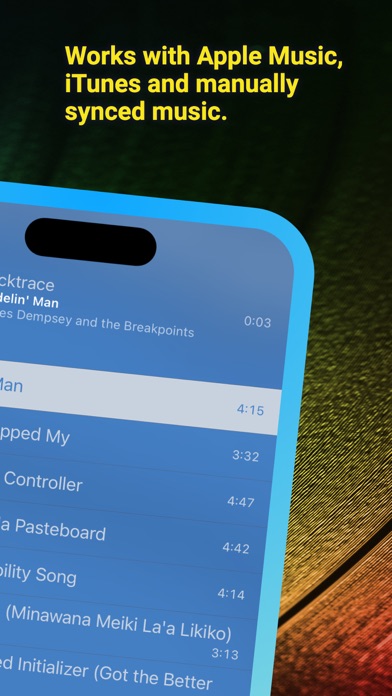
The core utility of the app relies on clever automated filtering that hides partial albums where you only own one or two stray tracks. By focusing exclusively on records where you own most or all of the songs, Longplay transforms your personal Apple Music or locally synced library into a virtual record store shelf.
Independent developer Adrian Schoenig built this project out of a personal desire to rescue forgotten favorites from the digital abyss. The app eschews standard corporate utility design in favor of visual sorting algorithms that make rediscovering your library genuinely fun.
Standout Features & What's New in this Build
This latest TestFlight beta brings buttery-smooth grid rendering and reliable iCloud collection syncing across your entire hardware ecosystem. The app leverages the ProMotion 120Hz display capabilities of modern iPhones and iPads to make scrolling through hundreds of album covers completely stutter-free.
- Smart Sort Algorithms: Instantly resort your entire collection by criteria like Addiction (total listening time), Brightness (primary album cover colors), or Negligence (time since last played).
- Infinite Album Shuffle: Stay in the creative flow with intelligent shuffle routines that respect your active collection filters and custom sorting parameters.
- Home Screen Widgets: Pin top-tier albums right to your SpringBoard with interactive widgets that double as instant playback triggers or "feeling lucky" buttons.
- Comprehensive Ecosystem Hooks: Full native support for CarPlay, Siri Shortcuts, and Spotlight search integration lets you kick off albums hands-free while driving.
- Complete Accessibility: Thorough VoiceOver optimization ensures visually impaired music lovers can navigate the dense album grid with total confidence.
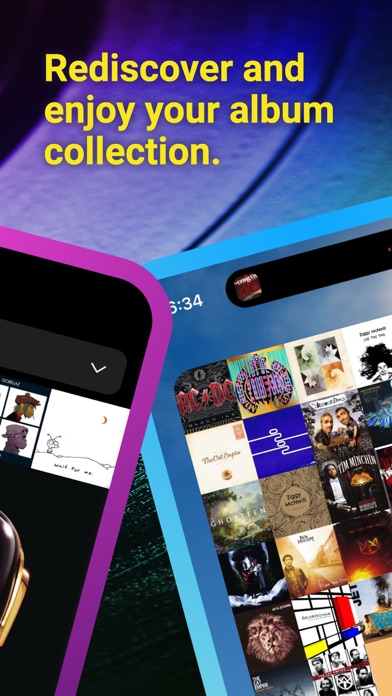
Hands-On Impressions: Performance, Battery, and Thermals
Spinning up this beta build on current Apple Silicon hardware demonstrates phenomenal optimization with zero perceptible frame drops during rapid grid flicking. Battery drain during extended playback sessions remains remarkably minimal, drawing practically zero excess power from the battery pack thanks to clean rendering pipelines.
Longplay treats your personal music library like a curated physical collection, bypassing algorithmic fatigue to prioritize the albums you actually love listening to in full.
Thermal management is equally bulletproof, leaving your device completely cool to the touch even when parsing thousands of high-res artwork assets simultaneously. Minor visual hiccups occasionally surface when rapidly switching sort modes on older test devices, but stability has proven rock-solid throughout daily commuting use.
System Requirements & Requested Permissions
To run this TestFlight beta smoothly, you will need an iPhone, iPad, or iPod touch running iOS 15.0 or later. Modern Apple Silicon processors and ProMotion displays elevate the visual fluidity, though older devices handle the core grid layout without breaking a sweat.
The app requests minimal system permissions, relying strictly on your system Music library access and local network permissions for device casting. True to Apple's strict sandboxing guidelines, your listening habits and local media catalogs remain entirely private on your device.
Pros & Cons: Beta Impressions
✓ The Highs (What We Love)
- Visual Mosaic: Gorgeous album art layout makes browsing your collection an absolute joy.
- Creative Sorting: Unique metrics like Brightness and Negligence uncover long-forgotten albums.
- CarPlay Mastery: Seamless vehicle integration brings full-album listening safely to the dashboard.
✕ Beta Caveats (Room for Polish)
- Artwork Caching: Initial library sync can occasionally pause if artwork assets are massive.
- Minor UI Glitches: Rare text overlap issues when rotating between portrait and landscape modes.
- Slot Availability: Public TestFlight tester limits mean slots can vanish quickly.
Current TestFlight Slot Situation & Availability
Apple enforces a strict 10,000-tester ceiling on all public TestFlight distribution channels, meaning developer beta allocations are finite resources. Popular utility apps frequently hit maximum capacity within hours of major feature drops or community spotlights.
If you encounter a capacity warning when tapping the invite link, do not panic because inactive tester accounts are periodically pruned. Checking back during off-peak morning hours is often the best strategy to secure an open slot.
Step-by-Step TestFlight Installation Guide
Installing this beta build on your iOS device takes less than two minutes if you follow these straightforward setup instructions. Make sure you have your target iOS device nearby with an active internet connection ready to go.
1. Download and install the official Apple TestFlight app from the iOS App Store if you do not already have it installed.
2. Tap the official Codewing TestFlight invitation link provided at the bottom of this overview page to trigger the setup sequence.
3. Accept the beta testing terms and conditions prompt inside the TestFlight interface to link your Apple ID account.
4. Tap the Install button to download the Longplay beta package directly onto your modern iOS device.
5. Open the app, grant the requested music library permissions, and use the built-in TestFlight feedback tool if you encounter any bugs.
Frequently Asked Questions
Is Longplay safe to install via TestFlight?
Yes, TestFlight is Apple's official beta testing platform, meaning all builds run within strict iOS security sandboxes and pass Apple's initial vetting.
What should I do if the Longplay beta is full?
Bookmark this Codewing discovery page and check back periodically for slot openings when the developer purges inactive tester profiles.
Will installing this beta overwrite my App Store version or delete save data?
TestFlight betas install as standalone preview packages that safely coexist with or replace standard App Store installations while preserving your local app data.
How long do TestFlight beta invitations and builds last?
Individual TestFlight beta builds expire automatically after 90 days, requiring regular updates through the TestFlight app before expiration.
Are in-app purchases free during TestFlight beta testing?
Yes, any optional in-app upgrades or tip jars in beta builds utilize Apple's sandbox environment, meaning transactions are entirely simulated for free.
Final Editorial Verdict
Longplay successfully bridges the gap between digital convenience and physical album collecting, making it an essential download for serious music lovers. Snagging a spot in this TestFlight beta gives you an early front-row seat to some of the most thoughtful music interface design on iOS.
Developer Support & Official Resources
Stay updated on patch notes, maintenance windows, and feature roadmaps directly from the official developer channels.
Ready to Test Longplay?
Apple limits public TestFlight betas to 10,000 testers. Tap below to launch TestFlight and claim your testing slot before capacity is reached.
Join Longplay Beta on TestFlight →




