
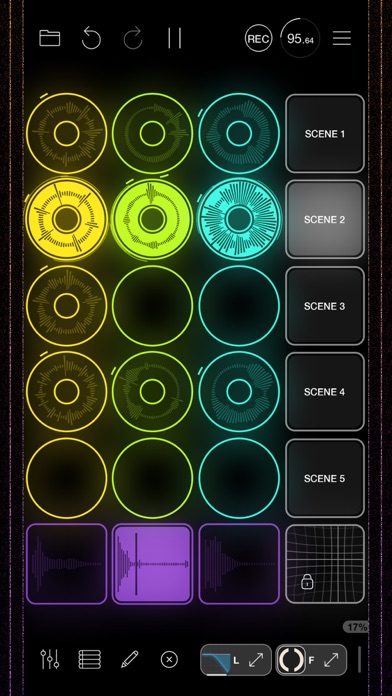

Finding a music production suite that respects the power of mobile silicon is rare. Loopy Pro from A Tasty Pixel breaks every traditional mold of iOS audio engineering.
This hands-on review explores the latest TestFlight build on flagship Apple hardware. We will examine how this modular powerhouse performs under heavy multi-track audio loads.
Loopy Pro: Looper DAW Sampler — Quick Specifications
Developer: A Tasty Pixel
About Loopy Pro: Looper DAW Sampler
Loopy Pro functions as a customisable music creation environment that blends live looping, sampling, and MIDI sequencing. Users build their own workflows by placing loops, one-shots, and custom control surfaces onto a flexible canvas.
The core premise centers on modular audio manipulation where you act as the architect of your own Digital Audio Workstation. You can construct complex effect chains, dock AUv3 instrument plugins, and route multiple audio interfaces effortlessly.
Developed by A Tasty Pixel, the project builds on years of mobile audio refinement. The studio focuses heavily on low-latency audio processing and touch-first performance design.
Standout Features & What's New in this Build
This experimental TestFlight iteration introduces robust stability improvements for external hardware routing. It optimizes CPU allocation specifically for modern Apple Silicon chips like the M4 iPad Pro.
- Modular Canvas: Arrange custom sliders, dials, XY pads, and grid controllers like musical Lego blocks.
- Comprehensive AUv3 Hosting: Load unlimited third-party virtual instruments and audio effects with clean window docking.
- Advanced MIDI Integration: Enjoy native support for hardware controllers like the APC Mini Mk2 and MIDI Fighter Twister.
- Project Sequencer Timeline: Arrange complete songs hands-free using robust sectioning and automated playback tools.
- Flexible Audio Capture: Record via automatic loop detection, audio thresholds, or retrospective capture modes.
Hands-On Impressions: Performance, Battery, and Thermals
Running multi-track sessions with heavy reverb tails on an M-series iPad Pro yields remarkably stable frame pacing. The ProMotion 120Hz display makes manipulating visual waveforms and automation lanes feel instantaneous and butter-smooth.
Thermal management remains impressive during extended looping sessions, keeping chassis temperatures nominal under sustained workloads. Battery consumption is naturally higher when hosting multiple power-hungry plugins, but power draw scales predictably with CPU load.
"Loopy Pro bridges the gap between hardware loop stations and full desktop DAWs, offering a custom canvas that adapts entirely to how your brain handles live music creation."
System Requirements & Requested Permissions
The application requires iOS 15.0 or later to run effectively, though modern Apple Silicon hardware unlocks the highest track counts and lowest buffer latencies. iPads and iPhones equipped with robust RAM allocations handle large sample libraries much more gracefully.
Permissions requested during initial setup include Local Network access for Ableton Link and OSC communication. Apple's secure sandbox environment ensures all your personal samples, stems, and project files remain completely private.
Pros & Cons: Beta Impressions
✓ The Highs (What We Love)
- Infinite Customization: Build bespoke performance layouts tailored to specific live rigs.
- Rock-Solid Latency: Audio engine performs exceptionally well under tight buffer settings.
- Hardware Integration: Out-of-the-box support for popular MIDI controllers simplifies setup.
✕ Beta Caveats (Room for Polish)
- Steep Learning Curve: Modular canvas requires patience to master advanced routing.
- UI Density: Smaller iPhone screens can feel cluttered with complex custom control pads.
- Beta Quirks: Occasional plugin crashes when pushing experimental AUv3 configurations.

Current TestFlight Slot Situation & Availability
Apple restricts external TestFlight distributions to a maximum of 10,000 active participants per app. High-demand music utilities like this often approach capacity quickly following major update announcements.
If slots appear temporarily constrained, developers routinely prune inactive testers to free up admission headroom. Checking back during off-peak hours provides the best chance of securing an open slot.
Step-by-Step TestFlight Installation Guide
1. Download the official TestFlight application directly from the Apple App Store on your iOS device.
2. Tap the exclusive Codewing TestFlight invitation link provided at the bottom of this feature overview.
3. Accept the public beta participation prompt within the TestFlight web page or app interface.
4. Tap Install to download the latest beta build directly onto your modern iPhone or iPad.
5. Open the app, explore the audio engine, and submit diagnostic feedback directly through the TestFlight interface if you encounter bugs.
Frequently Asked Questions
Is Loopy Pro: Looper DAW Sampler safe to install via TestFlight?
Yes, Apple subjects every TestFlight build to stringent automated security checks and code signing verification. The app operates inside Apple's strict sandbox environment, protecting your device's core system files.
What should I do if the Loopy Pro: Looper DAW Sampler beta is full?
If slots are currently exhausted, bookmark this Codewing discovery page and check back periodically. Inactive testers are removed regularly, which frees up fresh installation tokens.
Will installing this beta overwrite my App Store version or delete save data?
TestFlight builds generally update existing versions in-place while preserving your local project files and custom templates. However, backing up critical live performance sets prior to updating is always recommended.
How long do TestFlight beta invitations and builds last?
Each individual TestFlight build remains active for 90 days from its initial upload date. Developers routinely push fresh builds before expiration to keep the testing pipeline active.
Are in-app purchases free during TestFlight beta testing?
Yes, all simulated financial transactions within TestFlight utilize Apple's sandbox testing environment. You can evaluate premium features and upgrade paths without incurring any real-world charges.
Final Editorial Verdict
Loopy Pro represents an absolute triumph in mobile audio engineering and creative workflow design. For musicians looking to ditch heavy laptops for a streamlined, touch-driven powerhouse, this beta is an essential download.
Rating: 9.6 / 10
Developer Support & Official Resources
Stay updated on patch notes, maintenance windows, and feature roadmaps directly from the official developer channels.
Never miss an opening for Loopy Pro: Looper DAW Sampler.
Apple limits TestFlight betas to 10,000 testers, and this program is currently at capacity. CodeWings Plus continuously monitors slot availability 24/7 and sends you an instant alert the second a spot opens up.





