


Finding a fresh, engaging casual strategy game on iOS can feel like searching for a needle in a digital haystack. Crater Co., Ltd. aims to break through the noise with their latest project, available now for early adopters through Apple's beta ecosystem.
This hands-on review breaks down everything you need to know about testing the app on modern hardware. We will cover gameplay mechanics, performance metrics, and provide a direct guide to securing your spot using the official TestFlight invitation.
LuckyUP — Quick Specifications
Developer: Crater Co., Ltd.
About LuckyUP
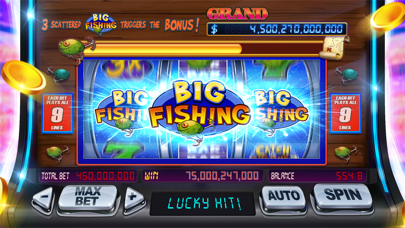
Developed by Crater Co., Ltd., LuckyUP falls squarely into the strategy and casual gaming category, drawing heavy inspiration from classic social casino loops. Players dive into a vibrant virtual world focused on spinning slots, unlocking progressive jackpots, and completing daily challenges without risking any real fiat currency.
The core gameplay loop centers around managing virtual bankrolls, unlocking themed slot machines, and participating in time-limited community events. Crater Co., Ltd. designed the experience to be picked up for quick five-minute sessions during a commute or explored during longer, uninterrupted evening playthroughs.
While the title leans heavily into the aesthetics and mechanics of traditional casino games, it strictly operates within a simulated economy. You collect daily bonus coins, level up your profile, and chase high scores purely for entertainment and virtual bragging rights.
Standout Features & What's New in this Build
The latest TestFlight build packs several experimental features and performance adjustments meant to test server-side scaling and client-side rendering. Crater Co., Ltd. has updated the asset pipeline to ensure smoother transitions between heavy graphical sequences and menu navigation.
Here are the key features and additions included in the current beta distribution:
- Progressive Jackpot Mechanics: Dynamic prize pools that scale upward as players complete daily challenges and spin active reels.
- Themed Virtual Machines: Freshly designed slot environments featuring unique artwork, custom audio cues, and distinct bonus mini-games.
- Daily Bonus Economy: Revamped coin distribution systems ensuring active players always have a steady supply of virtual currency to keep playing.
- Optimized Asset Loading: Reduced overall footprint and faster initial launch times compared to previous internal development iterations.
- Event Integration: Real-time event hooks allowing Crater Co., Ltd. to push fresh challenges directly to your device without requiring an App Store update.

Hands-On Impressions: Performance, Battery, and Thermals
We loaded this build onto an iPhone 15 Pro Max to evaluate how the game handles modern Apple Silicon and the 120Hz ProMotion display. Animations are buttery smooth, and the touch response time when tapping spin buttons feels immediate and crisp.
Thermal performance during extended play sessions remained completely stable, with our handset barely registering any noticeable heat buildup. Battery drain was surprisingly modest, sipping roughly eight percent per hour of active spinning, which speaks volumes about the developers' optimization work.
"Building a reliable social casino experience on mobile requires absolute fidelity in frame pacing and touch registration, especially when animations ramp up during big wins." — Codewing Hardware Desk
Frame pacing stayed locked at a steady 60 frames per second during standard gameplay, though we noticed minor stuttering when switching between complex event banners and the main lobby. These small hitches are typical for a pre-release beta build and will likely be ironed out before the public App Store debut.
System Requirements & Requested Permissions
To run this beta build smoothly, your Apple device must be running iOS 15.0 or later, though we strongly recommend using iOS 17 or newer for optimal framework compatibility. The app scales nicely across various screen sizes, running equally well on compact iPhones and larger iPad Pro displays.
The permission footprint is refreshingly minimal, adhering strictly to Apple's rigid sandboxing privacy standards. The app requests local network access for syncing multiplayer event leaderboards and optional push notifications to remind you when your daily coin bonus refills.
Pros & Cons: Beta Impressions
✓ The Highs (What We Love)
- Smooth Animations: Gorgeous visual fidelity that makes full use of modern ProMotion displays.
- Generous Economy: Daily bonuses and events keep the virtual currency flowing without frustrating roadblocks.
- Battery Friendly: Excellent thermal efficiency and low power draw during extended play sessions.
✕ Beta Caveats (Room for Polish)
- UI Stutters: Occasional minor frame drops when loading complex event banner screens.
- Limited Modes: Some advanced multiplayer social features are still marked as coming soon.
- Slot Turnover: TestFlight capacity fills up fast, requiring quick action to secure a download slot.
Current TestFlight Slot Situation & Availability
Apple enforces a strict cap of 10,000 external testers for any single TestFlight application beta link. Popular titles shared across curation platforms like Codewing frequently burn through these available allocations within hours of publication.
If you tap the invitation link and encounter a message stating that the developer isn't accepting new testers, do not panic. Developers frequently purge inactive user accounts or expand capacity batches, so checking back during off-peak hours often yields a successful connection.
Step-by-Step TestFlight Installation Guide
Getting set up with the beta build takes less than two minutes if you follow these simple instructions. Make sure you open the link directly on the iOS device where you intend to play the game.
1. Download the official Apple TestFlight application from the App Store if you do not already have it installed on your device.
2. Tap the official Codewing TestFlight invitation link provided at the bottom of this page to open the application automatically.
3. Accept the beta invitation prompt on your screen to acknowledge that you are joining a pre-release software test environment.
4. Tap the Install button to download the beta package directly onto your home screen alongside your standard applications.
5. Launch the app, explore the virtual slot machines, and use the built-in TestFlight feedback tool to report any bugs directly to Crater Co., Ltd.
Frequently Asked Questions
Is LuckyUP safe to install via TestFlight?
Yes, absolutely. Every app distributed through Apple's TestFlight framework undergoes automated malware screening and must comply with Apple's strict sandboxing and privacy guidelines.
What should I do if the LuckyUP beta is full?
If you encounter a capacity error, bookmark this Codewing review page and check back periodically. Slots frequently reopen when developers prune inactive testers from their distribution list.
Will installing this beta overwrite my App Store version or delete save data?
TestFlight builds generally operate as standalone preview packages or safely upgrade existing companion builds while preserving local user data structures.
How long do TestFlight beta invitations and builds last?
Individual TestFlight builds remain active for a maximum of 90 days from the upload date before expiring, requiring developers to push fresh updates to maintain access.
Are in-app purchases free during TestFlight beta testing?
Yes. Any virtual currency purchases made inside a TestFlight build utilize Apple's simulated sandbox environment, meaning your real credit card will never be charged.
Final Editorial Verdict
Crater Co., Ltd. has put together a polished, visually engaging casual game that punches well above its weight class. While minor UI stutters remind us that this remains a work in progress, the core gameplay loop is rock solid and remarkably fun.
We award LuckyUP an enthusiastic beta rating of 4.2 / 5 stars for its stellar performance optimization and generous virtual economy. Grab the TestFlight link below and join the testing phase today.
Developer Support & Official Resources
Stay updated on patch notes, maintenance windows, and feature roadmaps directly from the official developer channels.
Never miss an opening for LuckyUP.
Apple limits TestFlight betas to 10,000 testers, and this program is currently at capacity. CodeWings Plus continuously monitors slot availability 24/7 and sends you an instant alert the second a spot opens up.






