

For years, fitness enthusiasts have chased the elusive sweet spot between rigid spreadsheet programming and overly gamified workout apps. Stronger By Science Technologies LLC aims to bridge that exact gap with their newest ecosystem expansion on iOS. We have spent the last week rigorously testing the platform to see how it handles progressive overload.
Running builds through Apple's native testing channel gives us an exclusive look at how developers tune their software before a wide public rollout. This hands-on breakdown examines performance metrics, UI responsiveness, and how the smart auto-progression algorithms actually function in a real gym environment. Let us dive right into what makes this build worth testing on your iPhone.
MacroFactor Workouts - Tracker — Quick Specifications
Developer: Stronger By Science Technologies LLC
About MacroFactor Workouts - Tracker
MacroFactor Workouts combines innovative coaching algorithms with science-based workout routines customized to your goals, fitness level, and gym equipment. The software acts as an intelligent digital personal trainer that adapts to your performance rather than forcing you into a static, unchanging routine. Users can effortlessly track strength training regimens while monitoring personal records through detailed analytical charts.
The core utility centers around a robust workout planner that accommodates everything from fully equipped commercial facilities to minimalist home setups. Stronger By Science Technologies LLC built their reputation on evidence-based fitness methodologies, translating peer-reviewed exercise science into practical digital workflows. This app applies those exact principles to volume tracking, recovery metrics, and smart weight progressions.
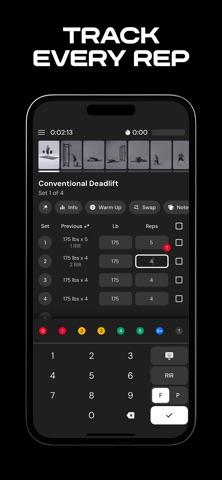
Within the utility ecosystem, you can easily log supersets, partial reps, myoreps, and Rate of Perceived Exertion (RIR) metrics without fighting the user interface. It also features a built-in plate calculator, smart warm-up planners, and asymmetrical tracking for unilateral movements. The developer background shines through in the meticulous attention to practical lifting details that many mainstream apps completely overlook.
Standout Features & What's New in this Build
This particular TestFlight build introduces several foundational architecture updates designed to speed up logging between heavy working sets. The interface has been optimized to take full advantage of modern Apple silicon and high refresh rate displays. Here are the standout features currently available to test in this mobile build:
- Smart Auto-Progression: The application analyzes your previous performance metrics and automatically prescribes weight or rep adjustments for your next session.
- Jeff Nippard Integration: Seamlessly import and track popular evidence-based routines designed by industry-leading fitness educator Jeff Nippard.
- Asymmetrical Tracking: Log differing weights and repetition counts for your left and right sides during unilateral dumbbell or cable exercises.
- Intelligent Exercise Swaps: Receive smart suggestions for alternative movements based on available equipment when your preferred gym machine is occupied.

Hands-On Impressions: Performance, Battery, and Thermals
Testing fitness applications on modern flagship hardware reveals a lot about a developer's optimization discipline and UI rendering efficiency. On an iPhone 16 Pro running iOS 18, scrolling through massive exercise libraries and switching between active workout tabs feels instantaneous. The ProMotion 120Hz display makes list animations buttery smooth, with zero dropped frames even when loading dense historical charts.
Battery draw during extended hour-long gym sessions remains impressively minimal, hovering at just a few percentage points of total capacity utilization. Thermal management is equally robust, as the app does not trigger any noticeable heat buildup or aggressive CPU throttling during background rest-timer tracking. Touch responsiveness is snappy, ensuring you can quickly log a set of heavy squats while dealing with elevated heart rates.
"Our goal was to eliminate the cognitive friction of tracking so lifters can focus entirely on executing their sets with maximum intensity and proper form." — Stronger By Science Technologies LLC
System Requirements & Requested Permissions
To run this beta build smoothly, your Apple device must be running iOS 18.0 or later with adequate storage space for the 298 MB download package. The application scales gracefully across various screen sizes, making it equally comfortable to use on compact standard iPhones or larger Max models. Performance remains rock-solid, leveraging modern framework optimizations to keep memory footprints exceptionally lean.
Regarding privacy and permissions, the software operates with a clean sandbox approach that respects user boundaries. It requests minimal local network access for syncing data and optional notification permissions to alert you when rest timers expire. Apple's rigorous app sandboxing ensures your personal body metrics, progress photos, and workout logs remain securely stored.
Pros & Cons: Beta Impressions
✓ The Highs (What We Love)
- Evidence-Based Logic: Algorithms grounded in actual sports science rather than fitness industry myths.
- Fluid UI Performance: Responsive touch targets and crisp typography that shine on ProMotion displays.
- Granular Tracking: Excellent support for RIR, unilateral lifts, and specialized rep schemes.
✕ Beta Caveats (Room for Polish)
- Data Density: Some dashboard charts can feel overwhelming for casual users initially.
- Build Turnover: Occasional minor UI realignment issues when rotating between portrait and landscape modes.
- Subscription Model: Premium pricing structure requires financial commitment past the trial period.
Current TestFlight Slot Situation & Availability
Apple enforces a strict cap of 10,000 concurrent external testers for any individual TestFlight application distribution package. Because Stronger By Science Technologies LLC maintains a dedicated and vocal community, beta slots for this utility tend to fill up rapidly. If you encounter a notification stating the program is currently full, you will need to check back periodically for slot purges.
Developers routinely remove inactive testers who have not installed recent updates, freeing up capacity for new participants. Keeping this discovery page bookmarked and checking during off-peak morning hours greatly increases your chances of securing an open slot. Timing is everything when dealing with high-demand developer previews on the iOS ecosystem.
Step-by-Step TestFlight Installation Guide
Getting set up with this beta build takes less than two minutes if you follow the correct sequential procedure. Make sure you have your iOS device ready with an active internet connection before proceeding through the checklist below.
- Download TestFlight: Open the App Store on your iPhone and download Apple's official, free TestFlight application.
- Access the Beta Link: Tap the official TestFlight invitation link provided here on Codewing using your default mobile browser.
- Accept the Invitation: Your device will automatically launch TestFlight, prompting you to review the developer terms and tap "Accept."
- Install the Build: Tap the "Install" button to download the 298 MB package directly to your device home screen.
- Submit Feedback: Take the app to the gym, test its auto-progression features, and use TestFlight's built-in screenshot feedback tool to report bugs.
Frequently Asked Questions
Is MacroFactor Workouts - Tracker safe to install via TestFlight?
Yes, absolutely. Every TestFlight build must pass Apple's automated safety checks and developer identity verifications before reaching users. The app runs within standard iOS security sandboxes, protecting your device filesystem and personal data.
What should I do if the MacroFactor Workouts - Tracker beta is full?
If Apple displays a message indicating the testing group has reached capacity, bookmark this Codewing discovery page. Slots open up automatically whenever the studio prunes inactive accounts or pushes a major milestone update.
Will installing this beta overwrite my App Store version or delete save data?
TestFlight builds generally install as standalone beta packages that run parallel to or safely replace existing production versions. However, because this is an early access utility, it is always wise to ensure your cloud account data is properly synced.
How long do TestFlight beta invitations and builds last?
Every individual TestFlight build remains active for a maximum duration of 90 days from the day it is uploaded by the developer. You will receive push notifications through the TestFlight app whenever a fresh build with bug fixes becomes available.
Are in-app purchases free during TestFlight beta testing?
Yes. Apple's TestFlight environment uses simulated sandbox transactions instead of charging real credit cards for subscription tiers or trials. You can test premium features freely without incurring actual financial charges.
Final Editorial Verdict
MacroFactor Workouts - Tracker delivers a refreshing, science-driven approach to strength training that cuts through the noise of generic fitness applications. Its intelligent auto-progression engine transforms a standard digital logbook into an active coaching companion that keeps your training efficient and goal-oriented. If you manage to grab an open TestFlight slot, it is an essential download for any serious lifter.
Developer Support & Official Resources
Stay updated on patch notes, maintenance windows, and feature roadmaps directly from the official developer channels.
Never miss an opening for MacroFactor Workouts - Tracker.
Apple limits TestFlight betas to 10,000 testers, and this program is currently at capacity. CodeWings Plus continuously monitors slot availability 24/7 and sends you an instant alert the second a spot opens up.




