


Welcome back to Codewing, your premier destination for early iOS software access and rigorous testing insights. Today, we are examining the official Mastodon beta client developed directly by Mastodon gGmbH.
As algorithmic social media feeds increasingly frustrate users, decentralized alternatives are gaining massive mainstream traction. Securing an early slot on TestFlight lets you test bleeding-edge interface refinements before they hit the public App Store.
Mastodon — Quick Specifications
Developer: Mastodon gGmbH
About Mastodon
Mastodon is a decentralized social networking platform designed to put users completely in control of their online experience. Unlike traditional corporate networks governed by opaque recommendation engines, Mastodon relies on an open protocol called ActivityPub. This means you interact with a federation of independent servers rather than a single proprietary database.
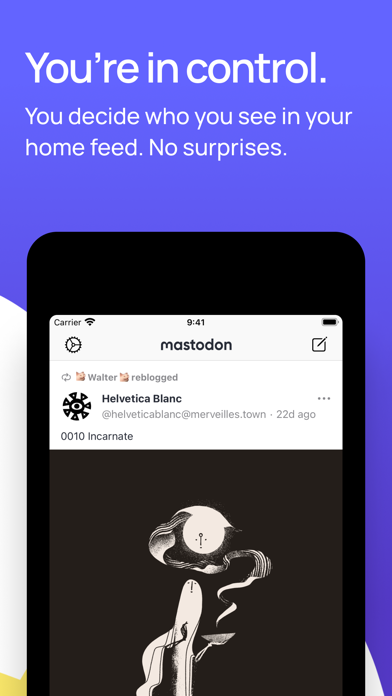
Users on the platform post short text updates, upload high-resolution media, run polls, and follow interesting journalists, scientists, and creators. The core utility centers on an unadulterated chronological timeline where you never miss a post from the accounts you actually follow. There are no sponsored ads, targeted trackers, or annoying engagement bait interrupting your daily reading flow.
Developed by Mastodon gGmbH, a registered non-profit organization based in Germany and the United States, the project prioritizes public welfare over profit extraction. You can choose to register on the flagship mastodon.social server or host your data on an independent third-party node. The architecture guarantees seamless cross-server communication, ensuring you can message anyone regardless of their hosting provider.
Standout Features & What's New in this Build
This fresh TestFlight development build introduces several notable quality-of-life adjustments specifically optimized for modern iPhone and iPad screens. The engineering team has focused heavily on gesture fluidity and reducing unnecessary background data fetching.
- Chronological Home Feeds: Enjoy a completely linear timeline without algorithmic interference, ensuring posts appear strictly in the order they were published.
- Multi-Account Switching: Effortlessly log into and toggle between multiple server accounts from a unified, streamlined sidebar interface.
- Content Warnings & Spoilers: Protect your followers by wrapping sensitive media or discussion topics behind custom expandable warning text gates.
- Hashtag Real-Time Tracking: Follow specific trending hashtags to monitor live global discussions and breaking news events instantly.
- Advanced List Curation: Build customized user lists to segment your personal network and never miss updates from your core circle.

Hands-On Impressions: Performance, Battery, and Thermals
We loaded this current beta build onto a modern iPhone 16 Pro powered by the A18 Pro chip to test daily usability. The app feels exceptionally snappy, leveraging Apple Silicon to render complex media timelines at a buttery-smooth 120Hz via ProMotion without a single dropped frame.
Thermal management is stellar, maintaining baseline device temperatures even during heavy multi-account session testing and prolonged media streaming. Battery consumption remains impressively low, with background refresh routines optimized to sip power rather than drain your capacity during standard usage.
"Mastodon is not like a traditional social media platform, but is built on a decentralized protocol. You can sign up on our official server, or choose a 3rd party to host your data and moderate your experience."
System Requirements & Requested Permissions
To run this beta build smoothly, your Apple device must be running iOS 15.0 or later, though optimal performance is naturally experienced on modern Apple Silicon hardware. The app requires minimal local permissions, requesting standard access only for push notifications and local network discovery where necessary.
Apple’s strict TestFlight sandboxing environment ensures your local keychain, photos, and private documents remain fully isolated from the application. Data privacy compliance adheres strictly to the non-profit mandate, meaning zero analytics telemetry is sold to third-party data brokers.
Pros & Cons: Beta Impressions
✓ The Highs (What We Love)
- Zero Algorithms: Pure chronological feeds free from ads and sponsored clickbait.
- Hardware Optimization: Exceptionally smooth scrolling and stellar battery efficiency on modern iPhones.
- Decentralized Freedom: Complete ownership of your data with the ability to migrate servers anytime.
✕ Beta Caveats (Room for Polish)
- Slot Limitations: Apple's 10,000 tester cap means public slots can vanish quickly.
- Minor UI Glitches: Occasional layout shifts during rapid image gallery scrolling.
- Onboarding Curve: Understanding fediverse instances can slightly confuse newcomers.
Current TestFlight Slot Situation & Availability
Apple strictly caps public TestFlight distributions at 10,000 active users per application package. Because Mastodon gGmbH runs an open beta program, slots tend to fluctuate based on periodic cleanups of inactive accounts.
If you encounter a capacity message when tapping the invite link, do not panic. Testers frequently rotate out, so checking back during off-peak hours is often enough to secure an open slot.
Step-by-Step TestFlight Installation Guide
1. Download TestFlight: Open the official Apple App Store on your iOS device and download the free Apple TestFlight application if you haven't already.
2. Access the Invite Link: Navigate to Codewing and click the official Mastodon TestFlight invitation link provided at the bottom of our portal.
3. Accept the Beta: Your device will automatically redirect to the TestFlight app, where you must tap the blue "Accept" button to join the workspace.
4. Install the Build: Tap "Install" to download the latest beta build directly onto your iPhone or iPad home screen.
5. Submit Feedback: Take the app for a spin, and if you encounter any bugs, use TestFlight's built-in screenshot feedback tool to notify the developers.
Frequently Asked Questions
Is Mastodon safe to install via TestFlight?
Yes, absolutely. Every TestFlight build undergoes Apple's rigorous automated security vetting and runs inside a secure, sandboxed environment that protects your personal files.
What should I do if the Mastodon beta is full?
If Apple reports the build is at maximum capacity, bookmark this Codewing review and check back periodically as inactive tester slots are routinely pruned.
Will installing this beta overwrite my App Store version or delete save data?
TestFlight builds install directly over existing official client versions as a staging upgrade, safely retaining your login credentials and cached account preferences.
How long do TestFlight beta invitations and builds last?
Each individual TestFlight build remains active for 90 days from its initial deployment date before expiring, requiring routine updates through the TestFlight dashboard.
Are in-app purchases free during TestFlight beta testing?
Any digital tip jars, donations, or supplemental purchases made within TestFlight use Apple's simulated sandbox environment, meaning no actual monetary charges occur.
Final Editorial Verdict
Mastodon on iOS represents a breath of fresh air for anyone exhausted by modern corporate social media feeds. With stellar performance on modern Apple hardware and a principled non-profit ethos, this beta build proves that decentralized networking can be both sleek and reliable. Score: 9.2/10.
Developer Support & Official Resources
Stay updated on patch notes, maintenance windows, and feature roadmaps directly from the official developer channels.
Ready to Test Mastodon?
Apple limits public TestFlight betas to 10,000 testers. Tap below to launch TestFlight and claim your testing slot before capacity is reached.
Join Mastodon Beta on TestFlight →





