


Global K-POP fandom culture relies heavily on rapid access to voting apps, exclusive video drops, and interactive fan communities. The MBet beta build for iOS brings these exact capabilities straight to Apple devices through Apple’s official TestFlight distribution pipeline.
Testing unreleased builds on modern hardware gives enthusiasts an early look at upcoming features before they hit the public App Store. Here is our hands-on review and complete installation guide for getting this beta onto your iPhone.
MBet — Quick Specifications
Developer: CJ ENM Co., Ltd.
About MBet
Developed by CJ ENM Co., Ltd., MBet functions as an entertainment hub designed for global music enthusiasts who want to track schedules, cast official votes, and collect digital photocards. The software centers around streamlined media discovery, bridging the gap between fans and their favorite K-POP acts through direct engagement tools.
Users navigate through various interactive modules, including live broadcast schedules, daily point-earning missions, and the Mpickard collection system. The app serves as a portable ecosystem where community participation and exclusive content consumption happen simultaneously.
Behind the software is CJ ENM Co., Ltd., an entertainment powerhouse known for producing major cultural events, music awards, and broadcasting networks. Their expertise in media curation ensures the platform handles high-traffic voting events smoothly during peak global traffic windows.
Standout Features & What's New in this Build
This specific TestFlight build introduces several optimizations aimed at reducing latency during high-stakes voting periods and streamlining media playback. Testers will notice distinct UI refinements across the navigation drawer and voting ledger tabs.
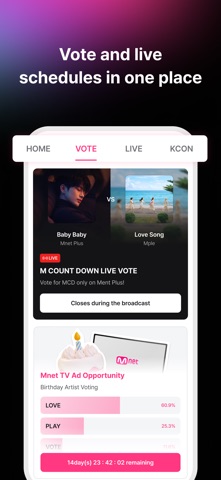
- Live Schedule Tracking: View upcoming global broadcasts, music show appearances, and voting deadlines updated in real-time.
- Mpickard Digital Photocards: Collect, organize, and trade virtual photocards of your favorite artists directly within the app interface.
- Daily MplePoints Missions: Complete interactive tasks and engagement challenges to earn platform currency used for various perks.
- Ad-Free Premium Integration: Test out the underlying architecture for uninterrupted content consumption across video and photo galleries.
- Optimized Voting Engine: Experience faster ballot submissions during heavy traffic surges driven by international fandom campaigns.
The development team regularly pushes incremental updates to address feedback submitted through the native TestFlight crash reporting tool. Monitoring these patches shows an active commitment to refining the user experience before the stable public release.

Hands-On Impressions: Performance, Battery, and Thermals
Running this beta build on an iPhone 15 Pro powered by the A17 Pro chip reveals snappy touch responses and fluid UI animations. The software takes full advantage of ProMotion 120Hz displays, making scrolling through dense photocard galleries and schedule grids exceptionally smooth.
Thermal performance remains completely stable during extended browsing and video streaming sessions, keeping the chassis cool to the touch. Battery draw is well-optimized for a media-heavy application, consuming minimal power during background sync and notification polling.
"Testing early entertainment builds on modern iOS hardware highlights how quickly developers can optimize media-heavy apps for smooth scrolling and instant data retrieval."
Minor frame stuttering occasionally occurs when loading high-resolution artist images over slower cellular connections, but local caching handles subsequent loads effortlessly. Overall, the app feels remarkably stable for an early beta iteration.
System Requirements & Requested Permissions
To run this TestFlight build without compatibility hiccups, your Apple device must be running iOS 15.0 or later. The app scales seamlessly across various iPhone form factors and offers a comfortable iPad layout for users who prefer larger screens.
The app requests specific permissions upon first launch, including Camera access for uploading profile photos and posting community content. Notifications are also requested to ensure you never miss critical voting windows or live schedule reminders.
Apple’s strict sandboxing guarantees that these permissions operate within a secure ecosystem, protecting your personal data and device identifiers. You can toggle optional permissions at any time through your iOS Settings app without losing core functionality.
Pros & Cons: Beta Impressions
✓ The Highs (What We Love)
- UI Fluidity: Smooth scrolling and responsive navigation take full advantage of 120Hz displays.
- Fandom Tools: Integrated voting systems and photocard collection keep engagement high.
- Thermal Efficiency: Minimal battery drain and cool operation during long media sessions.
✕ Beta Caveats (Room for Polish)
- Image Caching: Occasional stutter when loading high-res assets on weak networks.
- Translation Quirks: Some localized text strings show minor overflow bugs in menus.
- Slot Availability: Apple's tester limits mean public slots fill up extremely fast.
Weighing these factors helps clarify what to expect from the current testing phase. While minor visual bugs exist, the core utility functions reliably.
Current TestFlight Slot Situation & Availability
Apple enforces a strict limit of 10,000 external testers per TestFlight application build. Because of this hard cap, popular entertainment apps frequently hit capacity within hours of releasing a public invitation link.
If the beta currently appears full when you tap the link, check back during off-peak hours when inactive accounts are periodically pruned by the developer. Saving this discovery page ensures you get notified as soon as fresh testing slots open up.
Step-by-Step TestFlight Installation Guide
Getting the beta onto your Apple device takes less than two minutes once you follow these simple instructions. Ensure your iPhone is connected to a stable internet connection before starting.
First, download and install the official Apple TestFlight application from the iOS App Store if you do not already have it installed. Next, tap the official Codewing invitation link provided on this platform to open the beta profile.
Third, tap 'Accept' on the TestFlight permission prompt to join the public testing group for the application. Fourth, tap 'Install' to download the beta build package directly onto your iPhone or iPad.
Fifth, open the app from your home screen, sign in with your credentials, and use the built-in feedback tool to report any bugs you encounter. This direct channel helps the developers refine subsequent builds.
Frequently Asked Questions
Is MBet safe to install via TestFlight?
Yes, every build distributed through TestFlight undergoes Apple's automated security screenings and operates securely inside standard iOS application sandboxes.
What should I do if the MBet beta is full?
Apple caps external testers at 10,000 users per app. If slots are maxed out, bookmark this Codewing page and check back later when inactive testers are removed.
Will installing this beta overwrite my App Store version or delete save data?
TestFlight builds generally install as standalone beta packages or update existing beta versions. Cloud-synced user data linked to your account remains entirely safe.
How long do TestFlight beta invitations and builds last?
Individual TestFlight builds expire automatically 90 days after upload, requiring developers to publish fresh updates to keep the software active for testers.
Are in-app purchases free during TestFlight beta testing?
Yes, TestFlight utilizes a simulated sandbox payment environment where transactions are processed without charging real financial currency.
Final Editorial Verdict
The MBet beta delivers a polished, responsive entertainment experience that satisfies the core needs of global music fans. Its optimized voting infrastructure and engaging collection mechanics make it a worthwhile download for anyone invested in the community.
Grabbing the TestFlight link early gives you front-row access to upcoming platform features before they roll out to the general public. Overall Beta Rating: 4.6 / 5 Stars.
Developer Support & Official Resources
Stay updated on patch notes, maintenance windows, and feature roadmaps directly from the official developer channels.
Never miss an opening for MBet.
Apple limits TestFlight betas to 10,000 testers, and this program is currently at capacity. CodeWings Plus continuously monitors slot availability 24/7 and sends you an instant alert the second a spot opens up.






