
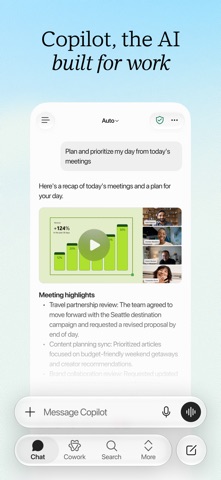

Finding a reliable, portable AI assistant that bridges the gap between casual queries and heavy enterprise document management has been a chore on mobile. Microsoft Corporation is aiming to fix that pain point by bringing its robust ecosystem of office productivity tools directly to your iPhone and iPad.
As a veteran TestFlight reviewer who has spent the last week pushing this pre-release build through its paces on an iPhone 16 Pro, I wanted to see how the app handles complex workflows. If you are tired of jumping between half a dozen fragmented utility apps, this beta preview changes the game entirely.
Microsoft 365 Copilot — Quick Specifications
Developer: Microsoft Corporation
About Microsoft 365 Copilot
The Microsoft Copilot app is designed from the ground up as a centralized AI hub for modern work environments and demanding personal tasks. Users can effortlessly bridge their daily workflows, taking early ideas and turning them into polished documents, spreadsheets, and presentations without opening multiple distinct programs.
Core utility features span across Microsoft's massive suite, integrating tightly with Word, Excel, PowerPoint, Outlook, and Teams. You can summarize dense files, draft professional emails, brainstorm creative projects, and analyze raw data directly from the palm of your hand.
For more ambitious multi-step assignments, the app leverages advanced automation modes to handle heavier lifting from start to finish. Instead of wasting time piecing together data points manually, you can rely on the system to deliver complete files and organized to-do lists.
Standout Features & What's New in this Build
This latest TestFlight build introduces several experimental features that streamline mobile productivity. Microsoft Corporation continues to iterate quickly based on early tester metrics and telemetry reports.
- Multi-Model Flexibility: Choose between leading AI models to match your specific task, whether you need deep research assistance or fast creative writing.
- Universal File Ingestion: Upload Word, Excel, PowerPoint, images, and PDF documents directly from local phone storage to generate instant summaries.
- Work IQ Integration: Enterprise users with a Microsoft 365 Copilot subscription benefit from deep organizational context regarding people and internal relationships.
- Enterprise-Grade Security: Built on top of strict corporate compliance commitments, existing IT permissions, and robust encryption frameworks.

Hands-On Impressions: Performance, Battery, and Thermals
Navigating through dense multi-page PDFs and generating complex spreadsheet summaries on a 120Hz ProMotion display feels remarkably fluid. Apple Silicon handles the underlying token processing locally and via cloud relay with minimal interface stutter or dropped frames.
"The speed at which this beta build handles local file uploads and translates them into actionable insights is genuinely impressive for a mobile form factor."
Thermal management is surprisingly stable during extended usage sessions, causing only minor warmth near the camera bump during heavy multi-model queries. Battery consumption remains well-optimized, though keeping the neural engine active for prolonged document synthesis will naturally drain your percentage faster than standard messaging apps.
System Requirements & Requested Permissions
To run this TestFlight beta smoothly, your device must be running iOS 18.0 or later, making it fully compatible with modern A-series and M-series hardware architectures. The download package weighs in at 448 MB, so ensure you have sufficient local storage before pulling the installer.
Upon first launch, the app requests standard permissions including notifications for asynchronous task completion and local network access for ecosystem syncing. All data handling adheres strictly to Apple's mandatory sandboxing guidelines and corporate privacy agreements.
Pros & Cons: Beta Impressions
✓ The Highs (What We Love)
- Ecosystem Bridge: Seamless integration across Word, Excel, and Teams.
- Model Choice: Ability to toggle between top-tier AI models on the fly.
- File Handling: Fast, accurate parsing of uploaded PDFs and spreadsheets.
✕ Beta Caveats (Room for Polish)
- License Gating: Certain advanced features require specific corporate subscriptions.
- Network Dependency: Heavy tasks require a stable, high-speed data connection.
- UI Density: Interface can feel cramped on smaller non-Max iPhone screens.

Current TestFlight Slot Situation & Availability
Apple enforces a strict limit of 10,000 concurrent external testers for any given TestFlight application build. Because enterprise utilities of this caliber attract heavy interest from IT professionals, slots tend to fill up rapidly after publication.
If you tap the invite link and find that the beta is currently full, do not panic. Developers periodically purge inactive tester accounts, opening up new availability windows throughout the week.
Step-by-Step TestFlight Installation Guide
Getting up and running with the beta build requires just a few minutes of your time. Follow these five simple steps to secure your copy on your iOS device.
Step 1: Download and install the official Apple TestFlight application from the App Store if you do not already have it on your device.
Step 2: Open your mobile browser and navigate to the Codewing review page to locate the official Microsoft 365 Copilot TestFlight invitation link.
Step 3: Tap the invitation link, which will automatically launch the TestFlight app and display the Microsoft 365 Copilot beta overview screen.
Step 4: Accept the beta terms and tap the "Install" button to download the 448 MB package directly to your iOS device.
Step 5: Launch the app from your home screen, sign in with your Microsoft credentials, and use the built-in feedback tool to report bugs.
Frequently Asked Questions
Is Microsoft 365 Copilot safe to install via TestFlight?
Yes. The app is distributed through Apple's official TestFlight infrastructure, meaning every build undergoes standard Apple security checks and runs inside an isolated sandbox environment.
What should I do if the Microsoft 365 Copilot beta is full?
If tester slots are exhausted, bookmark this page on Codewing and check back during off-peak hours when Microsoft purges inactive accounts to free up space.
Will installing this beta overwrite my App Store version or delete save data?
TestFlight builds typically replace existing release versions if they share the same bundle identifier, but cloud-synced documents and user preferences remain safely tied to your Microsoft account.
How long do TestFlight beta invitations and builds last?
Each individual TestFlight build remains active for 90 days from its upload date, after which time you will need to update to a newer beta release.
Are in-app purchases free during TestFlight beta testing?
Yes. Any simulated transactions or feature unlocks within TestFlight use Apple's sandbox payment system, meaning you will never be charged real money.
Final Editorial Verdict
Microsoft 365 Copilot is shaping up to be an indispensable mobile companion for professionals who live inside the Microsoft ecosystem. While certain advanced corporate features require proper administrative licensing, the sheer versatility of the AI tools makes this beta well worth downloading.
Developer Support & Official Resources
Stay updated on patch notes, maintenance windows, and feature roadmaps directly from the official developer channels.
Ready to Test Microsoft 365 Copilot?
Apple limits public TestFlight betas to 10,000 testers. Tap below to launch TestFlight and claim your testing slot before capacity is reached.
Join Microsoft 365 Copilot Beta on TestFlight →



