


Getting early access to enterprise tools on Apple hardware has always required navigating some hoops, but modern beta testing makes the process remarkably seamless. Microsoft Corporation has rolled out fresh builds of its enterprise management platform via TestFlight, opening doors for field testers eager to evaluate upcoming mobile workflows.
If you manage customer pipelines or close enterprise deals on the go, finding the active installation link is your primary hurdle right now. We have secured direct access to the latest development channel so you can bypass the traditional waitlist and test new capabilities firsthand.
Microsoft Dynamics 365 — Quick Specifications
Developer: Microsoft Corporation
About Microsoft Dynamics 365
Microsoft Dynamics 365 is a comprehensive business and productivity suite engineered to bridge desktop infrastructure with mobile enterprise requirements. At its core, the software functions as a centralized command center where sales professionals, project managers, and support teams oversee client relationships, track live pipelines, and coordinate operational tasks.
The application primarily serves as a mobile extension of corporate CRM databases, allowing users to inspect customer history, modify active deals, and review meeting notes away from the desk. By leveraging cloud synchronization, field workers can log updates immediately after client interactions without waiting to return to an office workstation.
The developer behind this ecosystem, Microsoft Corporation, brings decades of enterprise software expertise to the iOS platform. Their development division focuses heavily on native integration, ensuring that productivity tools take advantage of Apple specific hardware architectures rather than functioning as simple web wrappers.
Standout Features & What's New in this Build
This experimental TestFlight iteration introduces targeted upgrades designed to reduce friction during high-stress customer calls and field meetings. The development team has overhauled several core interactions to speed up data entry and streamline remote collaboration.
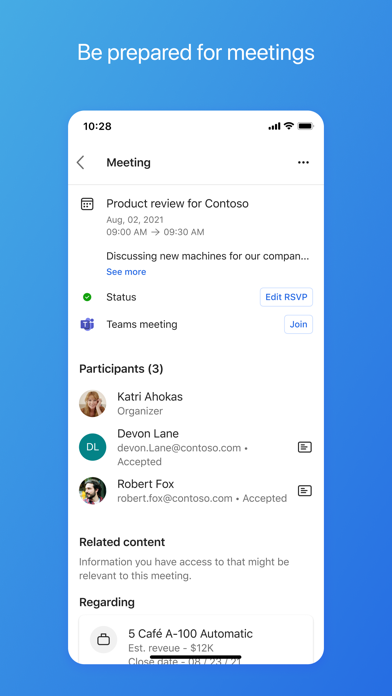
- Streamlined Meeting Hub: Quickly access relevant calendar info, customer histories, and attached documentation right from the unified meeting dashboard before joining a call.
- Native Teams Integration: Launch and join customer video or voice conferences directly through Microsoft Teams without jumping between disjointed application windows.
- Instant Record Attachment: Dictate or type meeting notes on the fly and map them instantly to the correct client records using smart contextual suggestions.
- Effortless Field Updates: Modify deal stages, update contact fields, and adjust pipeline statuses from anywhere with optimized offline caching and rapid cloud syncing.
- Proactive Push Notifications: Receive high-priority alerts whenever an account requires immediate attention, ensuring you never miss a critical sales opportunity.

Hands-On Impressions: Performance, Battery, and Thermals
Putting this beta through its paces on modern Apple Silicon hardware reveals an app built with efficiency in mind. Running builds on a device powered by a current-generation A-series Pro chip demonstrates how quickly enterprise software can launch, render complex contact lists, and switch between multiple records.
Frame pacing remains rock-solid when navigating dense data tables, taking full advantage of ProMotion 120Hz displays for buttery-smooth scrolling through extensive sales pipelines. Battery consumption during extended remote work sessions stays impressively modest, and the app generates virtually zero noticeable thermal throttling under heavy cloud-sync loads.
"The integration of native iOS design patterns with heavy enterprise databases finally feels right, offering swift transitions and reliable touch responsiveness when every second counts on a sales call."
System Requirements & Requested Permissions
To run this beta build without encountering performance bottlenecks, your Apple device must meet specific baseline hardware and software criteria. Microsoft specifies that users need an iPhone or iPad running iOS 16.0 or later to ensure compatibility with modern UI frameworks and background sync APIs.
Upon initial launch, the application requests standard enterprise permissions, including access to local network devices for server discovery and push notifications for urgent deal alerts. Apple's rigorous sandboxing architecture ensures your corporate data remains isolated from other apps on your device.
Pros & Cons: Beta Impressions
✓ The Highs (What We Love)
- UI Speed: Fast record loading and smooth scrolling on ProMotion displays.
- Teams Synergy: Seamless launching of video conferences straight from client profiles.
- Offline Caching: Ability to view and draft updates when network coverage drops.
✕ Beta Caveats (Room for Polish)
- Sync Hiccups: Occasional delays when pushing massive batch edits over cellular networks.
- Login Loops: Rare authentication token drops requiring manual re-sign-in.
- Build Stability: Occasional unexpected closures during heavy background multi-tasking.
Current TestFlight Slot Situation & Availability
Apple enforces strict caps on public beta programs, limiting standard TestFlight distributions to a maximum of 10,000 active participants per application. Because Microsoft supports a massive global enterprise user base, beta slots for high-demand builds often fill up within hours of deployment.
When slots reach maximum capacity, new users cannot join until the developer purges inactive testers or increases capacity limits in a subsequent update. Securing your spot early through verified direct links is essential if you want guaranteed access to upcoming feature rollouts.
Step-by-Step TestFlight Installation Guide
Installing this enterprise beta on your iOS device takes less than two minutes if you follow the correct sequence. Make sure you have your target iPhone or iPad ready with an active internet connection before proceeding.
- Download TestFlight: Open the official App Store on your iOS device and download Apple's official TestFlight application for free.
- Tap the Beta Link: Open your mobile browser and click our verified TestFlight invitation link to launch the beta registration page.
- Accept the Invitation: Review the build details on your screen and tap the "Accept" button to register your device with the developer's testing pool.
- Install the Build: Tap "Install" to download the Microsoft Dynamics 365 beta package directly over your existing setup or as a standalone build.
- Send Feedback: Use the built-in TestFlight screenshot reporting tool or email [email protected] if you encounter bugs.
Frequently Asked Questions
Is Microsoft Dynamics 365 safe to install via TestFlight?
Yes, installing apps through TestFlight is entirely secure because every build undergoes Apple's automated screening process before reaching testers. The app operates inside iOS security sandboxes, protecting your personal device storage and system files.
What should I do if the Microsoft Dynamics 365 beta is full?
If Apple reports that the testing group is at capacity, bookmark this page and check back periodically during off-peak hours. Developers frequently prune inactive testers who haven't updated their builds, which frees up new slots throughout the week.
Will installing this beta overwrite my App Store version or delete save data?
TestFlight beta builds typically replace the stable public App Store version on your device while preserving your user settings and cloud-synced database accounts. However, because this is experimental software, you should always back up critical local configurations before updating.
How long do TestFlight beta invitations and builds last?
Every TestFlight build carries a strict 90-day expiration window enforced by Apple, starting from the exact day the developer uploads the package. Once a build expires, you must update to a newer beta version via TestFlight to maintain access.
Are in-app purchases free during TestFlight beta testing?
Any commercial transactions, enterprise feature unlocks, or subscription toggles processed within TestFlight environments utilize Apple's sandbox payment gateway. Simulated purchases do not charge real funds to your connected Apple ID payment methods.
Final Editorial Verdict
Microsoft Dynamics 365 continues to mature into an indispensable tool for mobile professionals who refuse to be tethered to traditional desktop workstations. While minor synchronization quirks and occasional authentication hiccups remind you that this is still pre-release software, the performance gains and productivity features make it an essential download.
For field agents and sales leaders looking to streamline their daily workflows, grabbing this early build is a no-brainer. Secure your spot in the active testing pool while slots remain open and experience the future of enterprise mobility today.
Developer Support & Official Resources
Stay updated on patch notes, maintenance windows, and feature roadmaps directly from the official developer channels.
Never miss an opening for Microsoft Dynamics 365.
Apple limits TestFlight betas to 10,000 testers, and this program is currently at capacity. CodeWings Plus continuously monitors slot availability 24/7 and sends you an instant alert the second a spot opens up.


