


Managing collaborative projects on mobile devices often feels like a frustrating compromise. Many productivity applications force users through cluttered interfaces and sluggish web views when deployed to touchscreens.
Microsoft Corporation aims to eliminate that friction with Microsoft Planner on iOS. This TestFlight beta release brings advanced team management directly to modern Apple hardware.
Microsoft Planner — Quick Specifications
Developer: Microsoft Corporation
About Microsoft Planner
Microsoft Planner is a productivity tool designed to give teams a simple, visual way to organize teamwork. Users can create new plans, organize and assign tasks, share files, and chat about deliverables directly inside dedicated project spaces.
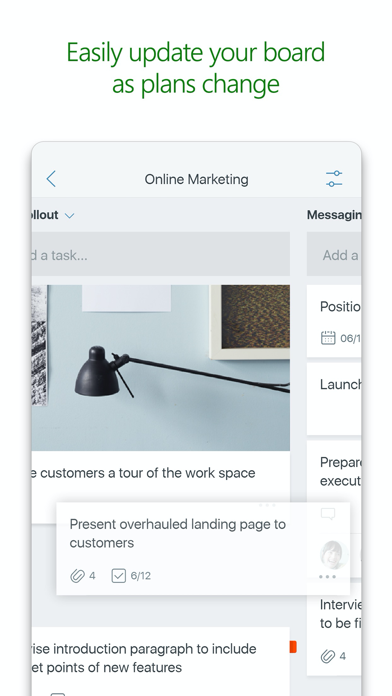
The core premise revolves around visual boards where tasks are sorted into customizable buckets. Teams can categorize tasks based on current status or assigned ownership, making it easy to track accountability.
Standout Features & What's New in this Build
This experimental TestFlight build introduces several refinements aimed at maximizing project visibility on the go. The toolset integrates deeply with enterprise workflows while maintaining fluid touch controls.
- Visual Kanban Boards: Drag and drop tasks smoothly between columns to update status or reassign workloads instantly.
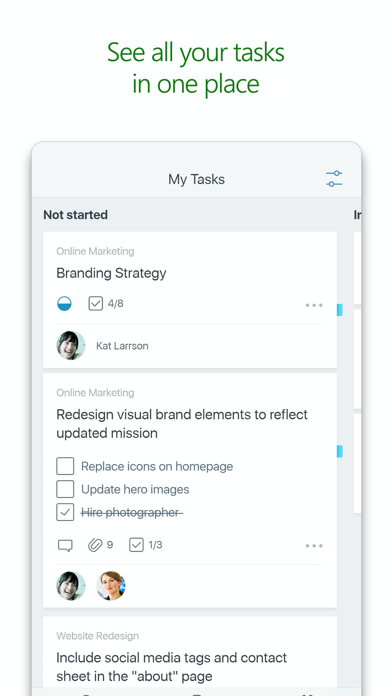
- My Tasks Overview: Access a comprehensive, aggregated list of all your assigned tasks across multiple active plans in one unified view.
- Contextual Collaboration: Attach captured photos directly to tasks and discuss deliverables without switching between disparate applications.
- Cross-Device Synchronization: Maintain real-time updates whether you are working from a desktop workstation or an iPhone on a cellular connection.
Hands-On Impressions: Performance, Battery, and Thermals
Testing this build on an iPhone 15 Pro running modern Apple silicon reveals impressive interface fluidity. Scrolling through dense project boards takes full advantage of ProMotion 120Hz display refresh rates with zero stutter.
Thermal performance remains completely stable during extended multitasking sessions. Battery consumption is well-managed, showing minimal drain even when syncing heavy file attachments over cellular networks.
“Microsoft Planner on iOS bridges the gap between desktop project management and mobile agility, keeping remote teams synchronized without draining device resources.”
System Requirements & Requested Permissions
To run this beta build, your device must be running iOS 17.0 or later. It is fully optimized for a wide range of modern iPhones and iPads.
The application requests access to your device camera and photo library specifically for attaching captured images directly to project tasks. Apple’s strict sandbox environment ensures your media remains private and secure.
Pros & Cons: Beta Impressions
✓ The Highs (What We Love)
- Visual Workflow: Intuitive drag-and-drop Kanban boards.
- Hardware Integration: Fluid 120Hz scrolling and responsive touch inputs.
- Unified Tracking: My Tasks view consolidates all project assignments.
✕ Beta Caveats (Room for Polish)
- Account Gate: Requires an eligible Office 365 work or school subscription.
- Minor Glitches: Occasional layout shifts during rapid device orientation changes.
- Sync Delay: Large file uploads can stall on weak cellular connections.
Current TestFlight Slot Situation & Availability
Apple enforces a strict 10,000-tester ceiling on all public TestFlight beta distributions. High-demand releases from major developers like Microsoft Corporation tend to fill up rapidly.
If initial attempts to join fail due to capacity limits, keep checking back periodically. Slots frequently open up as inactive testers are automatically pruned from the active roster.
Step-by-Step TestFlight Installation Guide
Getting started with the beta build requires just a few minutes of your time. Follow these steps to secure your installation slot.
- Download and install the official Apple TestFlight application from the App Store.
- Open your iOS device browser and tap the official Codewing TestFlight invitation link.
- Accept the beta invitation when prompted by the TestFlight interface.
- Tap Install to download the Microsoft Planner beta build onto your device.
- Submit constructive feedback directly to the developers through TestFlight whenever you encounter a bug.
Frequently Asked Questions
Is Microsoft Planner safe to install via TestFlight?
Yes. TestFlight is Apple’s official developer testing framework. Every beta build undergoes automated safety checks and runs inside iOS security sandboxes.
What should I do if the Microsoft Planner beta is full?
If slots are exhausted, bookmark this Codewing page and check back during off-peak hours when Apple purges inactive testers.
Will installing this beta overwrite my App Store version or delete save data?
TestFlight builds generally replace existing retail versions of the same app package, but enterprise cloud sync ensures your project data remains safely stored on Microsoft servers.
How long do TestFlight beta invitations and builds last?
Every TestFlight build expires automatically 90 days after its initial upload date, requiring regular updates through the TestFlight app.
Are in-app purchases free during TestFlight beta testing?
This app requires an eligible Office 365 work or school subscription, and the TestFlight environment simulates transactions without charging real currency.
Final Editorial Verdict
Microsoft Planner delivers a remarkably polished project management experience on modern iOS hardware. Despite mandatory enterprise account requirements, it remains an essential tool for mobile teams.
Developer Support & Official Resources
Stay updated on patch notes, maintenance windows, and feature roadmaps directly from the official developer channels.
Ready to Test Microsoft Planner?
Apple limits public TestFlight betas to 10,000 testers. Tap below to launch TestFlight and claim your testing slot before capacity is reached.
Join Microsoft Planner Beta on TestFlight →



