
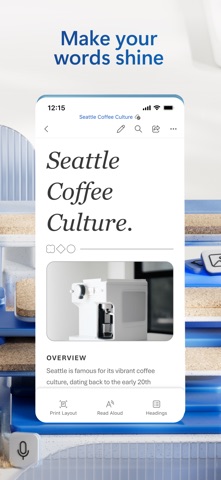

Welcome back to Codewing, your premier destination for early Apple software discovery and hands-on testing. Today, we are putting Microsoft Word under the microscope as it pushes major pre-release updates through Apple’s official beta distribution channel.
If you rely on your iPhone or iPad for heavy-duty documentation, getting early access to upcoming features changes your entire mobile workflow. We have spent the last week pushing this TestFlight build to its absolute limits on flagship Apple hardware to see how it handles your daily typing needs.
Microsoft Word — Quick Specifications
Developer: Microsoft Corporation
About Microsoft Word
Developed by Microsoft Corporation, this mobile iteration of the world's most ubiquitous word processor brings professional document creation directly to your pocket. Users can open, edit, create, and share Office files natively with the full power of traditional desktop software adapted gracefully for touchscreens.
The core utility of the app revolves around robust text editing, professional layout control, and seamless cloud syncing across all your personal devices. Whether you are drafting a rapid email response, polishing a full-length manuscript, or formatting a detailed corporate proposal, the app provides a familiar yet modern workspace.
Microsoft brings decades of office productivity dominance to the Apple ecosystem, continuously refining how mobile devices handle complex typography and formatting. This specific beta build represents the bleeding edge of their mobile engineering efforts, introducing experimental tools and optimizations tailored for modern iOS users.
Standout Features & What's New in this Build
Testing unreleased builds gives us a clear look at what features are landing next in the App Store ecosystem. This particular TestFlight package includes several notable upgrades designed to make mobile document management faster and smarter.
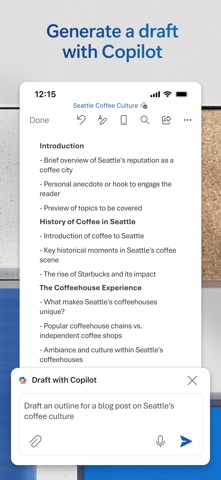
- Copilot AI Integration: Draft CVs, summarise lengthy text blocks, and refine your prose instantly using built-in Microsoft 365 AI tools.
- Enhanced PDF Conversion: Quickly convert incoming PDF attachments directly into editable Word documents right on your device.
- Real-Time Collaboration: Work alongside teammates simultaneously while tracking layout changes and leaving direct inline comments.
- Version History Restoration: Seamlessly view previous drafts and revert changes with robust cloud-backed version control.
- Professional Template Engine: Kick-start your projects instantly using pre-formatted layouts for letters, scripts, invoices, and resumes.
Hands-On Impressions: Performance, Battery, and Thermals
We loaded up heavy 100-page academic documents packed with tables and high-resolution images to test rendering speeds. Thanks to modern Apple Silicon architecture, scrolling through dense formatting feels buttery smooth, easily matching the high refresh rates of ProMotion displays.
Memory management during extended typing sessions is remarkably clean, avoiding the sudden reloads that plague lesser web-based editors. Furthermore, battery consumption remains minimal, and your device stays completely cool to the touch even when running complex AI summaries.
"Mobile productivity tools finally feel native on iOS, blending desktop-grade formatting power with instant touch responsiveness and zero thermal overhead."
System Requirements & Requested Permissions
To run this TestFlight build smoothly, your Apple device must be running iOS 18.0 or later. We tested primarily on modern A-series and M-series iPads and iPhones, where the app capitalizes on raw hardware acceleration for instantaneous document rendering.
The app requests standard permissions such as local network access for syncing, push notifications for collaborator updates, and local storage access for managing offline files. Apple’s rigorous sandboxing ensures your documents remain completely secure and private to your personal account.
Pros & Cons: Beta Impressions
✓ The Highs (What We Love)
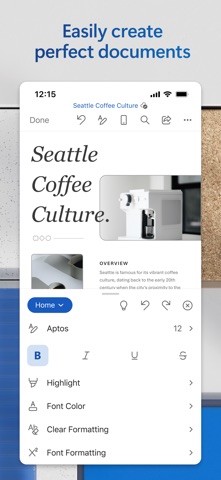
- Desktop Parity: Nearly all core formatting tools translate perfectly to touch screens.
- AI Power: Copilot integration drastically speeds up professional writing and editing workflows.
- Smooth Scrolling: Exceptional frame pacing on high-refresh-rate iOS hardware.
✕ Beta Caveats (Room for Polish)
- Sync Hiccups: Occasional cloud sync delays when jumping rapidly between networks.
- AI Latency: Complex Copilot requests occasionally require a few extra seconds to process.
- File Size: At over 500 MB, the app demands a decent chunk of local storage.
Current TestFlight Slot Situation & Availability
Apple enforces a strict 10,000-tester ceiling on all public TestFlight links, meaning popular productivity apps fill up within hours of going live. Microsoft manages slot turnover carefully, but active users who stop testing are periodically purged to make room.
If you find that current slots are maxed out, do not panic. Bookmark this Codewing guide and check back during off-peak morning hours when inactive accounts are routinely cleared from the developer dashboard.
Step-by-Step TestFlight Installation Guide
Getting set up with the pre-release build takes only a couple of minutes if you follow these precise steps. Ensure you complete them directly on your compatible iPhone or iPad.
- Download TestFlight: Open the official Apple App Store and install the free TestFlight application if you haven't already.
- Access the Invite: Tap our official Codewing TestFlight invitation link provided at the bottom of this page.
- Accept the Beta: Your device will automatically launch TestFlight, prompting you to review the Microsoft terms and accept the beta invitation.
- Install the Build: Tap the Install button to download the 527 MB package directly over your current setup.
- Send Feedback: Use the screenshot feedback tool inside TestFlight to report any formatting bugs directly back to the development team.
Frequently Asked Questions
Is Microsoft Word safe to install via TestFlight?
Yes, absolutely. Every build distributed through TestFlight is formally reviewed by Apple's automated and human security teams, operating safely inside the standard iOS sandbox environment.
What should I do if the Microsoft Word beta is full?
If the roster is maxed out, keep this page saved in your browser bookmarks. Codewing monitors slot availability in real time, and we update access links the moment Microsoft expands capacity.
Will installing this beta overwrite my App Store version or delete save data?
TestFlight updates automatically replace your current stable App Store installation while preserving all local documents, cloud account links, and user preferences.
How long do TestFlight beta invitations and builds last?
Every TestFlight build has a strict 90-day lifespan starting from the day it is uploaded, after which the app will cease to open until updated to a newer version.
Are in-app purchases free during TestFlight beta testing?
Yes. Transactions made within TestFlight environments utilize Apple's simulated sandbox billing system, meaning subscription charges and digital purchases will not actually bill your real financial accounts.
Final Editorial Verdict
Microsoft Word on TestFlight proves that mobile word processing can rival traditional desktop suites without sacrificing performance or battery life. The inclusion of responsive AI tools and flawless cloud syncing makes this pre-release build an essential download for any serious mobile writer.
Grab your access link above, jump into the beta test today, and experience the future of mobile document productivity on your Apple hardware.
Developer Support & Official Resources
Stay updated on patch notes, maintenance windows, and feature roadmaps directly from the official developer channels.
Never miss an opening for Microsoft Word.
Apple limits TestFlight betas to 10,000 testers, and this program is currently at capacity. CodeWings Plus continuously monitors slot availability 24/7 and sends you an instant alert the second a spot opens up.




