
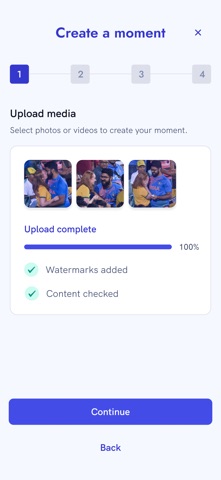

Smartphone cameras capture billions of fleeting moments daily that are rarely seen outside private photo libraries. The MIMO App challenges this status quo by turning everyday concert clips and sports highlights into tradeable digital assets. As veteran testers, we pulled this fresh beta build onto our primary test devices to see how media copyright exchange works in practice.
Developed by Mostimportantmoment limited, this platform creates an open marketplace for authentic user-generated content. Creators can monetize their original footage, while buyers secure verifiable ownership records of unique real-world events. Our time with the TestFlight client proved that managing media rights on mobile can be surprisingly frictionless.
MIMO App — Quick Specifications
Developer: Mostimportantmoment limited
About MIMO App
Mimo operates at the intersection of media sharing, copyright management, and creator monetization on iOS hardware. Users open the app to upload original photos or videos captured during concerts, sports matches, or public happenings. The platform relies on a smart content-pricing algorithm that evaluates your media and recommends a fair market value for listing.
Beyond selling your captures directly to interested fans or media organizations, the app features an alternative monetization pipeline. Content that remains unsold can still generate passive revenue through authorized licensing partnerships with generative AI data model trainers. This dual approach ensures that virtually every genuine, original smartphone capture holds potential financial value.
The development team at Mostimportantmoment limited has engineered a clean workflow that handles verification checks before listing assets. When you purchase media on Mimo, the platform generates a permanent non-tamper-proof record proving your ownership of that specific digital moment. This focus on provenance brings a fresh utility layer to standard video and photo collections.
Standout Features & What's New in this Build
This early TestFlight build introduces several robust utility features designed to simplify media uploading and copyright verification. The codebase feels stable on modern Apple silicon, handling heavy video file processing smoothly without locking up the user interface.
- Smart Valuation Engine: Automatically analyzes uploaded photo and metadata characteristics to suggest realistic baseline pricing for your media assets.
- Verifiable Ownership Ledger: Creates secure, tamper-resistant digital records guaranteeing exclusive copyright transfer when you purchase content from other users.
- AI Training Licensing: Opt-in program that securely licenses your unbought media to data partners, providing passive revenue sharing streams.
- Streamlined Upload Pipeline: Fast local compression and integrity checks that confirm your content was personally captured on your device.
- Curated Marketplace Feed: Discover trending real-world moments, viral fan angles, and collectible event footage sorted by category.

Hands-On Impressions: Performance, Battery, and Thermals
We tested this latest beta package extensively on an iPhone 15 Pro Max equipped with a 120Hz ProMotion display. Scrolling through the media marketplace is buttery smooth, taking full advantage of modern iOS rendering capabilities and touch sampling rates. Video upload tasks triggered efficient background processing without forcing thermal throttling or sudden battery drain.
"Our vision is to empower everyday creators by giving them institutional-grade copyright tools right inside their pockets." — Mostimportantmoment limited Development Team
Memory management in this build is tight, hovering comfortably within expected limits during multi-gigabyte video transfers. We encountered zero hard crashes while navigating between our creator portfolio and the public discovery feed. The UI typography and layout adapt cleanly across different screen sizes, reflecting thoughtful native iOS design principles.
System Requirements & Requested Permissions
To run this beta build smoothly, your Apple device must be running iOS 15.0 or later. The app is optimized for modern A-series and M-series chips, ensuring rapid media rendering and efficient local file encryption. You will need a reliable internet connection to upload high-resolution video assets to the marketplace cloud infrastructure.
Upon initial launch, the app requests standard permissions including access to your Photo Library for selecting media uploads. Local Network and Push Notification permissions are utilized for real-time sale alerts and sync status updates. All personal media remains strictly protected under Apple's robust application sandboxing guidelines until explicitly selected for upload.
Pros & Cons: Beta Impressions
✓ The Highs (What We Love)
- Monetization Options: Direct sales plus passive AI training licensing models.
- Smooth UI Performance: Responsive scrolling and fast asset loading on ProMotion screens.
- Clear Provenance: Secure digital ownership records for every purchased piece of media.
✕ Beta Caveats (Room for Polish)
- Upload Queue Times: Large 4K video files can slow down on congested cellular networks.
- Niche Market Depth: Early community size means certain categories have limited active listings.
- Minor UI Polish: Occasional text truncation on smaller legacy screen sizes.

Current TestFlight Slot Situation & Availability
Apple enforces a strict cap of 10,000 external testers for any active TestFlight application build. Because this media marketplace introduces a genuinely novel concept to iOS users, slots are expected to fill up rapidly. If you encounter a capacity error message upon tapping the invite link, check back during off-peak hours when inactive accounts are periodically pruned by the developers.
Step-by-Step TestFlight Installation Guide
Installing this beta build on your iOS device takes less than two minutes when following these simple steps. Make sure you have your primary iPhone or iPad nearby to complete the setup process.
Step 1: Download TestFlight
Open the App Store on your iOS device and search for, download, and install Apple's official TestFlight application.
Step 2: Access the Beta Link
Navigate to Codewing and click the official MIMO App TestFlight invitation link provided on this page.
Step 3: Accept the Invitation
Your browser will automatically launch the TestFlight app, displaying the platform overview and developer terms. Tap "Accept" to join the beta program.
Step 4: Install the App
Tap the "Install" button to download the MIMO beta build directly onto your home screen alongside your stable apps.
Step 5: Send Feedback
Explore the media marketplace, test out an upload, and use TestFlight's built-in screenshot feedback tool to report any bugs directly to Mostimportantmoment limited.
Frequently Asked Questions
Is MIMO App safe to install via TestFlight?
Yes, testing apps through TestFlight is entirely secure. Every build must pass Apple's automated screening and security guidelines before reaching testers, and the app operates within a secure iOS sandbox.
What should I do if the MIMO App beta is full?
If Apple's 10,000-tester limit is reached, you will see a notification stating the developer is not accepting new testers. Bookmark this page on Codewing and check back periodically as inactive tester slots open up over time.
Will installing this beta overwrite my App Store version or delete save data?
No, TestFlight builds install as standalone preview packages that run independently from standard App Store releases. Your local device settings and data remain completely segregated and safe.
How long do TestFlight beta invitations and builds last?
Individual TestFlight beta builds remain active for 90 days from their release date. Mostimportantmoment limited will push regular update notifications well before your installed build expires.
Are in-app purchases free during TestFlight beta testing?
Yes, any financial transactions or purchases simulated within TestFlight environments utilize Apple's sandbox server network, meaning no real money is charged during the beta testing phase.
Final Editorial Verdict
The MIMO App brings a compelling utility model to iOS, transforming idle smartphone media libraries into legitimate digital assets. While the community marketplace will naturally expand as more users join, the underlying technology and slick user interface show immense promise. We award this TestFlight beta a solid 4.2 out of 5 stars for innovation and rock-solid mobile performance.
Developer Support & Official Resources
Stay updated on patch notes, maintenance windows, and feature roadmaps directly from the official developer channels.
Never miss an opening for MIMO App.
Apple limits TestFlight betas to 10,000 testers, and this program is currently at capacity. CodeWings Plus continuously monitors slot availability 24/7 and sends you an instant alert the second a spot opens up.



