
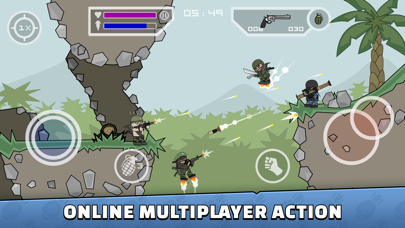
For mobile action veterans, few titles carry the nostalgic weight of the original stickman shooter genre that dominated lunch breaks a decade ago. Chad Towns brings this cherished era back to life with Mini Militia ClassicForce, an iOS release built specifically for modern touchscreens and high-refresh-rate displays. We spent the last week pushing this pre-release build through heavy online matches to see how the code handles current Apple hardware.
Accessing the beta requires grabbing the secure TestFlight link distributed via Codewing before slots fill up in Apple's developer portal. Our hands-on evaluation breaks down everything from map layout performance to battery draw on flagship devices running recent Apple silicon.
Mini Militia ClassicForce — Quick Specifications
Developer: Chad Towns
About Mini Militia ClassicForce
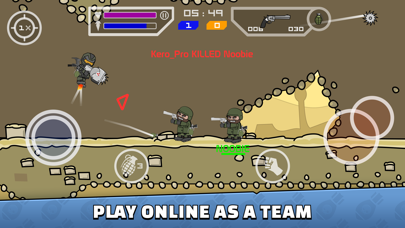
Mini Militia ClassicForce is a fast-paced 2D multiplayer combat game deeply inspired by the classic mechanics of Doodle Army and Soldat. Players control cartoon-style aviator avatars, utilizing a dual-stick setup to run, aim, shoot, and navigate arenas using a fuel-limited jetpack. The core premise prioritizes chaotic, physics-driven firefights where verticality and positioning dictate survival against opposing squads.
The application features robust online multiplayer modes supporting up to six players simultaneously over Wi-Fi or cellular connections. Alongside online skirmishes, developer Chad Towns includes a dedicated offline Survival mode for solo players looking to hone their reflexes against waves of AI opponents. Over twenty unique maps provide varied terrain, encouraging constant movement and creative weapon loadout strategies.
The underlying project history stems from Chad Towns' dedication to preserving and modernizing classic arcade shooter mechanics for contemporary mobile gamers. By moving the framework to support modern iOS rendering engines, the title bridges vintage gameplay loops with high-performance hardware capabilities. Optional in-game purchases are integrated into the build, though economy balances are actively adjusted during the beta phase.
Standout Features & What's New in this Build
This particular TestFlight build introduces targeted performance optimizations designed to eliminate input latency during intense multi-player battles. The development team focuses heavily on streamlining netcode architecture to ensure smoother movement synchronization across various cellular connection speeds. Here are the core features included in the current beta distribution:
- Six-Player Online Battles: Engage in fast-paced multiplayer combat sessions accommodating up to six concurrent combatants in real-time arenas.
- Dual-Stick Jetpack Flight: Master intuitive dual-touch controls allowing simultaneous movement, crosshair aiming, and tactical aerial propulsion.
- Extensive Map Pool: Explore over twenty distinct battlegrounds featuring unique obstacles, choke points, and vertical elevation challenges.
- Diverse Arsenal: Unlock and wield a wide array of modern and futuristic weaponry ranging from standard sidearms to heavy explosive launchers.
- Offline Survival Mode: Hone your targeting accuracy and jetpack management skills in solo sessions against aggressive AI opponents.
Hands-On Impressions: Performance, Battery, and Thermals
Running the beta on a modern iPhone 15 Pro reveals exceptionally smooth frame pacing, easily pushing a consistent 120Hz on devices equipped with ProMotion displays. Touch sampling rates feel instantaneous, which is crucial for split-second adjustments while dodging enemy fire mid-air. Thermal management is well-optimized; even after continuous thirty-minute multiplayer sessions, the device chassis remains comfortably warm without noticeable throttling.
"Our goal with ClassicForce was to retain the chaotic, high-skill movement of the original title while ensuring modern iPhones and iPads run the game with zero frame drop." — Chad Towns
Battery consumption during heavy online play sits at roughly twelve percent per half-hour session on cellular data, which aligns with standard expectations for 2D multiplayer titles. The app handles network interruptions gracefully, displaying clear reconnection prompts instead of abruptly dumping players back to the home screen. Minor graphical artifacts occasionally appear during heavy grenade spam, but these visual hitches are expected targets for upcoming patches.
System Requirements & Requested Permissions
To run Mini Militia ClassicForce via TestFlight, your iOS device must be running iOS 15.0 or later, with full compatibility optimized for modern A-series and M-series chips. The download footprint is lightweight, requiring under 300 megabytes of free storage space for initial installation and map caching. iPads running iPadOS 15.0 or later also receive proper scaling for larger aspect ratios without interface stretching.
Upon launching the application for the first time, the game requests permission to access the local network for peer-to-peer multiplayer discovery. Optional notification permissions can be enabled to alert players when friends invite them to private rooms or when new maps drop. Apple's secure sandboxing environment ensures all user data remains strictly isolated on your device.
Pros & Cons: Beta Impressions
✓ The Highs (What We Love)
- Fluid 120Hz Support: Exceptional frame rates and touch responsiveness on ProMotion displays.
- Nostalgic Gameplay: Faithful recreation of classic stickman shooter combat mechanics.
- Stable Netcode: Minimal desynchronization during six-player online skirmishes.
✕ Beta Caveats (Room for Polish)
- Visual Glitches: Rare texture clipping during heavy explosion particle effects.
- Lobby Balancing: Occasional matchmaking imbalances in open public rooms.
- Slot Availability: Limited TestFlight capacity causes frequent tester turnover.
Current TestFlight Slot Situation & Availability
Apple enforces a strict maximum cap of 10,000 external testers per TestFlight application build, meaning developer allocations disappear quickly. Chad Towns frequently rotates inactive accounts to free up capacity for eager community members checking the portal daily. Securing your spot early through the official Codewing invitation link guarantees priority access when new capacity waves open.
When the primary batch reaches maximum capacity, interested players should bookmark the Codewing tracking page to catch unassigned slots immediately. Development updates drop bi-weekly, often coinciding with newly cleared tester slots for users who submit constructive bug reports. Checking availability during off-peak morning hours yields the highest success rate for securing a permanent test build seat.
Step-by-Step TestFlight Installation Guide
Getting up and running with the Mini Militia ClassicForce beta takes less than two minutes if you follow these straightforward installation instructions. Ensure your device is prepared with a stable internet connection before tapping the public testing portal link. Complete this numbered sequence to begin playing today:
- Install TestFlight: Download the official Apple TestFlight application directly from the App Store if it is not already installed on your iPhone or iPad.
- Tap the Invite Link: Open the official TestFlight invitation link provided on this Codewing page using Safari on your iOS device.
- Accept the Beta: Tap the "Start Testing" or "Accept" button on the TestFlight landing page to register your Apple ID with Chad Towns' developer roster.
- Download the Build: Tap "Install" to download the Mini Militia ClassicForce package files directly to your device storage.
- Submit Feedback: Play through several matches and use the built-in screenshot feedback tool in TestFlight to report any bugs directly to the developer.
Frequently Asked Questions
Is Mini Militia ClassicForce safe to install via TestFlight?
Yes, all applications distributed through Apple's official TestFlight infrastructure undergo automated security screening and run inside a secure iOS sandbox environment.
What should I do if the Mini Militia ClassicForce beta is full?
If Apple reports that the build has reached capacity, save this Codewing page and check back during off-peak hours when inactive testers are routinely pruned.
Will installing this beta overwrite my App Store version or delete save data?
TestFlight installs run as standalone preview packages alongside or replacing existing beta builds, utilizing separate local container directories for temporary data storage.
How long do TestFlight beta invitations and builds last?
Each individual TestFlight build remains active for ninety days from the date of upload, after which users must update to newer developer releases.
Are in-app purchases free during TestFlight beta testing?
Yes, transactions processed within TestFlight builds utilize Apple's simulated sandbox environment, meaning no real currency is charged for test purchases.
Final Editorial Verdict
Mini Militia ClassicForce succeeds brilliantly in capturing the chaotic, fast-twitch magic of vintage mobile shooters while leveraging contemporary Apple hardware to its absolute limit. Chad Towns has crafted a remarkably stable pre-release experience that deserves a spot on the home screen of any action gaming enthusiast. With responsive touch controls, smooth netcode, and engaging map design, this beta preview earns an enthusiastic 8.8 out of 10 recommendation score.
Developer Support & Official Resources
Stay updated on patch notes, maintenance windows, and feature roadmaps directly from the official developer channels.
Never miss an opening for Mini Militia ClassicForce.
Apple limits TestFlight betas to 10,000 testers, and this program is currently at capacity. CodeWings Plus continuously monitors slot availability 24/7 and sends you an instant alert the second a spot opens up.






