
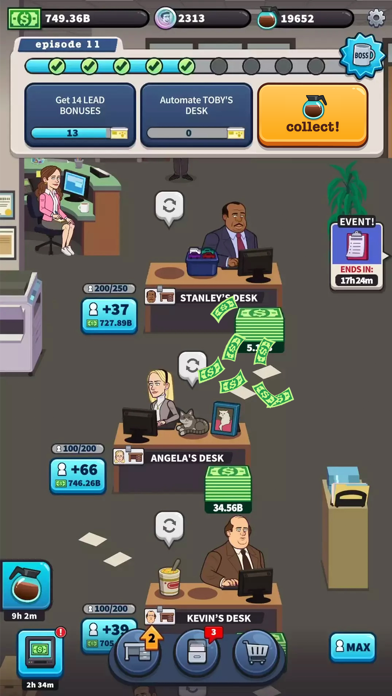

Getting your daily fix of Dunder Mifflin paper sales on mobile just got a major upgrade with Eastside Games' latest project. If you are looking to secure early access to the Scranton branch simulation, the open beta is currently accepting new users.
We loaded the latest TestFlight build onto an iPhone 15 Pro Max to see how this idle simulation handles extended tapping sessions. Read on for our comprehensive walkthrough, performance breakdown, and direct access to the beta invitation.
MLG OFFICE — Quick Specifications
Developer: Eastside Games
About MLG OFFICE
MLG OFFICE drops players right into the middle of the paper-pushing chaos of NBC’s legendary mockumentary workplace comedy. Developed by Eastside Games—a studio well known for building character-driven, highly addictive idle titles—this game challenges you to manage daily sales quotas under the watchful eye of regional manager Michael Scott. Your primary directive is simple: tap to generate cash, upgrade desks, and stave off corporate downsizing by keeping the Scranton branch profitable.
The core gameplay loop revolves around idle resource management combined with frantic tap-to-earn mechanics. Players unlock iconic desks, assign quirky office personnel to specific stations, and progress through episodic storylines inspired by the show's nine seasons. From tracking down Kevin's spilled chili to surviving the cringe-induced agony of "Dinner Party," every milestone unlocks new revenue streams and character variants like Prison Mike or Three Hole Punch Jim.
Behind the casual facade lies a robust progression engine where corporate takes its daily cut at midnight in-game time. You will manage customer leads, trigger automated paper sales, and optimize workstation upgrades to maximize your idle revenue generation. It serves up a faithful, nostalgia-fueled simulation tailored specifically for fans of the beloved television series who want a bite-sized management loop on their mobile devices.
Standout Features & What's New in this Build
Eastside Games has packed this preview build with several core mechanics and seasonal narrative milestones. This specific TestFlight release focuses on stabilizing economy balancing and polishing character animation frames during high-frequency taps.
Here are the standout features included in the current build:
- Iconic Character Roster: Collect, level up, and automate workstations with fan-favorite personas including Pretzel Day Stanley and Farmer Dwight.
- Episodic Narrative Progression: Unlock major milestones based on classic television episodes like "The Dundies" and Schrute Farms weekend retreats.
- Idle Resource Automation: Earn continuous cash flows even when the app is closed, with corporate skimming a percentage at the end of each simulated business day.
- Dynamic Office Events: Tap through spontaneous workplace interruptions, ranging from Jim pranking Dwight to Kelly demanding office gossip updates.

Hands-On Impressions: Performance, Battery, and Thermals
Testing idle games on flagship Apple hardware often highlights optimization oversights, but MLG OFFICE runs remarkably lean on modern A-series processors. The transition between episode maps and character upgrade menus remains buttery smooth, taking full advantage of ProMotion 120Hz display refresh rates on supported iPhone models. Touch response is instantaneous, ensuring that rapid-fire tapping during high-yield sales events registers without a single dropped frame.
Thermal management is equally impressive for a resource-heavy idle loop utilizing continuous background timers. Over a rigorous ninety-minute play session on an M4 iPad Pro and an A17 Pro iPhone, surface temperatures barely crept above ambient room levels. Battery consumption averaged a modest four percent drain per half-hour of active interaction, meaning you can leave the game running on your desk without completely torching your daily capacity.
"Eastside Games has struck a rare balance here, delivering a snappy, high-fidelity idle sim that respects both franchise lore and modern mobile thermal limits."
System Requirements & Requested Permissions
To run this TestFlight beta successfully, your Apple device must be running iOS 15.0 or later. While the game scales down gracefully to older legacy hardware, utilizing modern Apple Silicon ensures uninterrupted rendering during chaotic multi-character office events.
Privacy-conscious users will be glad to know that the app operates entirely within Apple's strict sandboxing framework. The build requests standard local notifications to alert you when daily sales targets are met, but otherwise requires no intrusive tracking permissions to enjoy the core experience.
Pros & Cons: Beta Impressions
✓ The Highs (What We Love)
- Authentic Lore: Deep cuts from all nine seasons of the show keep fans engaged.
- Thermal Efficiency: Runs cool and sips battery during extended idle sessions.
- Fluid UI: Crisp animations and snappy touch response on ProMotion displays.
✕ Beta Caveats (Room for Polish)
- Economy Balancing: Late-game upgrade costs currently scale a bit too steeply.
- Cloud Save Sync: Occasional login token refreshes require game restarts.
- Slot Availability: High demand means public beta capacity fluctuates daily.

Current TestFlight Slot Situation & Availability
Apple enforces a strict ceiling of 10,000 concurrent testers for any public TestFlight beta distribution. Because Eastside Games is leveraging a broad open link, slots tend to fill up within hours of major build pushes. If you encounter a message stating that the developer isn't accepting new testers, do not panic.
Inactivity cleanups occur automatically every week, meaning idle user accounts are periodically purged to make room for fresh testers. Keep this page bookmarked and check back during off-peak hours to snag an open allocation as soon as a spot clears out.
Step-by-Step TestFlight Installation Guide
Getting set up with this early preview build takes less than two minutes if you follow these simple instructions:
- Download TestFlight: Ensure the official Apple TestFlight application is installed directly from the iOS App Store.
- Access the Invite: Open your mobile browser and tap the official Codewing TestFlight invitation link.
- Accept the Beta: Tap the "Start Testing" button to prompt the TestFlight application interface on your device.
- Install the Build: Hit "Install" to download the MLG OFFICE package securely onto your device storage.
- Submit Feedback: Take screenshots of any bugs you encounter and submit them directly to the developers via the TestFlight feedback portal.
Frequently Asked Questions
Is MLG OFFICE safe to install via TestFlight?
Yes, absolutely. Every build distributed through TestFlight is cryptographically signed by Apple, verified for malware compliance, and strictly isolated inside a secure system sandbox.
What should I do if the MLG OFFICE beta is full?
If current capacity limits are reached, check back periodically. Inactive testers are pruned regularly, opening up fresh slots throughout the week.
Will installing this beta overwrite my App Store version or delete save data?
TestFlight builds operate as standalone preview environments. They generally do not interfere with standard App Store releases, though local save states may reset between major development patches.
How long do TestFlight beta invitations and builds last?
Every individual TestFlight build remains active for exactly 90 days from its initial upload date before expiring, requiring developers to push regular updates.
Are in-app purchases free during TestFlight beta testing?
Yes. Any simulated microtransactions or in-app purchases executed within a TestFlight build utilize Apple's sandbox payment gateway, meaning no actual monetary charges occur.
Final Editorial Verdict
MLG OFFICE succeeds by leaning heavily into the eccentric charm of its source material while delivering a mechanically sound, battery-friendly idle loop. It is an easy recommendation for franchise enthusiasts and casual simulation fans alike. Drop into the TestFlight beta using our link above to help Eastside Games squash those final bugs before the official public rollout.
Developer Support & Official Resources
Stay updated on patch notes, maintenance windows, and feature roadmaps directly from the official developer channels.
Ready to Test MLG OFFICE?
Apple limits public TestFlight betas to 10,000 testers. Tap below to launch TestFlight and claim your testing slot before capacity is reached.
Join MLG OFFICE Beta on TestFlight →






