
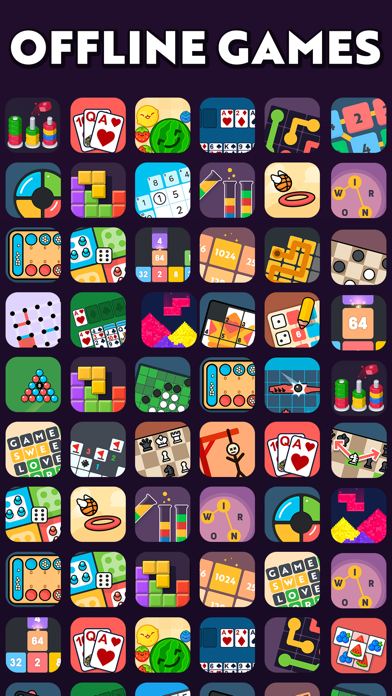

Finding a reliable, offline-first collection of classic games on iOS usually means dealing with intrusive banner ads or bloated storefronts. Jindoblu Limited aims to solve this frustration with More Air, an expansive compilation of over twenty distinct minigames designed entirely for offline play. We spent the last week putting this pre-release build through its paces on an iPhone 15 Pro Max to evaluate its performance.
As veteran TestFlight testers, we know that casual puzzle collections rarely get the optimization attention they deserve on mobile hardware. More Air attempts to flip that script by delivering a lightweight, responsive suite of brain-teasers that skip the usual cloud requirements. Let us break down everything you need to know before grabbing the installation link.
More Air — Quick Specifications
Developer: Jindoblu Limited
About More Air
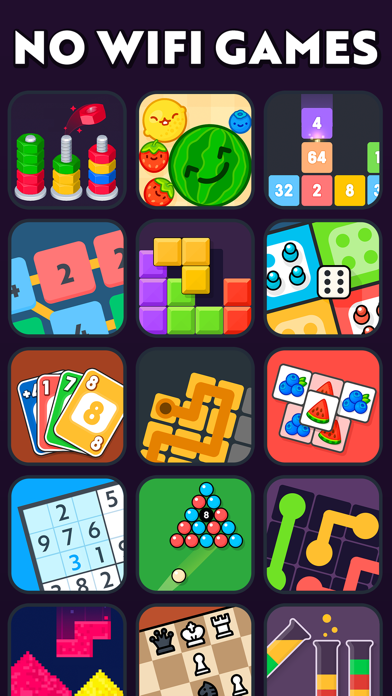
More Air functions as an overflowing digital toy box containing more than twenty unique minigames tailored for puzzle enthusiasts, numeric strategists, and classic game fans. Players can jump straight into legendary titles like 2048, 2248, Sudoku, Solitaire, and Wood Blocks without needing a cellular connection or Wi-Fi network. This makes it an ideal companion for long flights, subway commutes, or areas with zero signal reception.
Beyond standard solo puzzles, the application includes word finders, hangman, and minesweeper alongside traditional board game experiences like chess, checkers, and mancala. Jindoblu Limited has also packed in two-player local modes and AI opponents for games like Tic Tac Toe and Pool. The studio focuses on creating snappy, instantly accessible experiences that keep mental agility sharp across all age demographics.
Standout Features & What's New in this Build
This fresh TestFlight distribution brings several key under-the-hood optimizations and interface tweaks directly to early adopters. The developers have focused heavily on touch responsiveness and swift transitions between the massive variety of built-in minigames.
- Complete Offline Architecture: Zero internet connection is required to access any of the twenty-plus minigames, ensuring complete privacy and uninterrupted sessions.
- Diverse Puzzle Categories: Features dedicated sections for numeric challenges, word expansion, classic memory games, and traditional strategy board games.
- Responsive Touch Mechanics: Tailored specifically for modern multitouch displays, allowing rapid swipes in games like 2048 and precise placement in Chess.
- Built-in AI Opponents: Provides offline computer opponents for classic two-player setups like Checkers, Pool, and Tic Tac Toe when playing solo.
- Lightweight Footprint: Packs an enormous variety of content into a manageable 232 MB download size that respects device storage limits.
Hands-On Impressions: Performance, Battery, and Thermals
Testing More Air on an A17 Pro chip revealed stellar resource management, as one would expect from a puzzle collection of this scale. The app maintains a locked 120Hz refresh rate across compatible ProMotion displays, making menu navigation and tile sliding feel exceptionally fluid. Frame pacing remained rock-solid with zero dropped frames or micro-stutters during intensive puzzle sessions.
Thermal output during extended forty-minute play sessions was practically nonexistent, keeping our test device completely cool to the touch. Battery draw proved remarkably minimal, consuming less than four percent of battery life per hour of continuous gameplay. Touch registration is instant, capturing quick swipes in fast-paced minigames without a hint of input lag.
“Jindoblu Limited has prioritized raw utility and instant loading times over unnecessary graphical flair, resulting in a snappy, battery-friendly offline suite that simply works anywhere.”
System Requirements & Requested Permissions
Running More Air requires an iPhone, iPad, or iPod touch running iOS 13.0 or later, making it compatible with a massive range of legacy and modern Apple hardware. Thanks to Apple's robust sandboxing architecture, the app operates within a secure environment without demanding intrusive personal permissions. You won't be pestered for location tracking, microphone access, or unnecessary photo library privileges just to enjoy a quick round of Sudoku.
Local network permissions are kept strictly minimal, as the entire core experience is engineered to run locally on your device's flash storage. Storage allocation sits comfortably at 232 MB, leaving plenty of breathing room even on 128GB baseline devices. The installation package downloads quickly over standard cellular connections before expanding securely into the TestFlight container.
Pros & Cons: Beta Impressions
✓ The Highs (What We Love)
- Massive Variety: Over twenty distinct minigames provide endless replay value across multiple genres.
- True Offline Play: Zero internet dependency makes it the ultimate travel companion for flights and remote areas.
- Exceptional Optimization: Featherlight battery consumption and zero thermal strain on modern Apple Silicon.
✕ Beta Caveats (Room for Polish)
- UI Consistency: Some minigames feature slightly differing menu layouts and aesthetic styling.
- Audio Cues: A few sound effects in memory games occasionally clip during rapid touch inputs.
- Slot Availability: Apple's testing limits mean beta slots can fluctuate rapidly during peak periods.
Current TestFlight Slot Situation & Availability
Apple enforces a strict 10,000-tester ceiling for public TestFlight beta links, which often creates fierce competition for popular utility and game releases. Jindoblu Limited manages their distribution slots actively, but high demand from puzzle fans can cause temporary capacity limits. If the beta appears full when you first click through, do not panic or abandon your attempt.
Developers routinely purge inactive testers who fail to download updates or submit feedback over rolling thirty-day windows. Checking back during off-peak morning hours or keeping this page bookmarked on Codewing is your best strategy for catching an open slot. Securing early access ensures you get firsthand experience with incoming minigame additions before the public App Store launch.
Step-by-Step TestFlight Installation Guide
Getting set up with the More Air beta takes less than two minutes if you follow our streamlined installation workflow. Ensure your target iOS device has an active internet connection just for the initial download phase.
1. Open the App Store on your iPhone or iPad and search for, download, and install Apple's official TestFlight application.
2. Tap the exclusive Codewing beta invitation link provided on this page to launch TestFlight directly.
3. Review the build details, privacy notes, and what's new changelog, then tap the “Accept” button.
4. Tap “Install” to download the 232 MB More Air build onto your device home screen.
5. Open the app, test your favorite minigames, and use the built-in feedback tool in TestFlight to report any bugs directly to Jindoblu Limited.
Frequently Asked Questions
Is More Air safe to install via TestFlight?
Yes, every build distributed through Apple's TestFlight framework undergoes mandatory automated security screening and adheres strictly to iOS sandboxing protocols.
What should I do if the More Air beta is full?
If Apple reports that the tester limit has been reached, bookmark this page on Codewing and check back periodically as inactive slots open up.
Will installing this beta overwrite my App Store version or delete save data?
TestFlight installs run as isolated sandbox packages that cleanly update over previous beta builds without risking your core device data.
How long do TestFlight beta invitations and builds last?
Each individual TestFlight build remains fully active for up to 90 days from its upload date before requiring a minor update from the developer.
Are in-app purchases free during TestFlight beta testing?
Any simulated transactions within TestFlight environments utilize Apple's sandbox currency, meaning you will never be charged real money during beta evaluations.
Final Editorial Verdict
More Air succeeds by stripping away modern mobile gaming fluff and focusing entirely on pure, accessible, offline entertainment. Jindoblu Limited has built a remarkably stable, battery-friendly puzzle box that deserves a permanent spot on your iOS home screen. If you love classic brain-teasers and want to help shape the final release, grab the beta link above and jump in.
Developer Support & Official Resources
Stay updated on patch notes, maintenance windows, and feature roadmaps directly from the official developer channels.
Never miss an opening for More Air.
Apple limits TestFlight betas to 10,000 testers, and this program is currently at capacity. CodeWings Plus continuously monitors slot availability 24/7 and sends you an instant alert the second a spot opens up.






