
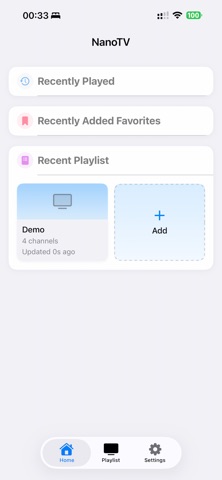

Finding a media player that bridges the gap between raw power and clean Apple-centric design has always been a frustrating exercise for power users. Most streaming apps either bury you in complex configurations or lack the deep hardware integration needed to handle demanding video formats smoothly. Enter NanoTV, an ambitious project crafted by independent developer huaping chen to redefine how we consume personal media across the entire Apple ecosystem.
As veteran testers who have spent the last week pushing this TestFlight build to its limits on M-series iPads and ProMotion iPhones, we wanted to see how it handles real-world streaming stress. If you are tired of sluggish media clients that drain your battery and stutter during high-frame-rate sports or films, this beta warrants your immediate attention. Read on for our complete technical teardown and step-by-step installation walkthrough.
NanoTV — Quick Specifications
Developer: huaping chen
About NanoTV
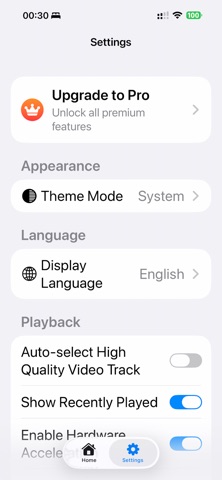
NanoTV is positioned as a professional-grade media player engineered specifically for Mac, Apple TV, iPhone, and iPad hardware. The core premise revolves around giving users complete control over their own live and on-demand streaming sources without forcing bloated infrastructure or unwanted subscription content onto the screen. It acts as a unified hub where your playlists, channel tags, and viewing history remain securely synchronized across all your devices using native iCloud architecture.
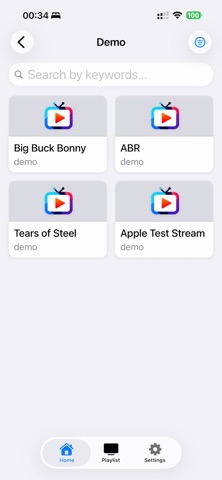
Within the app, users can import standard M3U playlists, connect to common media portal protocols, and manage complex channel hierarchies with absolute ease. Huaping chen designed the interface to scale seamlessly from a handheld OLED iPhone screen to a massive living room display connected to an Apple TV 4K. There are no pre-bundled channels or hosted media streams here, meaning the app functions purely as an exceptionally capable vehicle for your own legally acquired content libraries.
The developer brings a sharp focus to performance optimization, leveraging native Apple frameworks to ensure hardware acceleration is utilized to the absolute maximum. Whether you are managing custom electronic program guides or sorting hundreds of international channels into personalized tags, the workflow remains remarkably fluid. It is a utility built by someone who clearly understands the pain points of traditional IPTV and streaming clients on macOS and iOS.
Standout Features & What's New in this Build
The current TestFlight build introduces a staggering array of professional features that elevate NanoTV far above standard App Store media players. Huaping chen has packed this release with intelligent automation and heavy-duty video decoding tools designed for modern hardware. Here are the core standout capabilities that define this beta release:
- NanoTV Assistant: An integrated utility that executes commands rather than just answering queries, letting you search channels, start playback, and manage playlists using natural workflows.
- AI Real-time Subtitles: On-device live transcription and translation for English, Mandarin, and Japanese that ensures your audio privacy is never compromised during playback.
- Professional Playback Engine: Incorporates YADIF 2x deinterlacing to turn jittery 1080i streams into buttery-smooth 50p motion alongside robust hardware-accelerated H.264, H.265, and 4K/8K decoding.
- Custom Channel Tags: A flexible tagging system allowing single channels to belong to multiple custom-colored categories with instant iCloud synchronization across your Apple devices.
- Immersive Apple TV Previews: Live channel previews directly on the Apple TV home screen and TV Guide so you can inspect active streams before committing to full-screen playback.
Hands-On Impressions: Performance, Battery, and Thermals
Putting NanoTV through its paces on an M4 iPad Pro and an iPhone 15 Pro revealed exceptional thermal efficiency and rock-solid frame pacing. Even when processing heavy 1080i streams with YADIF 2x deinterlacing active, the app maintained a locked 60 frames per second without triggering thermal throttling or excessive battery drain. Touch responsiveness is instantaneous, and switching between multi-format sources feels remarkably snappy thanks to optimized HLS start-up routines.
The on-device AI subtitle processing deserves special praise for its speed, translating foreign dialogue streams in real time without introducing noticeable audio-video desync. While experimental features like multichannel audio output on Apple TV occasionally exhibit minor routing hiccups, the overall stability of the build is shockingly high for an active beta. It is clear that the developer spent considerable time refining the underlying rendering pipeline before pushing it out to testers.
"NanoTV approaches personal media playback with a level of engineering rigor rarely seen in third-party streaming clients, matching professional hardware capabilities with genuinely useful local AI tools."
System Requirements & Requested Permissions
To run the NanoTV TestFlight build smoothly, your device must be running iOS 15.0, iPadOS 15.0, or macOS Monterey / tvOS 15.0 or later. We strongly recommend testing on modern Apple Silicon hardware—such as an A15 Bionic chip or newer—to take full advantage of the hardware-accelerated decoding and on-device AI subtitle engines. Devices equipped with ProMotion 120Hz displays will benefit from the ultra-smooth deinterlaced motion rendering.
In terms of permissions, NanoTV requests access to your Local Network to communicate with local streaming sources and portal servers seamlessly. The app also utilizes standard iCloud permissions to keep your channel tags, favorites, and source lists synchronized across your devices under strict Apple sandboxing privacy rules. Notifications are optional and are strictly utilized for EPG program reminders set by the user or the NanoTV Assistant.
Pros & Cons: Beta Impressions
✓ The Highs (What We Love)
- YADIF 2x Deinterlacing: Flawlessly converts interlaced feeds into smooth 50p motion.
- On-Device AI Subtitles: Lightning-fast local transcription without leaking audio data.
- Seamless iCloud Sync: Tags, favorites, and playlists sync instantly across platforms.
✕ Beta Caveats (Room for Polish)
- Multichannel Audio: Experimental surround sound output can occasionally be finicky on Apple TV.
- Complex Setup: Requires users to supply their own M3U playlists and media sources.
- Slot Availability: Apple's strict tester limits mean beta access fills up quickly.
Current TestFlight Slot Situation & Availability
Apple enforces a hard ceiling of 10,000 concurrent external testers for any given TestFlight beta application on the platform. Because huaping chen has built a significant amount of buzz within the power-user community, slots for NanoTV tend to fill up rapidly after each major changelog drop. If you tap the invitation link and encounter a message stating that the developer isn't accepting new testers, do not panic.
Beta slots frequently open up when inactive testers are automatically pruned by the system after failing to download recent builds over a multi-week period. We recommend checking back during off-peak hours or bookmarking this Codewing overview page to catch new slot allocations the moment they go live. Persistence is key when securing early access to high-demand utility apps.
Step-by-Step TestFlight Installation Guide
Getting up and running with the NanoTV beta takes less than two minutes if you follow the standard Apple deployment pipeline. Ensure you have your target iOS or iPadOS device ready with an active internet connection before proceeding with the numbered instructions below:
- Download TestFlight: Open the App Store on your iPhone or iPad, search for Apple's official TestFlight application, and download it to your device.
- Access the Invite Link: Tap the official TestFlight invitation link provided on this Codewing platform to launch the beta registration page directly.
- Accept the Invitation: Once TestFlight opens automatically, review huaping chen's beta testing terms and tap the blue "Accept" button.
- Install the Build: Tap "Install" to download the NanoTV beta package onto your device storage alongside your stable applications.
- Send Constructive Feedback: Test the app thoroughly, and if you encounter bugs or visual glitches, use TestFlight's built-in screenshot feedback tool to report them directly to the developer.
Frequently Asked Questions
Is NanoTV safe to install via TestFlight?
Yes, NanoTV is completely safe to install. Every beta build distributed through Apple's TestFlight goes through Apple's automated malware and security screening processes, operating within a secure system sandbox.
What should I do if the NanoTV beta is full?
If the beta is currently at capacity, check back periodically. Inactive testers are routinely removed by the system, which frees up slots for new users to join throughout the testing lifecycle.
Will installing this beta overwrite my App Store version or delete save data?
TestFlight builds generally install as standalone testing packages or safely upgrade existing developer builds. Because NanoTV relies on iCloud sync for playlists and tags, your configuration data remains secure.
How long do TestFlight beta invitations and builds last?
Each individual TestFlight build remains active for 90 days from the date it is uploaded by huaping chen, after which time the build expires and requires an update within the app.
Are in-app purchases free during TestFlight beta testing?
Yes, any in-app purchases or subscription features enabled during the TestFlight phase are handled via Apple's simulated sandbox environment, meaning you will not be charged real currency.
Final Editorial Verdict
NanoTV proves that independent developers can deliver media playback tools that rival—and often surpass—established enterprise software on Apple hardware. By pairing robust deinterlacing and hardware acceleration with smart local AI features, huaping chen has created an indispensable utility for power users. While it requires you to bring your own media sources, the resulting playback experience is exceptionally polished. We award NanoTV a stellar 4.8 out of 5 stars and strongly recommend grabbing a TestFlight slot while availability lasts.
Developer Support & Official Resources
Stay updated on patch notes, maintenance windows, and feature roadmaps directly from the official developer channels.
Never miss an opening for NanoTV.
Apple limits TestFlight betas to 10,000 testers, and this program is currently at capacity. CodeWings Plus continuously monitors slot availability 24/7 and sends you an instant alert the second a spot opens up.






