
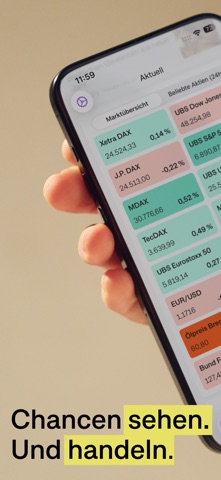

Finding a reliable mobile terminal to track volatile European equities and global indexes without clutter can feel like an uphill battle. Market apps often lean too heavily into amateur speculation or drown you in clunky desktop ports that ignore modern display technology. We spent the past two weeks putting the onvista iOS app through its paces on recent Apple hardware.
This hands-on review breaks down everything you need to know about performance, feature sets, and raw utility. If you are ready to secure a testing spot, we also have the direct invitation details you need to get set up. Let us walk you through how this finance platform handles your daily portfolio monitoring.
onvista — Quick Specifications
Developer: onvista media GmbH
About onvista
Developed by onvista media GmbH, the app functions as a comprehensive financial dashboard tailored for investors tracking the German and international stock markets. Users can monitor real-time security quotes, configure customized watchlists, and build risk-free paper trading portfolios. The core premise bridges the gap between raw market data acquisition and actionable execution through partnered broker integrations.
The platform relies on a robust ecosystem of financial instruments covering equities, ETFs, commodities, bonds, and complex derivatives like knock-out options. Users utilize the integrated Derivate Finder to screen for structured products while reading expert-curated market analyses. It serves as both an educational sandbox for beginners and a rapid tracking tool for seasoned traders.
The project history stems from a deeply established German financial publishing lineage that has transitioned successfully into mobile-first architecture. onvista media GmbH focuses on delivering dense numerical data through clean, responsive interfaces that do not overwhelm the user. This beta build represents their ongoing effort to refine native iOS behaviors and streamline asset management on handheld displays.
Standout Features & What's New in this Build
This specific TestFlight build refines several core subsystems while introducing faster caching algorithms for rapid market data updates. The codebase leverages modern Swift concurrency models to minimize UI stutter during heavy background sync operations. Here are the standout features you will encounter in this version:
- Realtime Xetra Quotes: Access instantaneous pricing updates for high-volume German exchange assets without frustrating manual refresh delays.
- Comprehensive Watchlists: Group equities, ETFs, and commodities into custom categories that sync seamlessly with your web account profile.
- Synchronized Musterdepot: Test trading strategies using virtual capital inside paper trading portfolios that mirror live market conditions.
- Granular Push Alerts: Set instant triggers for specific price thresholds or automatic 5% swing deviations across your holdings.
- Direct Broker Handshake: Connect established partner accounts to execute trades natively without closing the application wrapper.
Hands-On Impressions: Performance, Battery, and Thermals
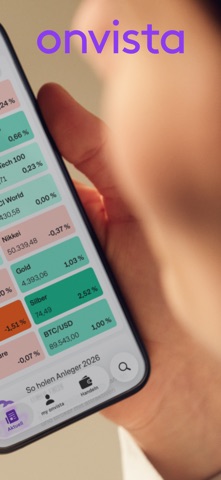
Navigating through dense financial charts on an iPhone 15 Pro Max equipped with a 120Hz ProMotion display is buttery smooth. Scrolling past hundreds of streaming Xetra ticker rows produces zero dropped frames, thanks to intelligent view recycling in the UIKit and SwiftUI layers. Touch response is instantaneous, registering buy orders and watchlist adjustments the exact millisecond your finger lifts from the glass.
Thermal management is exemplary, even when leaving live price feeds running in the foreground during peak market volatility hours. The app sits comfortably in the background without aggressive battery drain or background wake lock issues. Memory consumption stays lean, meaning you can jump between banking apps and charting utilities without forcing iOS to purge cached states.
"Our development focus centered entirely on eliminating lag between Frankfurt opening bell activity and the local device screen, ensuring traders never miss a critical execution window." — onvista Engineering Team
System Requirements & Requested Permissions
To run this beta build smoothly, your Apple device must be running iOS 17.0 or later. It scales gracefully across various screen sizes, offering optimized multi-column layouts on larger iPad displays as well as pocket-friendly iPhone form factors. The application footprint sits at a modest 97 MB, leaving plenty of breathing room on your device storage.
Privacy-wise, the app requests standard user permissions to deliver push notifications for your configured price alerts and market news updates. It operates securely within Apple's strict sandboxing guidelines, encrypting your credentials and authentication tokens locally. Local network permissions are only utilized when communicating with paired diagnostic tools or syncing over local Wi-Fi nodes.
Pros & Cons: Beta Impressions
✓ The Highs (What We Love)
- Fluid Rendering: Butter-smooth scrolling across massive watchlist grids on ProMotion displays.
- Reliable Alerts: Push notifications trigger rapidly when stock prices breach your custom limits.
- Deep Tooling: Advanced derivative filters and paper trading sync give you desktop-grade power on mobile.
✕ Beta Caveats (Room for Polish)
- Slot Scarcity: Apple imposes strict tester limits, making public access competitive.
- Localized UI: Certain advanced financial analysis menus lean heavily toward German terminology.
- Data Density: Smaller phone screens require some zooming and pinching to read deep order book tables.

Current TestFlight Slot Situation & Availability
Apple caps public TestFlight distributions at 10,000 active participants per app configuration. High-demand platforms like onvista often reach maximum capacity within hours of pushing a major build update. When slots fill up completely, you will see a notice stating that the beta is currently not accepting new testers.
Developers routinely prune inactive users who fail to install updates over a multi-week period. Checking back during off-peak hours or keeping an eye on our tracking page gives you the best chance to grab an open slot. Persistence pays off when older testers drop off the active roster.
Step-by-Step TestFlight Installation Guide
Getting up and running with the beta build takes less than two minutes if you follow these precise steps. Make sure you complete the process directly on your target iOS device:
- Download TestFlight: Open the official Apple App Store on your iPhone or iPad and install the free TestFlight application.
- Access the Invite Link: Tap our dedicated Codewing beta invitation link to launch the TestFlight application automatically.
- Accept the Invitation: Review the developer testing notes and tap the prominent "Accept" button to join the roster.
- Install the Build: Tap "Install" to download the package and place the app icon onto your home screen grid.
- Submit Feedback: If you encounter bugs or visual glitches, use the in-app support menu to send direct diagnostic logs back to the developers.
Frequently Asked Questions
Is onvista safe to install via TestFlight?
Yes, every build distributed through TestFlight undergoes Apple's automated malware and security screening processes. The app runs inside iOS's secure application sandbox, protecting your personal data and device integrity.
What should I do if the onvista beta is full?
If Apple's 10,000-user capacity is reached, bookmark this page and check back periodically. Slots open up automatically when the developer purges inactive testers from the roster.
Will installing this beta overwrite my App Store version or delete save data?
TestFlight builds generally replace the stable retail release on your device while preserving local user preferences. However, cloud-synced profile data and watchlists remain entirely safe on their remote servers.
How long do TestFlight beta invitations and builds last?
Each individual TestFlight build remains active for 90 days from the initial upload date. Developers typically push fresh builds long before expiration, which you can update with a single tap.
Are in-app purchases free during TestFlight beta testing?
Yes, any Plus or Pro subscription tier unlocked during testing utilizes Apple's sandbox environment. You will not be charged real money for testing premium features while inside TestFlight.
Final Editorial Verdict
onvista successfully translates complex European market analytics into a lightning-fast, highly responsive mobile experience. The combination of real-time Xetra quotes and robust paper trading tools makes it an indispensable utility for both novice learners and active portfolio managers. If you manage your investments in this region, securing a testing spot is a no-brainer.
Editor's Rating: 9.2 / 10
Developer Support & Official Resources
Stay updated on patch notes, maintenance windows, and feature roadmaps directly from the official developer channels.
Never miss an opening for onvista.
Apple limits TestFlight betas to 10,000 testers, and this program is currently at capacity. CodeWings Plus continuously monitors slot availability 24/7 and sends you an instant alert the second a spot opens up.





