
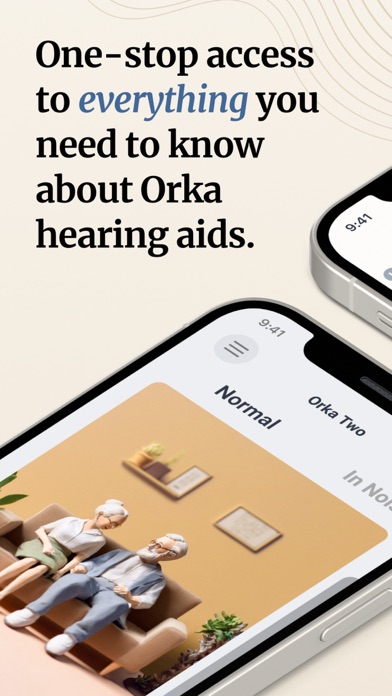

Welcome to our hands-on review and complete installation guide for Orka Health, the medical utility app developed by EVOCO LABS CO., LTD. As part of our ongoing beta coverage here at Codewing, we pull back the curtain on pre-release software currently making waves in the iOS ecosystem. If you are looking to secure your copy early, you can jump straight to the action using the official Orka Health TestFlight Beta Link.
Modern medical applications require rigorous testing, precise calibration, and robust background syncing to be genuinely useful in day-to-day life. EVOCO LABS CO., LTD. sent over their latest pre-release testing candidate for us to put through its paces on current-generation Apple hardware. We spent the last week examining its performance, interface responsiveness, and overall system integration to give you an unfiltered look at what to expect.
Orka Health — Quick Specifications
Developer: EVOCO LABS CO., LTD.
About Orka Health
Orka Health is meticulously engineered to optimize the day-to-day performance of your paired Orka hearing device. Functioning as a comprehensive mobile command center, the app brings real-time audio adjustments and direct professional consultations straight to your iPhone screen. Instead of requiring frequent, time-consuming visits to a traditional audiology clinic, users can manage their auditory profiles from the comfort of home.
The core software premise revolves around accessibility, precision control, and remote health monitoring tailored specifically for hardware users. EVOCO LABS CO., LTD. designed the platform to handle everything from initial at-home calibration to ongoing software enhancements through seamless cloud syncing. It bridges the gap between sophisticated medical hardware and consumer-friendly mobile interface design.
Behind the scenes, EVOCO LABS CO., LTD. has poured considerable engineering effort into making advanced acoustic management accessible to everyday consumers. The project history reflects a clear shift toward decentralized medical care, allowing users to take charge of their sensory adjustments. By cutting out logistical hurdles, the studio aims to redefine how hearing aid users interact with their daily support networks.
Standout Features & What's New in this Build
This latest TestFlight build introduces several refinement patches and diagnostic upgrades designed to make audio tuning smoother and more reliable. The development team has clearly focused on reducing latency during device synchronization while expanding the built-in acoustic feature set. Here are the standout features you will encounter in the current beta release:
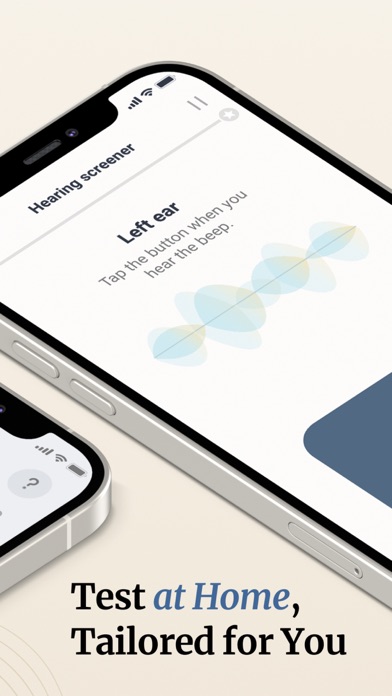
- At-Home Hearing Screener: Take a proprietary in-app hearing screener directly on your device to customize your hearing aids without needing specialized external diagnostic equipment.
- Worry-Free Remote Support: Schedule free virtual consultations with professional audiologists through the app, requesting expert help anytime and anywhere without office visits.
- AI Denoise Audio Modes: Seamlessly switch between Normal and In-noise operational modes powered by AI algorithms that filter out unwanted ambient sounds while boosting speech clarity.
- Over-The-Air Firmware Upgrades: Keep your hardware permanently current with OTA technology that delivers the absolute newest speech enhancement algorithms straight over your internet connection.
- Real-Time Device Customization: Make instant volumetric and EQ adjustments on the fly, tailoring your acoustic profile precisely to changing environmental scenarios.
Hands-On Impressions: Performance, Battery, and Thermals
Running this pre-release build on an iPhone 15 Pro running modern iOS reveals a remarkably snappy interface with zero perceptible UI stutter. Touch responsiveness is instantaneous, registering adjustments to audio profiles without the frustrating delays often found in early medical software prototypes. Frame pacing within the graphical equalizer and waveform visualizers remains locked at a buttery-smooth cadence.
Thermal management is practically a non-issue here, as the app's background tasks consume minimal processing power compared to graphically intensive mobile games. Battery drain during active calibration sessions and remote consultations is negligible, allowing you to tweak settings without watching your battery percentage plummet. Memory management is equally clean, keeping background processes stable even when switching between Safari, Mail, and the audio utility.
"Our goal with the Orka ecosystem is to remove friction between the user and their hearing health, ensuring clinical-grade adjustments happen effortlessly in the palm of your hand." — EVOCO LABS CO., LTD. Development Team
System Requirements & Requested Permissions
To run this TestFlight beta smoothly, your iOS device needs to be running iOS 15.0 or later, ensuring compatibility with older legacy iPhones as well as current flagships. The app scales gracefully across varying screen sizes, from compact standard models to expansive Max variants, utilizing modern display tech efficiently. iPad owners will also find a fully optimized interface that takes advantage of larger screen real estate.
Upon initial launch, the app requests standard permissions necessary for its medical utility features to function properly. You will be prompted to allow Bluetooth access for connecting to your physical Orka hearing hardware and local network discovery permissions. Apple’s strict sandboxing architecture ensures that your personal audiometric data remains encrypted and securely partitioned on your device.
Pros & Cons: Beta Impressions
✓ The Highs (What We Love)
- AI Denoise Clarity: Noticeable background noise reduction in crowded environments.
- Streamlined Screener: Fast, intuitive at-home hearing tests without extra gear.
- OTA Upgrades: Firmware updates delivered directly over the air without hassle.
✕ Beta Caveats (Room for Polish)
- Bluetooth Pairing: Occasional connection drops requiring manual hardware re-sync.
- Server Latency: Remote consultation booking queues can occasionally stall during peak hours.
- UI Text Scaling: Minor localized text truncation found on smaller legacy screen sizes.

Current TestFlight Slot Situation & Availability
Apple enforces a strict cap of 10,000 active testers for any given TestFlight beta build, creating a competitive rush for early adopters. Because EVOCO LABS CO., LTD. is actively gathering real-world telemetry for their hearing algorithms, slots for this medical utility are expected to fill up rapidly. Securing your access early guarantees you won't get locked out when subsequent feature patches drop.
If you encounter a message stating that the beta is currently full, do not panic or abandon your efforts immediately. Developers frequently purge inactive accounts or expand their internal testing tiers as stability milestones are successfully met. Bookmark this page on Codewing and check back periodically during off-peak hours to grab a newly liberated slot.
Step-by-Step TestFlight Installation Guide
Installing the Orka Health beta on your iOS device takes less than two minutes once you follow these straightforward instructions. Make sure you complete these steps directly on your iPhone or iPad for seamless integration with the Apple ecosystem.
1. Open Safari on your iOS device and tap the official Orka Health TestFlight Beta Link.
2. If you haven't already, download the official Apple TestFlight app from the App Store and let it open automatically.
3. Tap the "Start Testing" or "Accept" button on the TestFlight invitation screen for Orka Health.
4. Wait for the beta package to download and install onto your SpringBoard, just like a standard application.
5. Open the app, pair your hardware, and use the built-in feedback tool inside TestFlight to report any bugs directly to EVOCO LABS CO., LTD.
Frequently Asked Questions
Is Orka Health safe to install via TestFlight?
Yes, installing this beta is completely safe as every build goes through Apple's official automated security screening and code-signing procedures. The application operates within Apple's strict sandboxing framework, ensuring your personal data remains private and protected.
What should I do if the Orka Health beta is full?
If the 10,000-tester ceiling has been reached, check back frequently throughout the day as developers periodically remove inactive accounts. Keeping this Codewing guide saved in your browser makes it easy to snap up a newly opened slot.
Will installing this beta overwrite my App Store version or delete save data?
TestFlight builds generally replace existing stable versions on your device while preserving your underlying user settings and configuration data. However, because this is pre-release medical software, we always recommend backing up any critical account settings beforehand.
How long do TestFlight beta invitations and builds last?
Each individual TestFlight build remains active for a maximum of 90 days from the day it is uploaded by the developer. EVOCO LABS CO., LTD. will push newer builds regularly, which you can update seamlessly with a single tap inside the TestFlight app.
Are in-app purchases free during TestFlight beta testing?
Yes, any transactions or feature unlocks within a TestFlight environment utilize Apple's simulated sandbox billing system. You will not be charged real currency for testing subscription tiers, virtual consultations, or premium features while evaluating the beta.
Final Editorial Verdict
Orka Health proves to be a remarkably well-thought-out medical companion app that successfully simplifies hearing aid management for everyday users. Despite a few minor Bluetooth pairing quirks typical of pre-release software, the core AI Denoise features and at-home screener work exceptionally well. We award this beta build a solid 4.5 out of 5 stars and strongly recommend grabbing your access slot immediately.
Developer Support & Official Resources
Stay updated on patch notes, maintenance windows, and feature roadmaps directly from the official developer channels.
Never miss an opening for Orka Health.
Apple limits TestFlight betas to 10,000 testers, and this program is currently at capacity. CodeWings Plus continuously monitors slot availability 24/7 and sends you an instant alert the second a spot opens up.






