

Finding a relaxing pixel art app that actually respects your attention span can feel impossible in today's crowded App Store. That changes the moment you load up the latest Payoo Sandbox build on your daily driver.
Developed by Alexey Grigorkin, this engaging puzzle and entertainment title transforms basic numbered grids into satisfying creative sessions. Here is everything you need to know about testing the app before its wider public release.
Payoo Sandbox — Quick Specifications
Developer: Alexey Grigorkin
About Payoo Sandbox
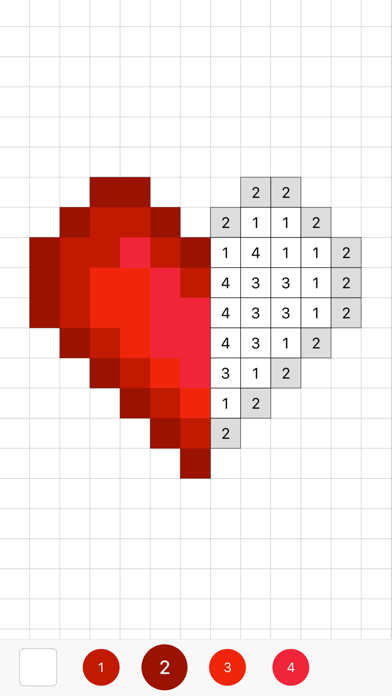
Payoo Sandbox is designed around the tactile joy of coloring tiny pixel art images by numbers. Users select from a massive library of pre-made templates and fill in numbered grid cells with corresponding color palettes.
The core gameplay loop centers on mindful creation, making it a peaceful puzzle experience rather than a stressful game. Players tap individual pixels or drag across matching numbers to watch intricate designs gradually snap into vibrant visual focus.
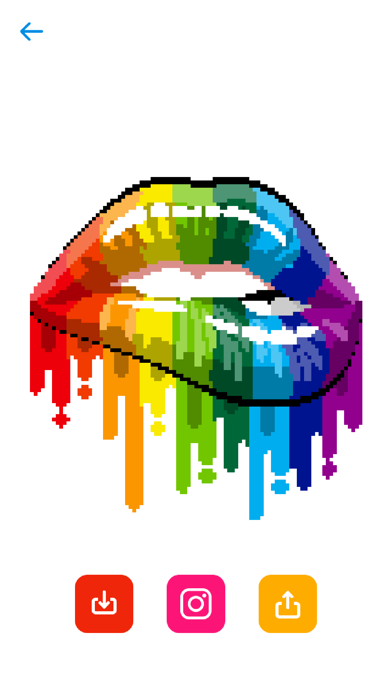
Beyond traditional coloring, the application functions as a robust creative studio. Users can test their own concepts in a dedicated free drawing mode or convert personal photo gallery images straight into pixel art templates.
Standout Features & What's New in this Build
This open beta build introduces several smart workflow enhancements and content filters requested by early testers. The development team has fine-tuned the navigation so you can dive straight into your preferred art styles without wading through clutter.
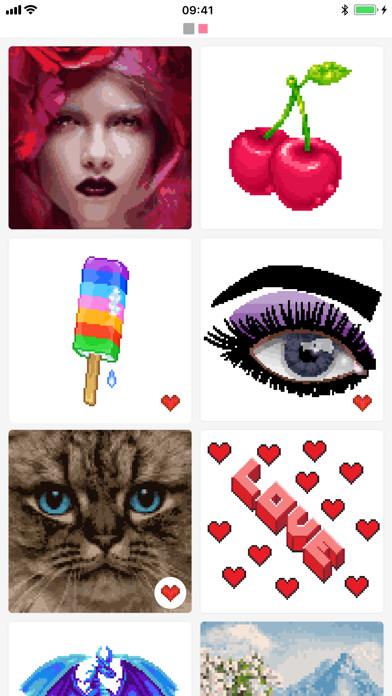
- Smart Content Search: Quickly filter thousands of pixel templates by typing keywords like fruits, lips, gadgets, or cats.
- Magic Round Button: Instantly discover similar artwork variations with a single tap based on your active color palette.
- Personal Collections: Organize your completed masterpieces and work-in-progress projects neatly inside dedicated folders.
- Photo Converter: Automatically translate personal iPhone photo library images into customized pixel art grids.
- Curated Hints: Intelligent suggestion engine highlights trending and interesting art pieces tailored to your history.
Hands-On Impressions: Performance, Battery, and Thermals
Testing this beta build on an iPhone 15 Pro reveals exceptionally smooth frame pacing and zero noticeable UI stutter. The 120Hz ProMotion display makes zooming in and out of dense pixel grids feel buttery and responsive.
Battery drain is remarkably minimal during extended coloring sessions, drawing very little power from the A-series silicon. Thermal output remains entirely flat, as the app's lightweight 2D rendering engine pushes modern hardware nowhere near its limits.
"Sandbox bridges the gap between digital puzzles and creative expression, offering a genuinely calming experience that scales effortlessly from kids to design enthusiasts."
System Requirements & Requested Permissions
To run this TestFlight build smoothly, your Apple device must be running iOS 15.0 or later. It scales cleanly across a wide range of hardware, from older budget iPhones up to the latest M-series iPad Pro models.
The app requests standard photo library access strictly for its photo-to-pixel conversion feature. Apple’s robust sandboxing architecture ensures your personal files remain secure and inaccessible outside of the specific images you choose to import.
Pros & Cons: Beta Impressions
✓ The Highs (What We Love)
- Fluid Performance: Zero dropped frames even when panning across massive pixel grids.
- Photo Conversion: Incredibly fast algorithm for turning personal snaps into colorable art.
- Family Friendly: Clean, intuitive interface with zero disruptive banner ads.
✕ Beta Caveats (Room for Polish)
- Search Latency: Occasional brief loading delays when querying massive keyword filters.
- Cloud Sync: Collection backups can occasionally stall on unstable cellular connections.
- Build Stability: Minor graphical hiccups when switching rapidly between drawing modes.
Current TestFlight Slot Situation & Availability
Apple enforces a strict cap of 10,000 active testers for any individual TestFlight application. Popular utility titles like this frequently see high demand surge immediately following community discovery.
If you encounter a message stating that the developer isn't accepting new testers, do not panic. Slots periodically open up as inactive users get pruned from the active roster during build updates.
Step-by-Step TestFlight Installation Guide
Getting up and running with the beta takes less than two minutes if you follow these precise steps. Make sure you complete them directly on your compatible iOS device.
1. Download and install the official Apple TestFlight application from the App Store if you haven't already. 2. Tap the official Codewing TestFlight invitation link provided on this page. 3. Accept the beta invitation prompt within the TestFlight web interface. 4. Tap 'Install' to download the Payoo Sandbox beta build onto your home screen. 5. Launch the app and use the built-in feedback tool to report any bugs you encounter.
Frequently Asked Questions
Is Payoo Sandbox safe to install via TestFlight?
Yes, every build distributed through TestFlight is formally reviewed by Apple and operates inside a secure iOS sandbox environment.
What should I do if the Payoo Sandbox beta is full?
Bookmark this Codewing overview and check back during off-peak hours when inactive tester slots are routinely recycled.
Will installing this beta overwrite my App Store version or delete save data?
TestFlight builds install as standalone preview packages alongside your production apps, though local save data structures remain isolated.
How long do TestFlight beta invitations and builds last?
Each individual TestFlight build remains active for 90 days from its upload date before requiring a refreshed update.
Are in-app purchases free during TestFlight beta testing?
Yes, any subscription tiers or in-app purchases triggered inside a TestFlight build use Apple's simulated sandbox billing without charging real currency.
Final Editorial Verdict
Payoo Sandbox delivers a genuinely relaxing pixel art experience that shines on modern iOS hardware. Grab the beta link while slots remain open to test out the upcoming feature set.
Developer Support & Official Resources
Stay updated on patch notes, maintenance windows, and feature roadmaps directly from the official developer channels.
Ready to Test Payoo Sandbox?
Apple limits public TestFlight betas to 10,000 testers. Tap below to launch TestFlight and claim your testing slot before capacity is reached.
Join Payoo Sandbox Beta on TestFlight →






