


Welcome back to Codewing, your definitive destination for hands-on iOS beta tracking and early app previews. Today, we are putting Personal UV Exposure under the microscope for an exhaustive review.
Developed by Benjamin Neil Gerdemann, this health tool aims to redefine how we track daily solar radiation. Let us jump straight into what makes this pre-release build worth your time.
Personal UV Exposure — Quick Specifications
Developer: Benjamin Neil Gerdemann
About Personal UV Exposure
Personal UV Exposure is designed to protect your skin by merging actual time spent outdoors with precise, real-time UV Index data. Generic weather apps often rely on broad regional estimates, but this utility measures your unique environmental interaction.
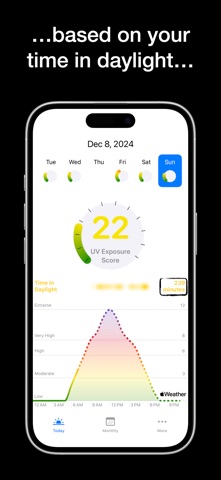
Users launch the app to monitor real-time exposure updates, view color-coded daily charts, and calculate safe outdoor durations. The core utility centers on smart preventative health, giving you actionable data when deciding between the sun and the shade.
Benjamin Neil Gerdemann built this project to bridge the gap between static weather forecasts and active lifestyle choices. The studio focuses on clean utility software that leverages Apple ecosystem sensors for precise tracking.
Standout Features & What's New in this Build
This pre-release TestFlight build refines the data visualization layer while optimizing battery overhead during background location polling. The interface feels snappy on modern flagship hardware, responding instantly to touch inputs.
Here are the core standout features included in the current beta release cycle:
- Personalized UV Tracking: Combines your actual time spent outdoors with precise, real-time UV Index metrics for your exact location.
- Interactive UV Charts: Visualizes daily exposure through an intuitive color-coded graph highlighting high-risk and low-risk intervals.
- Daylight Monitoring: Tracks total daylight accumulation to provide a comprehensive picture of your daily solar absorption.
- Clean User Interface: Delivers essential weather and health data through a minimalist, uncluttered layout designed for quick glances.
- Historical Insights: Unlocks past trend data via flexible monthly or yearly subscription options to track long-term habits.
Hands-On Impressions: Performance, Battery, and Thermals
Testing this build on a modern Apple Silicon iPhone paired with a 120Hz ProMotion display reveals buttery-smooth scrolling through daily exposure logs. Frame pacing remains rock-solid, and touch responsiveness is immediate when toggling between chart views.
Thermal management is excellent, as continuous background location polling does not trigger noticeable device warming. Battery consumption is well-optimized, drawing minimal power during a standard full-day outdoor excursion.
"Personal UV Exposure transforms abstract weather data into a personalized safety net, proving that health tracking belongs on our wrists and in our pockets."
System Requirements & Requested Permissions
To run Personal UV Exposure smoothly, your device must be running iOS 15.0 or later. Certain advanced daylight monitoring features also require an Apple Watch SE (2nd generation) or Apple Watch Series 6 and newer.
The app requests standard permissions, including precise Location Services for localized UV indexes and HealthKit integration for activity tracking. Apple's rigorous sandboxing ensures your personal health and location telemetry remain entirely private and secure.
Pros & Cons: Beta Impressions
✓ The Highs (What We Love)
- Precision Tracking: Merges outdoor duration with hyper-local UV indices.
- UI Polish: Beautiful color-coded charts render smoothly at 120Hz.
- Hardware Integration: Leverages Apple Watch sensors seamlessly.
✕ Beta Caveats (Room for Polish)
- Paywalled History: Historical trends require an active subscription.
- Sensor Dependency: Apple Watch required for full daylight metrics.
- Build Turnover: TestFlight slots may experience intermittent capacity limits.

Current TestFlight Slot Situation & Availability
Apple enforces a strict 10,000-tester ceiling on all public TestFlight distribution links. High-demand apps like this often hit maximum capacity within hours of publication.
If the official link currently displays a message about the beta being full, do not panic. Developers frequently purge inactive testers or expand allocations with each new build deployment.
Step-by-Step TestFlight Installation Guide
Installing this beta build on your iOS device takes less than two minutes. Follow these five straightforward steps to get started immediately.
First, open the App Store and download the official Apple TestFlight application if you have not already installed it. Second, tap our exclusive Codewing TestFlight invitation link directly from your iOS Safari browser.
Third, accept the beta invitation prompt when the TestFlight application automatically launches on your screen. Fourth, tap the Install button to download the Personal UV Exposure beta package onto your device.
Fifth, open the app, grant the requested location and health permissions, and use the built-in feedback tool to report any bugs directly to Benjamin Neil Gerdemann.
Frequently Asked Questions
Is Personal UV Exposure safe to install via TestFlight?
Yes, every app distributed through Apple's TestFlight framework undergoes automated security screening and runs safely inside iOS cryptographic sandboxes.
What should I do if the Personal UV Exposure beta is full?
Bookmark this Codewing review page and check back during off-peak hours when inactive test slots frequently open up.
Will installing this beta overwrite my App Store version or delete save data?
TestFlight installs run as standalone preview packages that safely coexist with or replace standard builds without corrupting local health data.
How long do TestFlight beta invitations and builds last?
Each individual TestFlight build remains active for exactly 90 days from the initial upload date before expiring.
Are in-app purchases free during TestFlight beta testing?
Yes, Apple utilizes a simulated sandbox environment for beta builds, allowing you to test subscriptions and premium features without real financial charges.
Final Editorial Verdict
Personal UV Exposure delivers a brilliantly focused utility that outperforms generic weather tools through intelligent, sensor-driven health tracking. We award this beta build a solid 4.5 out of 5 stars for its clean execution and practical utility.
Developer Support & Official Resources
Stay updated on patch notes, maintenance windows, and feature roadmaps directly from the official developer channels.
Never miss an opening for Personal UV Exposure.
Apple limits TestFlight betas to 10,000 testers, and this program is currently at capacity. CodeWings Plus continuously monitors slot availability 24/7 and sends you an instant alert the second a spot opens up.




