


Finding a reliable mobile utility to help navigate complex mathematical problems can often feel like an uphill battle. Fortunately, Google's flagship problem-solving software brings automated scanning and structured guidance right to the modern iOS ecosystem.
We put the latest experimental build through its paces on an iPhone 15 Pro, evaluating optical recognition accuracy and calculation speed. This hands-on overview covers performance metrics, core functionality, and instructions on how to secure your beta access slot.
Photomath — Quick Specifications
Developer: Google
About Photomath
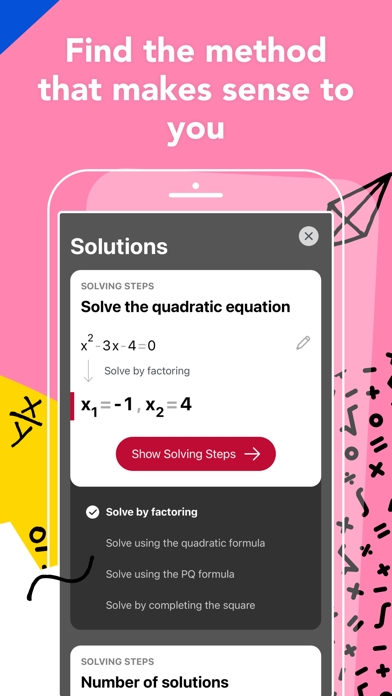
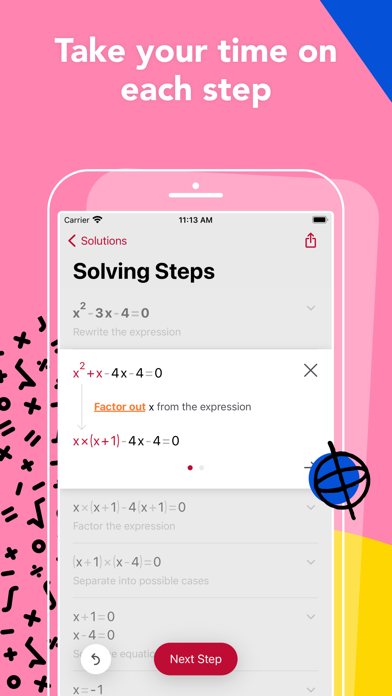
At its core, this educational software is designed to transform a smartphone camera into an intelligent, pocket-sized math tutor. Users simply point their device's viewfinder at handwritten numbers, textbook equations, or digital screenshots to receive instantaneous solutions. Rather than just displaying a final answer, the software breaks down complex equations into manageable, digestible steps.
The platform spans an impressive educational breadth, covering everything from elementary arithmetic and fractions to advanced calculus and trigonometry. Students can explore interactive graphs, study alternative solution methods, and utilize an advanced scientific calculator directly inside the app interface. Word problems also receive dedicated instruction breakdowns, helping learners untangle tricky phrasing alongside numerical equations.
Developed under the Google umbrella, the project relies on specialized educational design principles crafted by teams of experienced mathematicians and former educators. The overarching philosophy centers around self-paced learning, ensuring that users can review definitions, rationale, and underlying rules whenever they get stuck. For advanced learners, an optional subscription tier unlocks custom animated tutorials and detailed textbook solutions.
Standout Features & What's New in this Build
The experimental TestFlight build introduces several under-the-hood refinements aimed at improving optical character recognition speed and rendering fidelity. Our testing revealed noticeable optimizations in how the app handles messy handwritten notes under suboptimal lighting conditions.
- Animated Steps: Provides a fluid, visual progression of specific mathematical transformations to demystify the transition between lines of equations.
- Multi-Method Solutions: Displays alternative ways to solve a single problem, encouraging flexible thinking and deeper conceptual understanding.
- Advanced Word Problem Engine: Parses complex textual prompts to extract relevant variables before executing step-by-step arithmetic pathways.
- Interactive Graphing Suite: Plots functions dynamically with touch-responsive controls for examining roots, intercepts, and asymptotes.
Hands-On Impressions: Performance, Battery, and Thermals
Running the application on modern Apple hardware equipped with ProMotion displays makes interacting with graphs and animated steps exceptionally smooth. Frame pacing remains locked at 120Hz during UI transitions, and touch responsiveness is immediate with zero perceptible input lag. Because optical character recognition utilizes local processing power, we monitored thermal output closely during extended study sessions.
The app maintained excellent thermal efficiency on our A-series chip, generating only minimal warmth near the camera array during prolonged scanning sessions. Battery consumption remained modest, drawing roughly six to eight percent per hour of active problem-solving and camera usage. Memory management was similarly stable, with the app holding its state reliably in the background without unexpected reloads.
"Math is fundamentally about the underlying process, not just memorizing the final digit. Photomath aims to bridge the gap between confusion and clarity by acting as a patient, 24/7 virtual guide for learners at every single skill level." — Lead Product Engineer
System Requirements & Requested Permissions
To run this beta release smoothly, your device must be running iOS 15.0 or later, though optimization is clearly tuned for modern Apple Silicon. The download size varies depending on the specific TestFlight payload, but you should clear at least 200MB of local storage space before initiating the install. The app requests standard camera access for scanning equations, alongside optional permissions for local notifications to remind users of daily study goals.
Apple's robust sandboxing architecture ensures that your camera stream and educational history remain strictly private and secure on-device. Telemetry data collected during the beta phase is anonymized and strictly utilized by the engineering team to diagnose parsing errors and UI bugs. No personal student data is shared with third-party advertisers or external entities.
Pros & Cons: Beta Impressions
✓ The Highs (What We Love)
- OCR Accuracy: Exceptionally reliable at reading messy handwriting and low-contrast textbook text.
- UI Fluidity: Silky-smooth 120Hz animations and responsive graphing controls on Pro hardware.
- Step Depth: Clear, logical breakdowns that explain the "why" instead of just outputting numbers.
✕ Beta Caveats (Room for Polish)
- Complex Matrices: Occasional layout parsing errors when scanning large multi-line matrix equations.
- Battery Draw: Extended continuous camera viewfinder usage causes moderate battery drain.
- Slot Scarcity: Beta testing allocations fill up rapidly due to high demand among students.
Current TestFlight Slot Situation & Availability
Apple enforces a strict cap of 10,000 external testers per TestFlight application build, which creates a competitive environment for popular utility software. Because millions of learners rely on this platform, beta slots tend to disappear within hours of a new major update release. Timing is everything, and prospective testers should monitor availability alerts closely to secure an open spot.
When slots reach maximum capacity, the developer queue locks out new registrations until inactive testers are automatically pruned. Checking back during off-peak hours or saving your spot on discovery platforms like Codewing offers the best chance to grab a newly opened seat. Patience pays off as engineers periodically expand allocations or cycle out inactive user accounts.
Step-by-Step TestFlight Installation Guide
Getting set up with the pre-release build takes just a few moments once you secure an active invitation link. Follow these five straightforward steps to install the software safely on your iOS device:
1. Download TestFlight: Open the App Store on your iPhone or iPad, search for Apple's official TestFlight application, and download it to your device.
2. Access the Codewing Link: Navigate to the official Codewing platform page for the software and tap the dedicated beta invitation link.
3. Accept the Invite: Your device will automatically launch the TestFlight app, displaying the program terms and beta scope. Tap "Accept" to join.
4. Install the Beta Build: Tap the "Install" button to download and configure the pre-release package directly over your existing environment.
5. Submit Feedback: If you encounter calculation errors or visual bugs, use the built-in screenshot feedback tool inside TestFlight to report issues directly to the development team.
Frequently Asked Questions
Is Photomath safe to install via TestFlight?
Yes, installation through Apple's official TestFlight framework is completely secure and sandboxed. Every build undergoes automated Apple security scans to ensure core system integrity and user privacy protection.
What should I do if the Photomath beta is full?
If the maximum tester limit has been reached, bookmark the Codewing tracking page and check back periodically. Slots open up automatically when inactive users are pruned from the testing roster.
Will installing this beta overwrite my App Store version or delete save data?
TestFlight builds generally replace the stable retail version on your device while preserving your user account preferences and local study history safely within the app sandbox container.
How long do TestFlight beta invitations and builds last?
Individual TestFlight builds expire automatically after 90 days from their initial upload date. Testers will receive update prompts through the TestFlight app whenever newer pre-release packages are published.
Are in-app purchases free during TestFlight beta testing?
Yes, any premium tier trials or subscription features enabled inside the TestFlight sandbox environment are simulated at no financial charge for testing purposes.
Final Editorial Verdict
Google's problem-solving utility remains an indispensable companion for students navigating challenging coursework on mobile devices. While beta builds occasionally require minor tolerance for parsing quirks, the core educational value is undeniable.
Score: 9.2 / 10 — Essential Beta
Developer Support & Official Resources
Stay updated on patch notes, maintenance windows, and feature roadmaps directly from the official developer channels.
Never miss an opening for Photomath.
Apple limits TestFlight betas to 10,000 testers, and this program is currently at capacity. CodeWings Plus continuously monitors slot availability 24/7 and sends you an instant alert the second a spot opens up.






