
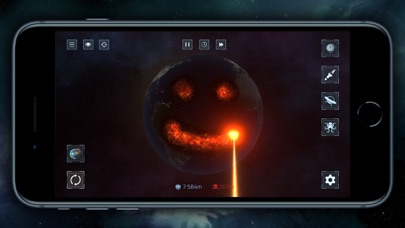

Welcome to Codewing's comprehensive hands-on evaluation of the Planet X Staging TestFlight beta build. PARADYME LIMITED has rolled out an updated preview package for mobile simulation fans looking for unrestrained digital sandbox physics.
This early access build gives passionate iOS power-users direct entry into a universe built for creative destruction. We spent hours stress-testing every cosmic tool available on Apple silicon.
Planet X Staging — Quick Specifications
Developer: PARADYME LIMITED
About Planet X Staging
Planet X Staging functions as a physics-based sandbox simulation title centered on planetary creation, system management, and total destruction. Players assume the role of cosmic architects controlling fundamental natural forces to sculpt, warp, and obliterate celestial bodies.
The core gameplay loops center around building customized planetary systems from microscopic space rocks to colossal gas giants. Users can test orbital mechanics or systematically wipe out civilizations using an absurdly large arsenal of instruments.
Game Modes and Mechanics
Two distinct modes govern the entire experience, offering vastly different gameplay paces for mobile users. Planet Smash focuses entirely on pure devastation, granting instant access to more than fifty distinct weapons.
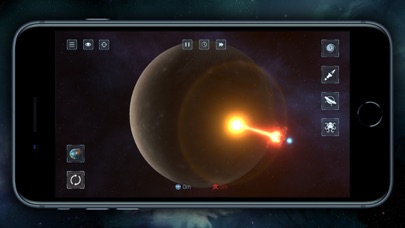
Solar System Smash shifts focus toward gravitational equations, allowing players to manipulate real or custom star systems. You can simulate planetary collisions, generate rogue black holes, or construct massive artificial megastructures.
Developer Background and Vision
PARADYME LIMITED designed this mobile experience to push the boundaries of physics rendering on handheld displays. The studio aims to deliver desktop-grade simulations without sacrificing touch responsiveness or intuitive control layouts.
This TestFlight staging branch allows the development team to gather real telemetry data regarding performance scaling across varied hardware. Early community feedback directly influences how gravity engines and particle effects behave in subsequent patches.
Standout Features and What's New in this Build
PARADYME LIMITED packed this TestFlight candidate with notable additions that elevate the core physics loop. Here are the standout features worth testing immediately upon installation:
- Extensive Weapon Arsenal: Over fifty destructive tools ranging from orbital ion cannons and antimatter missiles to space shibas and supernovas.
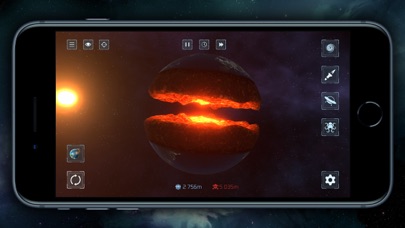
- Accurate Gravitational Physics: Scientifically sound celestial mechanics that trigger breathtaking chain reactions during planetary collisions.
- Mega-Structure Customization: Build and shatter artificial rings, planetary force fields, and engineered star systems.
- Optimized Touch Controls: Refined user interface scaling smoothly across both compact iPhones and expansive iPad displays.
- Staging Stability Patches: Experimental graphics toggles designed specifically to maintain high frame rates during cataclysmic screen wipes.
Hands-On Impressions: Performance, Battery, and Thermals
Running this beta build on an iPhone 15 Pro reveals remarkably stable frame pacing during heavy particle calculations. Even when spawning multiple black holes simultaneously, the rendering engine maintains smooth motion thanks to Metal API optimizations.
Extended play sessions do introduce noticeable thermal warmth around the device chassis, which is expected for intense physics simulations. Battery consumption accelerates faster than standard casual titles, so keeping a power brick nearby is recommended during long orbital experiments.
"Watching an entire solar system crumble into space dust on a ProMotion OLED display is a visceral, deeply satisfying mobile gaming milestone."
System Requirements & Requested Permissions
Playing Planet X Staging requires an iOS device running iOS 15.0 or later. Modern Apple Silicon processors provide the ideal performance headroom for heavy gravitational calculations and large particle counts.
The app requests standard sandboxed storage access to save custom star systems locally on your device. Apple's secure sandbox environment ensures complete privacy, keeping all experimental destruction isolated safely inside the app bundle.
Pros & Cons: Beta Impressions
✓ The Highs (What We Love)
- Physics Engine: Incredibly satisfying and accurate gravitational destruction mechanics.
- Weapon Variety: Massive inventory of creative tools, lasers, and celestial anomalies.
- Performance: Solid frame rates on modern Apple hardware during heavy chaos.
✕ Beta Caveats (Room for Polish)
- Thermal Load: Extended sandbox sessions cause noticeable device heating.
- Battery Drain: Heavy CPU and GPU utilization drains portable power quickly.
- Slot Limits: Apple's testing restrictions mean available spots fill up fast.
Current TestFlight Slot Situation & Availability
Apple caps public TestFlight distributions at 10,000 active users per app ID. Because sandbox simulation titles attract massive communities, these staging slots frequently hit capacity within hours of release.
When slots are full, prospective users must monitor Codewing for automatic slot turnovers when inactive testers are pruned. Timing your installation window correctly remains the single best strategy for securing access.
Step-by-Step TestFlight Installation Guide
Getting set up with this beta package requires just a few minutes of your time. Follow these numbered steps to join the staging ecosystem right now:
1. Download the official Apple TestFlight application from the iOS App Store if it is not already installed on your device.
2. Tap the official Codewing TestFlight invitation link provided at the bottom of this guide to open the installation portal.
3. Accept the beta invitation agreement on the TestFlight web page, which automatically registers your device ID with PARADYME LIMITED.
4. Tap the Install button to download the Planet X Staging package directly onto your iPhone or iPad.
5. Open the app, test the simulation tools, and submit any bug reports directly through the TestFlight feedback portal.
Frequently Asked Questions
Is Planet X Staging safe to install via TestFlight?
Yes, every build distributed through TestFlight undergoes Apple's automated security review and operates strictly within iOS application sandboxing guidelines.
What should I do if the Planet X Staging beta is full?
Keep this Codewing page bookmarked and check back during off-peak hours when inactive accounts are routinely removed to free up slots.
Will installing this beta overwrite my App Store version or delete save data?
TestFlight builds generally operate as standalone preview packages or replace existing installations safely without corrupting local save directories.
How long do TestFlight beta invitations and builds last?
Standard Apple TestFlight builds remain active for up to 90 days from the initial upload date before requiring a developer refresh.
Are in-app purchases free during TestFlight beta testing?
Yes, all simulated transactions utilize Apple's TestFlight sandbox environment, allowing you to test purchases without being charged real money.
Final Editorial Verdict
Planet X Staging delivers an exceptionally entertaining brand of cosmic chaos that feels right at home on modern mobile hardware. PARADYME LIMITED has crafted a compelling physics playground that rewards both careful planetary design and chaotic destruction.
We rate this beta build an impressive 8.5/10 for stability, performance scaling, and sheer sandbox fun. Grab your link below before the current testing wave fills up completely.
Developer Support & Official Resources
Stay updated on patch notes, maintenance windows, and feature roadmaps directly from the official developer channels.
Ready to Test Planet X Staging?
Apple limits public TestFlight betas to 10,000 testers. Tap below to launch TestFlight and claim your testing slot before capacity is reached.
Join Planet X Staging Beta on TestFlight →






