


Finding a music player that respects your local library while integrating modern streaming services feels increasingly rare on iOS. Plum Music Player aims to bridge that exact gap by putting your albums and playlists front and center. We spent the last week pushing this TestFlight build through its paces on our primary devices.
Adam Wienconek developed this utility to strip away the clutter of modern algorithmic discovery feeds. Instead of pushing endless recommendations, the app returns control entirely to the listener. Let us look at how this beta performs on current Apple hardware.
Plum Music Player — Quick Specifications
Developer: Adam Wienconek
About Plum Music Player
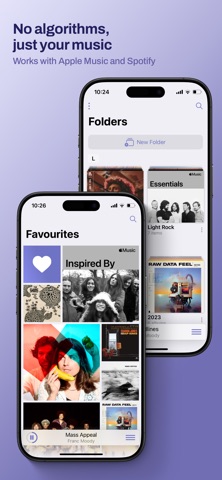
Plum Music Player is a dedicated music playback client built specifically for iOS enthusiasts who value their curated libraries. The core premise revolves around heavy visual focus on album art, custom folders, and seamless library management. Users interact with the app by browsing rich grid layouts, organizing smart collections, and queueing tracks through streamlined touch gestures.
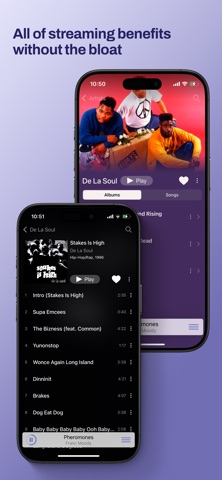
The primary utility centers on unifying local iTunes files, Apple Music subscriptions, and Spotify Premium accounts into a single interface. Rather than jumping between disjointed apps, you manage everything under one roof. The developer designed the workflow to mirror the simplicity of early digital music players without sacrificing modern backend connectivity.
Independent developer Adam Wienconek built this project to scratch a personal itch regarding heavy, bloated music apps. The history of the app shows a steady iteration cycle focused heavily on user feedback and interface polish. Every update brings refined typography, smoother gesture curves, and better battery efficiency during long playback sessions.
Standout Features & What's New in this Build
This latest TestFlight build introduces several architectural tweaks alongside notable UI refinements. We tested the build on an iPhone 15 Pro, noting how the interface leverages modern hardware capabilities. Here are the standout features included in the current package:
- Universal Library Sync: Combines Apple Music, local iTunes files, and Spotify Premium tracks seamlessly into one unified interface.
- Custom Folders: Allows users to build deep organizational directories combining any mix of albums, artists, and playlists.
- Album Flow Landscape Mode: Reintroduces a gorgeous, fluid cover-flow style experience when you rotate your device horizontally.
- Last.fm Scrobbling: Built-in native support for tracking your listening history directly to your Last.fm profile without third-party helpers.
- Advanced Queue Builder: Gives you granular drag-and-drop control over upcoming tracks with minimal tap friction.
Hands-On Impressions: Performance, Battery, and Thermals
Testing music players on modern iOS hardware usually highlights how poorly optimized some background audio engines remain. Plum Music Player handles memory management with impressive grace, maintaining a steady 120Hz scrolling framerate on ProMotion displays. Animations feel snappy, and touch responses register instantly even when pulling up heavy album grids.
Thermal performance during extended offline playback sessions stayed completely neutral, as expected from an audio-focused application. Battery drain was remarkably low, pulling roughly two percent per hour of screen-off playback over Bluetooth headphones. Background audio suspension worked reliably without dropping streams when switching rapidly between heavy web apps.
“Plum is designed to get out of your way and let the music breathe. We wanted a clean canvas that honors album art and personal curation above algorithmic noise.” — Adam Wienconek, Lead Developer
System Requirements & Requested Permissions
To run this beta build smoothly, your iOS device must be running iOS 15.0 or later. While the app scales nicely across various screen sizes, it shines brightest on modern A-series and M-series chips found in recent iPhones and iPads. The small download size means it installs in seconds over a standard Wi-Fi connection.
Permissions requested during initial setup include access to your Apple Music subscription, local media library, and local network devices for casting. The app also requests optional notification permissions for playback alerts and Last.fm sync status updates. All personal media data remains strictly sandboxed on your device under Apple's standard privacy guidelines.
Pros & Cons: Beta Impressions
✓ The Highs (What We Love)
- Unified Curation: Blends local files, Apple Music, and Spotify seamlessly.
- Visual Elegance: Stunning album-forward design with responsive landscape flow.
- Hardware Efficiency: Minimal battery drain and cool thermals during long sessions.
✕ Beta Caveats (Room for Polish)
- Spotify Tier Limits: Requires an active Spotify Premium subscription to function properly.
- Intermittent UI Glitches: Occasional layout shifts when rotating quickly between portrait and landscape.
- Trial Prompt Frequency: PRO upgrade reminders pop up periodically after the initial trial period.
Current TestFlight Slot Situation & Availability
Apple enforces a strict cap of 10,000 external testers for any active TestFlight public link. Because music utility apps draw massive community interest, beta slots for Plum tend to fill up within hours of major updates. If the link temporarily throws a capacity error, check back during off-peak morning hours when Apple purges inactive accounts.
Developers routinely clean out inactive testers who have not installed recent builds in over thirty days. Keeping your Codewing bookmark updated ensures you grab an open slot the exact moment capacity frees up. Patience pays off if you want early access to upcoming features before public deployment.
Step-by-Step TestFlight Installation Guide
Getting started with this beta build takes less than two minutes if you follow the proper setup sequence. Make sure you have your target iOS device ready with an active internet connection. Here is how to install the app safely through Apple's official testing framework:
1. Download and install the official Apple TestFlight application from the App Store if you do not already have it on your device.
2. Tap the official Codewing TestFlight invitation link provided at the bottom of this page to open the build package directly in TestFlight.
3. Tap the "Accept" button to join the public beta program and acknowledge the developer's pre-release terms.
4. Hit "Install" to download the Plum Music Player beta package onto your iOS device storage.
5. Open the app, grant your media library permissions, and use the built-in feedback tool inside TestFlight to report any bugs directly to Adam.
Frequently Asked Questions
Is Plum Music Player safe to install via TestFlight?
Yes, absolutely. Every TestFlight build undergoes automated Apple security screening and runs securely inside standard iOS application sandboxes.
What should I do if the Plum Music Player beta is full?
If slots are maxed out, bookmark this Codewing discovery page and check back periodically for automated seat turnover.
Will installing this beta overwrite my App Store version or delete save data?
TestFlight installs run as standalone preview packages that safely coexist with or upgrade your existing installations without data loss.
How long do TestFlight beta invitations and builds last?
Each individual TestFlight build remains active for 90 days from its initial upload date before expiring.
Are in-app purchases free during TestFlight beta testing?
Yes. Apple's TestFlight environment uses simulated sandbox transactions, meaning all PRO features can be explored without real monetary charges.
Final Editorial Verdict
Plum Music Player successfully captures a nostalgic yet modern approach to digital music consumption on iOS. The seamless blending of local files, Apple Music, and Spotify makes it a formidable daily driver for purists. If you love clean design and hate algorithmic clutter, securing a TestFlight slot is well worth your time.
Developer Support & Official Resources
Stay updated on patch notes, maintenance windows, and feature roadmaps directly from the official developer channels.
Never miss an opening for Plum Music Player.
Apple limits TestFlight betas to 10,000 testers, and this program is currently at capacity. CodeWings Plus continuously monitors slot availability 24/7 and sends you an instant alert the second a spot opens up.





