
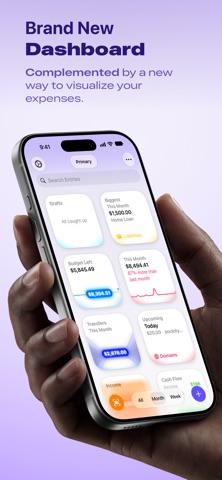

Finding a fast finance tracker that respects personal privacy is rare in the modern utility ecosystem. Nikhil Nigade has stepped up to solve this exact problem with his fresh approach to personal expense tracking.
We spent the last week pushing this pre-release build through its paces on modern Apple hardware. Here is everything you need to know about joining the active public testing phase.
Pockity — Quick Specifications
Developer: Nikhil Nigade
About Pockity
Pockity is engineered from the ground up as a private, lightning-fast expense tracker and budget planner. The platform spans iPhone, iPad, Mac, and Apple Watch with seamless iCloud synchronization across your personal devices.
Users log everyday purchases, income streams, internal transfers, and reimbursements in mere seconds. The primary utility focuses on giving you a crystal-clear look at where your money goes without sacrificing personal data.
Developer Nikhil Nigade built this utility to eliminate the heavy friction found in traditional finance apps. There are no mandatory bank logins, no intrusive ad banners, and zero account creation requirements to get started.
Standout Features & What's New in this Build
This active TestFlight build introduces several refined utility features designed to speed up daily logging. The developer has packed a surprising amount of polish into the current package.
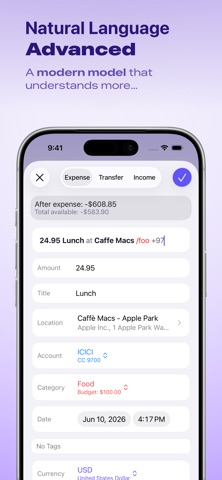
- Smart Add Expense: Automatically parses incoming bank or credit card text messages into a ready-to-save draft with categories and amounts pre-filled.
- Multi-Device Syncing: Real-time background iCloud sync keeps ledgers updated across iPhone, iPad, Mac, and Apple Watch instantly.
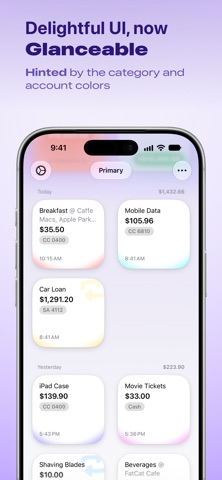
- Interactive Visual Budgets: Weekly and monthly budget rings change color dynamically as spending approaches or exceeds preset limits.
- Natural Language Search: Query your spending history using everyday phrasing like "coffee last week" or "Uber in March".
- Receipt Scanning: Instantly capture physical receipts or attach PDF invoices directly to individual transaction entries.
Hands-On Impressions: Performance, Battery, and Thermals
Testing finance applications on modern Apple hardware running 120Hz ProMotion displays reveals a lot about UI responsiveness. Pockity flies through transaction lists and Sankey charts with zero frame drops or stuttering.
Thermal management is practically a non-issue since database operations and SwiftUI layouts demand very little heavy processing. Battery drain during extended budgeting sessions remains completely negligible, even when handling large CSV import files.
"The core vision behind Pockity is frictionless record-keeping that stays entirely under your own cryptographic lock and key. We want lightning-fast entries without ever compromising user privacy." — Nikhil Nigade
System Requirements & Requested Permissions
To run this TestFlight build smoothly, your Apple device must be running iOS 15.0 or later. The app scales effortlessly across compact iPhone screens, iPad multitasking windows, and macOS desktop displays.
The application requests standard local network access for device-to-device sync features and optional notification permissions for upcoming bill alerts. Thanks to strict Apple sandboxing, all financial records stay confined to your personal device and private iCloud container.
Pros & Cons: Beta Impressions
✓ The Highs (What We Love)
- Zero Accounts: No mandatory cloud servers, passwords, or bank credential harvesting.
- Instant Logging: Widgets, Siri Shortcuts, and Smart Add parse transactions effortlessly.
- Native Ecosystem: Gorgeous SwiftUI design language across iOS, iPadOS, macOS, and watchOS.
✕ Beta Caveats (Room for Polish)
- Feature Gates: Advanced multi-ledger sharing requires the Pockity+ family upgrade.
- Exchange Limits: Currency conversion rates rely on scheduled tri-daily sync windows.
- Minor UI Polish: Occasional text wrapping anomalies found in legacy iPad split views.
Current TestFlight Slot Situation & Availability
Apple enforces a strict 10,000-tester cap for public TestFlight beta distributions. Popular utility titles frequently hit this threshold within hours of gaining traction across discovery platforms.
Availability fluctuates as developers purge inactive users or push major build updates. Securing your spot early through the official invitation link is essential before slots vanish.
Step-by-Step TestFlight Installation Guide
Getting up and running with the beta build requires just a few minutes of your time. Follow these direct steps to load the software onto your iPhone or iPad right now.
1. Download the official Apple TestFlight utility from the App Store if you do not already have it installed on your target device.
2. Tap the direct Codewing TestFlight invitation link provided at the bottom of this page to open the enrollment portal.
3. Accept the beta invitation prompt when it appears in your browser or redirects automatically into the TestFlight application.
4. Tap the Install button to download the Pockity beta package directly onto your device storage safely.
5. Open the app, configure your initial currency preferences, and use the built-in feedback tool to report bugs directly to the developer.
Frequently Asked Questions
Is Pockity safe to install via TestFlight?
Yes, every TestFlight build goes through Apple's automated malware screening and basic binary review. The app operates inside a secure iOS sandbox, ensuring your device files remain completely protected.
What should I do if the Pockity beta is full?
If Apple's 10,000-user capacity is reached, bookmark this Codewing review page and check back periodically. Slots frequently open up when developers prune inactive testers prior to major software drops.
Will installing this beta overwrite my App Store version or delete save data?
TestFlight builds generally install directly over existing development installations while preserving local sandboxed data containers. However, backing up your ledgers via JSON export is always recommended before applying major updates.
How long do TestFlight beta invitations and builds last?
Every individual TestFlight build remains active for exactly 90 days from the initial upload date. The developer will typically push newer builds well before expiration to maintain continuous testing workflows.
Are in-app purchases free during TestFlight beta testing?
Apple routes all transactions through a dedicated sandbox environment during the beta lifecycle. Any simulated purchases or unlocks required for testing features will not charge your real payment method.
Final Editorial Verdict
Pockity successfully redefines personal finance tracking by eliminating account bloat and prioritizing device-level privacy. It earns a solid 4.8 out of 5 stars for its blistering speed and elegant Apple ecosystem integration.
Developer Support & Official Resources
Stay updated on patch notes, maintenance windows, and feature roadmaps directly from the official developer channels.
Ready to Test Pockity?
Apple limits public TestFlight betas to 10,000 testers. Tap below to launch TestFlight and claim your testing slot before capacity is reached.
Join Pockity Beta on TestFlight →





