


Bringing full desktop-grade 3D pipelines directly to a mobile touchscreen used to sound like an impossible developer dream. WondaPix Technologies GmbH took on this exact challenge by building a comprehensive graphics suite tailored for everyday iPhone and iPad users.
For mobile artists eager to model, rig, and render on the go, the current beta phase provides an early look at what mobile creation tools can accomplish. Let us walk through everything you need to know about getting the build onto your device right now.
Prisma3D - Animation, Modeling — Quick Specifications
Developer: WondaPix Technologies GmbH
About Prisma3D - Animation, Modeling
Prisma3D is an all-in-one suite designed to make complex 3D modeling, lighting, and animation accessible without requiring a high-end desktop workstation. Users can build entire scenes from scratch using primitive shapes, custom polygon meshes, and an expansive built-in model store. Whether you want to construct game characters, architectural concepts, or kinetic typography for social media intros, the software scales to your project needs.
The core utility relies on an intuitive touch-first viewport where users manipulate objects along three-dimensional axes using familiar gesture controls. Alongside custom polygon editing, the app includes robust rigging and skinning tools to bring static meshes to life using traditional skeletal animation. A dedicated timeline allows creators to keyframe position, rotation, and scale data with frame-by-frame precision.
WondaPix Technologies GmbH designed the platform to bridge the gap between absolute beginners and intermediate creators who need a portable sandbox. The inclusion of asset importing via standard formats like .gltf, .fbx, and .obj ensures that mobile workflows can easily integrate into larger desktop rendering pipelines. Cloud syncing and local project management keep your scenes organized across multiple iOS devices.
The development team at WondaPix focuses heavily on lowering the barrier to entry for mobile multimedia creation. By combining educational wizard-style prompts with professional-grade timeline controls, they have carved out a unique space in the iOS graphics ecosystem. This TestFlight release represents their ongoing effort to optimize performance for Apple Silicon hardware.
Standout Features & What's New in this Build
This early preview build packs several key engineering additions designed to take advantage of modern iOS hardware capabilities. The developers have refined the viewport rendering engine to push smoother frame rates during heavy scene manipulations.
- Advanced Timeline Keyframing: Smoothly interpolate movement, scaling, and camera tracking parameters across complex multi-layered project timelines.
- Multi-Format Model Importing: Seamlessly bring external assets into your mobile workspace via standard .gltf, .fbx, and .obj file extensions.
- Interactive Rigging System: Apply skeletal structures and weight paints directly on touchscreens to prepare characters for cinematic motion graphics.
- Real-Time Lighting & Shadows: Preview dynamic light sources, ambient occlusion, and shadow mapping natively within the viewport before exporting.
- Optimized Video Rendering: Utilize native hardware acceleration to export completed animation sequences directly to your camera roll in minutes.
The current TestFlight deployment also includes stability fixes targeting memory leaks during heavy texture application phases. Testers will notice an improved UI layout that automatically adjusts to various iPad display ratios and iPhone Dynamic Island footprints.
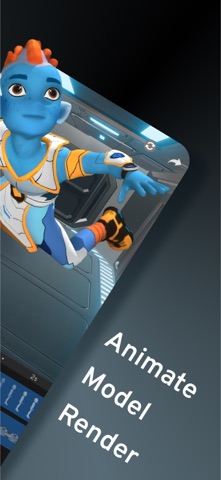
Hands-On Impressions: Performance, Battery, and Thermals
Testing this build on an iPhone 15 Pro reveals impressive hardware utilization, especially when navigating dense polygon meshes with active shadows enabled. The touch response inside the viewport feels immediate, making object manipulation and camera panning feel organic and precise. ProMotion 120Hz display support ensures that timeline scrubbing remains buttery smooth without noticeable stutter.
Extended rendering sessions do generate measurable thermal output around the back glass chassis, which is entirely expected given the computational load of 3D raytracing. Battery consumption ticks upward noticeably when working with heavy particle simulations or rendering 1080p video sequences. Fortunately, the app manages background RAM allocation efficiently, preventing sudden memory-pressure crashes during autosaves.
“Our goal with Prisma3D is to remove the friction between imagining a three-dimensional world and actually rendering it on the device in your pocket.” — WondaPix Development Team
The overall stability of the beta build has proven remarkably reliable across recent iOS iterations. While minor UI clipping can occasionally occur when rotating complex rigs on smaller screens, core modeling and export features operate without major flaws.
System Requirements & Requested Permissions
To run this beta build smoothly, your Apple device must be running iOS 15.0 or later. We strongly recommend testing on devices powered by modern A-series Pro chips or Apple Silicon M-series processors to maintain stable frame rates during heavy rendering.
The app requests standard sandboxed permissions required for media management and project sharing. Local network access is utilized for seamless file transfers between companion desktop utilities, while photo library access is strictly used to save rendered video outputs.
Pros & Cons: Beta Impressions
✓ The Highs (What We Love)
- Desktop Power: Full rigging and keyframing tools in a mobile footprint.
- Format Support: Easy import and export of standard 3D file formats.
- Responsive UI: Touch gestures feel natural and precise within the viewport.
✕ Beta Caveats (Room for Polish)
- Thermal Load: Intensive rendering sessions will warm up mobile hardware quickly.
- Screen Real Estate: Complex timelines require larger screens for comfortable editing.
- Minor UI Bugs: Occasional layout clipping on smaller iPhone form factors.

Current TestFlight Slot Situation & Availability
Apple enforces a strict 10,000-tester ceiling for individual TestFlight public invite links. Popular creative utilities in this category tend to burn through available slots rapidly once tech communities share the access URL.
If you tap the invite link and encounter a message stating that the developer is not accepting new testers, it simply means current capacity has been reached. WondaPix Technologies GmbH periodically purges inactive accounts to free up space, so checking back during off-peak hours often yields results.
Step-by-Step TestFlight Installation Guide
Getting set up with the beta build takes less than two minutes if you follow this straightforward installation sequence:
1. Download TestFlight: Open the App Store on your iPhone or iPad, search for Apple's official TestFlight application, and download it to your device.
2. Access the Invite Link: Navigate to Codewing and click the official TestFlight beta invitation link provided for Prisma3D.
3. Accept the Beta Terms: Your browser will automatically launch the TestFlight app, displaying the developer's release notes and testing agreement. Tap "Accept" to proceed.
4. Install the Build: Tap the "Install" button to download the application package directly onto your iOS device alongside your standard apps.
5. Submit Feedback: Encounter a bug or visual glitch? Use the built-in screenshot feedback feature inside TestFlight to report issues directly to the development team.
Frequently Asked Questions
Is Prisma3D - Animation, Modeling safe to install via TestFlight?
Yes, absolutely. Every TestFlight build runs inside Apple's strict cryptographic sandbox environment and must pass automated security evaluations before public distribution.
What should I do if the Prisma3D - Animation, Modeling beta is full?
If slot capacity is maxed out, bookmark this page on Codewing. We monitor slot availability closely and refresh links as soon as developers expand capacity.
Will installing this beta overwrite my App Store version or delete save data?
TestFlight builds operate as standalone companion packages or cleanly update existing installations depending on bundle identifiers, though local project backups are always recommended.
How long do TestFlight beta invitations and builds last?
Individual TestFlight builds remain active for a maximum of 90 days from the upload date before expiring, requiring routine updates through the TestFlight app.
Are in-app purchases free during TestFlight beta testing?
Yes. Any simulated financial transactions or premium tier unlocks within a TestFlight sandbox environment are entirely free of charge for participating testers.
Final Editorial Verdict
Prisma3D successfully demonstrates that complex 3D animation and modeling do not need to remain locked behind heavy desktop hardware. WondaPix Technologies GmbH has engineered a deeply capable mobile workspace that punches well above its weight class. Grab the beta link while slots remain open and test out the future of mobile graphics creation.
Developer Support & Official Resources
Stay updated on patch notes, maintenance windows, and feature roadmaps directly from the official developer channels.
Never miss an opening for Prisma3D - Animation, Modeling.
Apple limits TestFlight betas to 10,000 testers, and this program is currently at capacity. CodeWings Plus continuously monitors slot availability 24/7 and sends you an instant alert the second a spot opens up.


