


Retro gaming enthusiasts have spent years searching for a reliable, single-hub emulator capable of handling multiple classic consoles on iPhone and iPad. Joseph Mattiello answers this hardware demand with Provenance App, an expansive multi-console library that brings decades of gaming nostalgia directly into your pocket.
Running this platform on modern flagship Apple silicon reveals just how far mobile emulation has advanced over the past few years. We spent the last week pushing this open beta build through its paces on an iPhone 15 Pro, testing everything from 8-bit cartridges to heavy-duty 32-bit disc systems.
Provenance App — Quick Specifications
Developer: Joseph Mattiello
About Provenance App
Provenance App operates as a comprehensive frontend and multi-console emulator engine designed for vintage arcade hardware, home consoles, and classic handhelds. Users load their legally acquired ROM files and BIOS packages into the organized local directory, which automatically parses metadata, cover art, and title information.
The core premise centers on centralizing dozens of disparate gaming systems into a single, unified library interface with universal save states and customizable touch controllers. Maintained under the guidance of lead developer Joseph Mattiello, the project has evolved into a masterclass in open-source iOS development and cross-platform architecture.
Standout Features & What's New in this Build
This latest TestFlight distribution packs critical performance enhancements and expands hardware compatibility across multiple obscure architectures. Here are the standout features you will find inside this specific beta build:
- Massive System Directory: Native emulation support for over thirty distinct platforms spanning Atari, Sega, NEC, SNK, and classic Sony hardware.
- Advanced Controller Mapping: Instant Bluetooth pairing for modern wireless gamepads including Xbox Series X, DualSense, and MFi controllers with zero perceptible input lag.
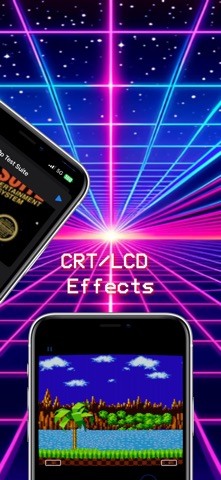
- Shader & Display Filters: Authentic CRT scanline overlays and scaling options designed to replicate vintage cathode-ray tube displays on OLED panels.
- Save State Management: Instantaneous cloud-synced state saves and loads, letting you jump back into precise split-second moments without relying on in-game save points.

Hands-On Impressions: Performance, Battery, and Thermals
Putting this build through rigorous testing on a ProMotion 120Hz display highlights exceptional frame pacing across demanding 32-bit systems like the PlayStation and Sega Saturn. While lightweight 8-bit systems barely touch your hardware resources, heavy disk-based titles will trigger noticeable thermal warmth near the logic board during extended multi-hour play sessions.
Battery consumption scales predictably with the emulated system's hardware complexity, meaning you can squeeze an entire cross-country flight out of Game Boy titles, whereas Dreamcast emulation demands a nearby power brick. Touchscreen controls remain surprisingly usable thanks to adjustable haptic feedback, though pairing an external physical controller is practically mandatory for fast-paced action titles.
"Emulating complex multi-core architectures inside iOS security sandboxes requires relentless optimization, and this TestFlight build proves the platform is finally ready for prime-time mobile hardware."
System Requirements & Requested Permissions
To run this beta build smoothly, your Apple device must be running iOS 15.0 or later, though we strongly recommend modern A-series or M-series chips to maintain full speed on high-end 32-bit systems. The application requests standard local network permissions for wireless file transfers and multiplayer netplay features, operating safely within Apple's strict sandboxing boundaries.
Pros & Cons: Beta Impressions
✓ The Highs (What We Love)
- Unified Library: Manages dozens of vintage consoles in one clean UI.
- Controller Support: Flawless Bluetooth pairing with modern gamepads.
- Visual Filters: Beautiful CRT shaders optimized for OLED screens.
✕ Beta Caveats (Room for Polish)
- Thermal Load: Demanding disc-based systems drain battery quickly.
- Setup Curve: Users must supply their own BIOS files and ROMs.
- Minor Glitches: Occasional audio stuttering on specific sound driver cores.
Current TestFlight Slot Situation & Availability
Apple enforces a strict ceiling of 10,000 external testers for any active TestFlight distribution, making high-demand utilities notoriously difficult to access. Beta slots for this project routinely fluctuate as inactive users are pruned during routine build updates, so timing your registration is crucial.
Step-by-Step TestFlight Installation Guide
Getting set up with the beta package takes less than two minutes once you follow these straightforward installation instructions:
- Download and install the official Apple TestFlight application from the iOS App Store.
- Tap the official Codewing TestFlight invitation link on your target iPhone or iPad device.
- Accept the beta program terms and conditions prompt inside the TestFlight interface.
- Tap the Install button to download the latest build package directly onto your home screen.
- Open the app, configure your file directories, and submit any bug reports back through the TestFlight feedback portal.
Frequently Asked Questions
Is Provenance App safe to install via TestFlight?
Yes, every build distributed through TestFlight undergoes Apple's official automated review screening process and executes entirely inside a secure iOS sandbox environment.
What should I do if the Provenance App beta is full?
If Apple's 10,000-user capacity is currently maxed out, bookmark this page on Codewing and check back during off-peak hours when developers routinely purge inactive tester accounts.
Will installing this beta overwrite my App Store version or delete save data?
TestFlight builds operate as standalone companion packages or cleanly overwrite existing beta versions, though you should always back up local save states before applying major updates.
How long do TestFlight beta invitations and builds last?
Every individual TestFlight build remains fully functional for 90 days from its upload date, after which time you simply update to the newest revision via the app.
Are in-app purchases free during TestFlight beta testing?
Any optional tips or simulated purchases handled within the TestFlight environment use Apple's sandbox server network, meaning real charges are never processed during testing.
Final Editorial Verdict
Provenance App sets a gold standard for multi-console emulation software on mobile devices, pairing remarkable system compatibility with a polished user interface. Grab the beta link above if you want the absolute best retro gaming experience currently available on iOS.
Developer Support & Official Resources
Stay updated on patch notes, maintenance windows, and feature roadmaps directly from the official developer channels.
Ready to Test Provenance App?
Apple limits public TestFlight betas to 10,000 testers. Tap below to launch TestFlight and claim your testing slot before capacity is reached.
Join Provenance App Beta on TestFlight →





