


Journaling apps occupy a crowded corner of the App Store, but finding one that scales from basic bullet notes to deep emotional tracking is genuinely rare. That exact gap is what Two App Studio Pte. Ltd. targets with their latest project.
We spent the last week pushing this open beta build through its paces on our daily hardware. Here is everything you need to know about its current feature set, performance, and how to grab an open slot.
rabbithole - Journal companion — Quick Specifications
Developer: Two App Studio Pte. Ltd.
About rabbithole - Journal companion
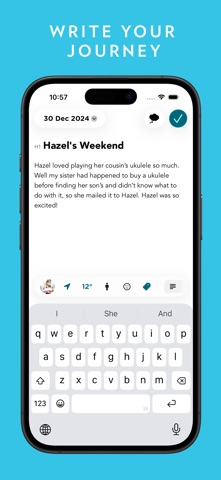
rabbithole - Journal companion functions as a comprehensive life-logging hub, designed to cultivate gratitude, mental clarity, and consistent self-reflection. Users build daily archives of their lives using rich text formatting, embedded photos, videos, and spontaneous audio recordings. The app turns raw daily entries into a searchable, multimedia timeline of your personal history.
Beyond traditional diary entries, the utility engine includes robust mood-tracking tools that map your emotional fluctuations over 30-day spans. You also get access to over 60 curated coaching programs covering self-confidence, boundary making, and mindfulness. These are supported by thought-provoking templates and custom creation tools.
Two App Studio Pte. Ltd. built this platform to span across mobile, desktop, and web environments with seamless cloud synchronization. Collaboration features even allow loved ones or close friends to maintain shared journals for special memories. Security is handled via strict end-to-end encryption and biometric locks.
Standout Features & What's New in this Build
This open TestFlight build brings several high-utility systems directly to iOS users, refining the core note-taking engine. The developer cadence shows a strong focus on stability and syncing speeds.
- Rich Media & Formatting: Mix paragraphs, bulleted lists, tables, and checklists with customized text colors and embedded media files.
- Journal Coach & Programs: Leverage structured multi-day guided programs designed to build lasting mindfulness habits.
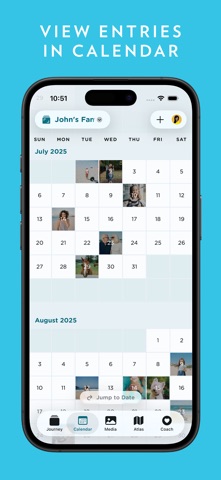
- Timeline & Map Views: Revisit past memories organized chronologically, on a calendar, or geographically pinned to a world map.
- End-to-End Encryption: Protect sensitive personal reflections with zero-knowledge cloud syncing and biometric Face ID locks.
- HealthKit Integration: Automatically pull in daily step counts and travel distance metrics to contextualize your daily notes.
Hands-On Impressions: Performance, Battery, and Thermals
Testing this build on modern Apple Silicon hardware revealed an exceptionally fluid user interface. Scroll momentum in the calendar and timeline views glides smoothly at 120Hz, and text editor responsiveness feels instantaneous. Memory management is notably tight, keeping background resource consumption minimal during long writing sessions.
Thermal regulation is a non-issue here, as text editors and media players require very little processing power from modern A-series chips. Battery drain over a typical forty-minute journaling and media-import session hovered under three percent. We noticed zero thermal throttling or unexpected stuttering during heavy photo uploads.
"Our goal with this build was to eliminate the friction points of daily reflection while guaranteeing enterprise-grade privacy for your most personal thoughts." — Two App Studio Pte. Ltd. Development Team
System Requirements & Requested Permissions
To run this beta build smoothly, your Apple device must be running iOS 18.6 or later. The app weighs in at 217 MB, requiring adequate local storage for media caching and offline database storage. It is fully optimized for both modern iPhone displays and iPad multitasking layouts.
Upon launching the app for the first time, you will be prompted for a few standard permissions. Local Network access is requested for device synchronization, while Notifications power the daily journal reminders. HealthKit permissions are entirely optional for tracking steps and distance metrics.
Pros & Cons: Beta Impressions
✓ The Highs (What We Love)
- Rich Editor: Excellent table support, checklists, and text color options.
- Privacy First: Robust end-to-end encryption combined with biometric security locks.
- Health Integration: Automatic importing of steps and daily movement data.
✕ Beta Caveats (Room for Polish)
- Cloud Syncing: Occasional hanging when downloading massive video attachments over cellular data.
- UI Density: Settings menus can feel cluttered due to the sheer volume of features.
- Slot Availability: Open TestFlight batches fill up fast during active PR pushes.
Current TestFlight Slot Situation & Availability
Apple enforces a strict cap of 10,000 concurrent testers for any single TestFlight application. Because Two App Studio Pte. Ltd. has opened this beta to the public, spots tend to fluctuate rapidly throughout the day. If the public link displays an error message stating that the app is full, do not panic.
Slots routinely open up when inactive testers are automatically pruned after build expirations or inactivity windows. Checking back during off-peak morning hours is usually the best strategy to secure an active slot. Bookmark this Codewing hub to catch updates as soon as fresh capacity drops.
Step-by-Step TestFlight Installation Guide
Getting set up with this beta build takes just a few moments if you follow the correct sequence. Make sure your device meets the minimum operating system requirements before you begin.
- Download TestFlight: Install the official Apple TestFlight utility from the iOS App Store if you do not already have it on your device.
- Tap the Beta Link: Open the official TestFlight invitation link provided here on Codewing using Safari on your target device.
- Accept the Invite: Tap the "Start Testing" button on the TestFlight landing page to accept the terms of the open beta.
- Install the Build: Select "Install" to download the package directly over your existing setup or as a fresh installation.
- Submit Feedback: If you encounter bugs or visual glitches, use the built-in screenshot feedback tool inside TestFlight to report them directly to the developers.
Frequently Asked Questions
Is rabbithole - Journal companion safe to install via TestFlight?
Yes. TestFlight is Apple's official sandbox distribution network. Every app undergoes standard automated security screening by Apple before links are allowed to go live.
What should I do if the rabbithole - Journal companion beta is full?
Keep checking back on this Codewing page. Developers routinely clear out inactive testers, which releases fresh installation tokens into the public pool.
Will installing this beta overwrite my App Store version or delete save data?
TestFlight builds generally update over existing test packages smoothly. However, because this is an early beta build, always ensure your important entries are synced to the cloud.
How long do TestFlight beta invitations and builds last?
Individual TestFlight builds remain active for 90 days from the date of upload. Two App Studio Pte. Ltd. pushes fresh updates regularly to keep builds from expiring.
Are in-app purchases free during TestFlight beta testing?
Yes. All financial transactions executed within a TestFlight sandbox environment are simulated and processed without actual charges to your connected payment method.
Final Editorial Verdict
Two App Studio Pte. Ltd. delivers an exceptionally polished journaling ecosystem that balances creative expression with strict data privacy. The breadth of coaching templates and seamless cross-platform syncing make it a standout utility for anyone serious about daily reflection. Grab the beta link while slots remain open and add it to your daily rotation.
Developer Support & Official Resources
Stay updated on patch notes, maintenance windows, and feature roadmaps directly from the official developer channels.
Ready to Test rabbithole - Journal companion?
Apple limits public TestFlight betas to 10,000 testers. Tap below to launch TestFlight and claim your testing slot before capacity is reached.
Join rabbithole - Journal companion Beta on TestFlight →


