
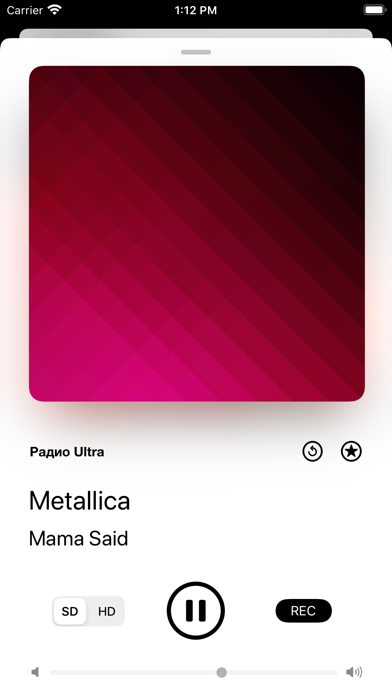

Streaming apps often feel bloated, heavy, and bogged down by algorithmic feeds that care more about ads than actual audio discovery. Independent developer Igor Fuchkin aims to solve this problem by taking things back to the pure roots of global radio broadcasting. RadioX Beta gives users direct access to tens of thousands of live feeds without forcing subscription paywalls or tracking personal habits.
We loaded up this open beta build on an iPhone 16 Pro running on Apple Silicon to see how it handles streaming over both 5G and Wi-Fi networks. Testing software through Apple’s official infrastructure gives us a front-row seat to how early-stage applications handle audio routing, background tasks, and battery draw. This comprehensive look examines everything from raw database depth to day-to-day usability.
RadioX Beta — Quick Specifications
Developer: Igor Fuchkin
About RadioX Beta
At its core, RadioX Beta serves as a massive portal connecting listeners to over 55,000 radio stations broadcasting from every corner of the planet. The library spans broad geographical borders and linguistic preferences, including dedicated Italian, Spanish, French, German, Russian, and Portuguese broadcasts. Genre categories run the gamut from heavy metal and alternative rock to deep electronic subgenres, jazz standards, and classical compositions.
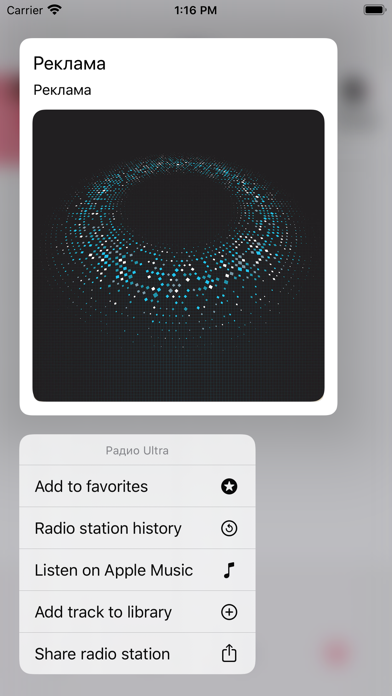
Rather than acting as a passive streaming utility, the app includes robust companion tools designed to help listeners capture music in real time. Features like built-in song recognition let you identify unfamiliar tracks playing over the airwaves with a single tap. Once a song is identified, you can instantly search for the track on YouTube or pull up lyrics to sing along with the broadcast.
The development vision spearheaded by Igor Fuchkin focuses heavily on utility and speed over visual clutter. Every menu item and playback control has been streamlined to minimize friction, ensuring you can jump between international stations without getting lost in nested menus. The inclusion of deep Apple Music integration means discovered songs are never more than a tap away from being added to your personal cloud library.
Standout Features & What's New in this Build
This open TestFlight build introduces several advanced audio features that elevate it far beyond standard web radio streaming apps. The current test package packs significant upgrades under the hood, tailored specifically for mobile audiophiles.
- 55,000+ Global Stations: An exhaustive worldwide database covering hyper-local cultural broadcasts and major international networks alike.
- 12-Band Equalizer: Fine-tune audio output precisely to match your favorite headphones or external Bluetooth speakers.
- Apple Music & YouTube Sync: Instantly cross-reference unrecognized radio tracks with major streaming catalogs and video platforms.
- Live Lyrics Search: Pull up real-time lyrics for tracks as they broadcast over live radio feeds.
- Car Mode: A simplified, high-contrast user interface optimized for safe control while driving.
Hands-On Impressions: Performance, Battery, and Thermals
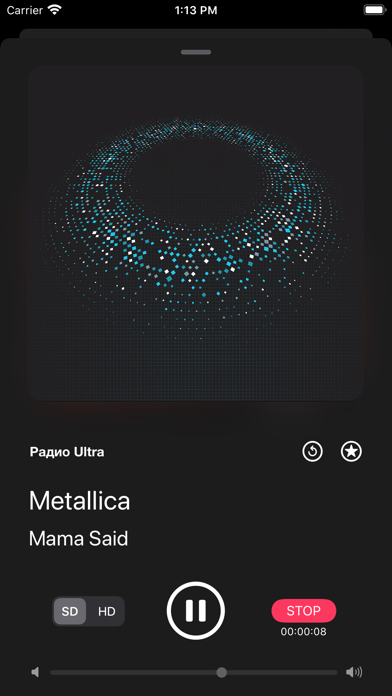
Firing up an audio app powered by a database of tens of thousands of live streams usually spells trouble for thermal management and battery health. Surprisingly, RadioX Beta maintains a remarkably light footprint on modern A-series hardware, keeping processor wake cycles to a strict minimum. The app glides at a buttery-smooth 120Hz on ProMotion displays when scrolling through dense station directories and genre lists.
Background audio execution remains rock-solid, refusing to drop streams even when jumping between heavy multitasking apps or locking the phone display. Memory leaks appear non-existent, and the app gracefully handles sudden network handoffs between cellular data and home Wi-Fi networks. The minimalist dark and light design implementations scale perfectly across OLED panels, preventing unnecessary battery drain during night listening sessions.
"Our goal with RadioX was to strip away the noise of modern music streaming services and give listeners a clean, lightning-fast window into global broadcasting." — Igor Fuchkin
System Requirements & Requested Permissions
Getting this beta up and running requires an Apple device running iOS 13.2 or later, making it compatible with a massive legacy install base alongside modern flagships. The installation package is quite lean at just 45 MB, downloading in mere seconds over a standard broadband connection. Hardware resource usage is exceptionally modest, meaning older iPhones and iPads will experience zero stutter.
During initial setup, the app requests standard permissions required for network streaming and audio routing. Local Network access may be prompted if you plan on streaming audio directly to AirPlay-compatible receivers around your house. Notifications are entirely optional, used primarily to alert you about system announcements or major beta feature updates.
Pros & Cons: Beta Impressions
✓ The Highs (What We Love)
- Massive Library: Over 55,000 global stations across dozens of languages.
- Advanced Audio: Built-in 12-band equalizer delivers exceptional sound shaping.
- Music Discovery: Instant song recognition linked directly to Apple Music and YouTube.
✕ Beta Caveats (Room for Polish)
- Station Metadata: Occasional missing song titles on obscure international streams.
- UI Edge Cases: Minor text overlap when switching between extreme font-size accessibility settings.
- Server Load: Occasional buffer delays on hyper-popular regional feeds during peak evening hours.
Current TestFlight Slot Situation & Availability
Apple enforces a strict 10,000-tester ceiling on all public and private TestFlight beta links distributed to developers. Because RadioX Beta launched as an open beta campaign, spots tend to fluctuate rapidly as inactive accounts get automatically pruned by the system. If you tap the installation link and discover that the current testing cohort is full, do not panic.
Developer Igor Fuchkin routinely reclaims tester slots by clearing out inactive users who haven't updated to recent builds. Checking back during off-peak hours—such as early mornings or late evenings—often yields an open slot. Keeping this page bookmarked on Codewing ensures you have instant access the moment new capacity opens up.
Step-by-Step TestFlight Installation Guide
Jumping into the testing ecosystem on iOS is simple if you follow the correct sequence of steps. Make sure you complete these instructions directly on your target iPhone or iPad device.
1. Open the App Store on your iOS device and download the official Apple TestFlight application if you do not already have it installed.
2. Tap the official Codewing TestFlight invitation link provided at the bottom of this review page.
3. Your device will automatically launch the TestFlight app and display the official RadioX Beta landing page.
4. Tap the blue "Accept" button, followed by "Install," to download the beta package directly onto your home screen.
5. Launch the app, test out the audio streams, and use the built-in feedback tool in TestFlight to report any bugs directly to the developer.
Frequently Asked Questions
Is RadioX Beta safe to install via TestFlight?
Yes, every build distributed through TestFlight undergoes Apple's rigorous automated review process for malware and private API violations. The app runs safely inside iOS security sandboxes, protecting your personal data.
What should I do if the RadioX Beta beta is full?
If Apple's 10,000-tester limit is currently maxed out, simply check back periodically. Slots open up automatically when the developer removes inactive testers from the program.
Will installing this beta overwrite my App Store version or delete save data?
TestFlight builds operate as standalone installation packages that update in place over previous beta versions without harming your core device data or system settings.
How long do TestFlight beta invitations and builds last?
Each individual TestFlight build remains active for 90 days from the release date. Developers typically push fresh updates long before this expiration window closes.
Are in-app purchases free during TestFlight beta testing?
Yes, any simulated transactions or premium feature unlocks within TestFlight use Apple's sandbox testing environment, meaning you will never be charged real money.
Final Editorial Verdict
RadioX Beta successfully proves that radio streaming does not need to feel corporate, bloated, or overly complicated. By combining a massive international station database with practical discovery tools like 12-band equalization and Apple Music sync, Igor Fuchkin has built a standout utility. Grab the beta link below while slots remain open and experience the future of global radio.
Developer Support & Official Resources
Stay updated on patch notes, maintenance windows, and feature roadmaps directly from the official developer channels.
Ready to Test RadioX Beta?
Apple limits public TestFlight betas to 10,000 testers. Tap below to launch TestFlight and claim your testing slot before capacity is reached.
Join RadioX Beta Beta on TestFlight →




