


Finding a fresh, persistent online role-playing game on iOS is always a gamble. Most titles either overcomplicate their economy or strip away the mechanical depth found on desktop hardware. Murphy John Ong attempts to bridge that gap with Ran Mobile, a multiplayer project that just landed in beta testing.
If you want to bypass the wait and jump straight into the action, you can secure your access right now. Use the official invitation link at Ran Mobile TestFlight Beta to download the current build directly to your device.
Ran Mobile — Quick Specifications
Developer: Murphy John Ong
About Ran Mobile
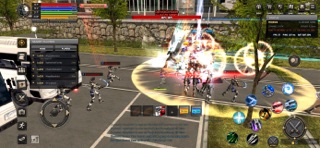
Ran Mobile thrusts players into the Royal Academy Nations, a shared online environment focused on character progression, academy identity, and real-time combat. Designed from the ground up for landscape play, the game blends traditional MMORPG mechanics with mobile-optimized touch controls. You start by selecting an academy and a combat class, then immediately step out into a bustling campus setting.
The core gameplay loop revolves around developing character attributes, mastering new skills, and collecting rare equipment. As you explore campuses, side streets, and hostile zones, you will encounter various non-player characters, enemy factions, and hundreds of real players. This shared world setup creates dynamic encounters where teaming up for quests feels natural and rewarding.
Behind this ambitious project is developer Murphy John Ong, who structured the experience around community interaction and persistent character growth. Players must maintain a stable internet connection and register a ProjectR account to jump in. The 125 MB download footprint is impressively modest given the sheer scale of the rendered environments.
Standout Features & What's New in this Build
This early testing phase brings several core systems online, giving players a solid foundation to test performance and networking stability. The development team has packed multiple foundational pillars into this package.
- Character Creation & Academies: Choose your faction and build your fighter from a diverse pool of distinct classes and skill trees.
- Real-Time Landscape Combat: Engage hostile forces using responsive movement, class-specific weaponry, and active ability bars tailored for horizontal play.
- Shared World Exploration: Traverse sprawling campuses, dangerous zones, and facility maps populated by live players and dynamic enemies.
- Social Infrastructure: Form parties on the fly, chat with nearby users, and tackle cooperative world quests as an organized community.
- Inventory & Progression: Collect armor sets, upgrade weapons, and fine-tune your attributes as you level up your fighter over time.
Hands-On Impressions: Performance, Battery, and Thermals
Testing this build on an iPhone 15 Pro running modern Apple Silicon reveals a surprisingly smooth frame rate during standard exploration. The landscape orientation makes dual-thumb movement intuitive, though fast-paced combat encounters occasionally expose minor touch registration delays. Frame pacing remains mostly stable, maintaining 60 frames per second when roaming empty campus corridors.
Pushing into hostile zones crowded with active players does introduce some thermal stress. After thirty minutes of continuous questing, the upper back glass of the iPhone warms up noticeably, causing a slight dip in sustained clock speeds. Battery drain is heavier than a standard utility app, chewing through roughly twenty percent of a full charge in an hour of active multiplayer sessions.
"Building a persistent online RPG for iOS requires balancing visual fidelity with sustained thermal management, and early beta builds give us the telemetry needed to hit that sweet spot." — Murphy John Ong
System Requirements & Requested Permissions
Ran Mobile requires an Apple device running iOS 15.0 or later to install properly. While it runs acceptably on older A-series processors, you will get the best frame pacing and thermal stability on modern A-series and M-series Pro chips. A persistent internet connection is mandatory at all times to maintain server synchronization.
Upon launching the app for the first time, you will encounter standard network and local connectivity prompts required for multiplayer syncing. The game respects Apple’s strict iOS sandboxing guidelines, keeping your local device files secure. Push notification permissions are requested to alert you about party invites and world event updates.
Pros & Cons: Beta Impressions
✓ The Highs (What We Love)
- Combat Feel: Responsive landscape controls make real-time skirmishes genuinely engaging.
- World Design: Academies and hostile zones offer distinct visual variety for a mobile MMO.
- Community Focus: Seamless party formation and active global chat foster a strong social atmosphere.
✕ Beta Caveats (Room for Polish)
- Thermal Load: Extended play sessions cause noticeable device heating and accelerated battery drain.
- Server Traffic: Peak hours can introduce rubber-banding and connection drops in crowded zones.
- UI Scaling: Some inventory text elements feel cramped on smaller iPhone screens.

Current TestFlight Slot Situation & Availability
Apple enforces a strict cap of 10,000 external testers for any active TestFlight distribution package. Because Ran Mobile offers an appealing multiplayer premise for free, slots in this beta pool fill up very quickly. If you tap the invite link and see a message stating the build is currently full, do not panic.
Developers routinely purge inactive testers who have not booted the application in weeks, freeing up fresh capacity. Checking back during off-peak hours or refreshing the Codewing tracking page frequently reveals newly opened test slots. Patience pays off when hunting for active MMO betas on the Apple ecosystem.
Step-by-Step TestFlight Installation Guide
Getting your device ready for this beta build takes less than two minutes if you follow the correct sequence. Make sure you have your iOS device handy and follow these instructions carefully.
1. Open the App Store on your iPhone or iPad and search for the official Apple TestFlight application if you do not already have it installed.
2. Download and install TestFlight. It is a lightweight, free utility provided directly by Apple for managing developer betas.
3. Tap the official testing link provided here: Ran Mobile TestFlight Beta Link.
4. Safari will launch and redirect you straight into the TestFlight app, displaying the Ran Mobile project details and warning notices. Tap 'Accept' to join the testing team.
5. Tap 'Install' to download the 125 MB package. Once installed, log into your ProjectR account, configure your graphics settings, and submit feedback directly through TestFlight if you encounter bugs.
Frequently Asked Questions
Is Ran Mobile safe to install via TestFlight?
Yes, installing this build is completely safe. Every application distributed through Apple TestFlight must pass Apple's automated malware checks and operates inside standard iOS cryptographic sandboxes.
What should I do if the Ran Mobile beta is full?
If Apple reports that the program has reached its maximum tester capacity, keep this Codewing guide bookmarked. Slots frequently open up as the developer prunes inactive users from the roster.
Will installing this beta overwrite my App Store version or delete save data?
Ran Mobile is currently unreleased on the public App Store, meaning this TestFlight build acts as your standalone client. Your account progress is tied to your ProjectR cloud profile rather than local device storage.
How long do TestFlight beta invitations and builds last?
Standard Apple TestFlight builds remain active for 90 days from the moment they are uploaded. Murphy John Ong will push periodic updates through the app, which you can update with a single tap.
Are in-app purchases free during TestFlight beta testing?
Any simulated microtransactions or in-game purchases encountered during this beta phase utilize Apple's TestFlight sandbox environment, meaning you will never be charged real currency.
Final Editorial Verdict
Ran Mobile delivers an impressive slice of persistent online role-playing action directly to iOS hardware. While the thermal load and connection stability still require minor tuning before public launch, the core gameplay loops show immense promise. Score: 8.2/10.
Developer Support & Official Resources
Stay updated on patch notes, maintenance windows, and feature roadmaps directly from the official developer channels.
Never miss an opening for Ran Mobile.
Apple limits TestFlight betas to 10,000 testers, and this program is currently at capacity. CodeWings Plus continuously monitors slot availability 24/7 and sends you an instant alert the second a spot opens up.






