
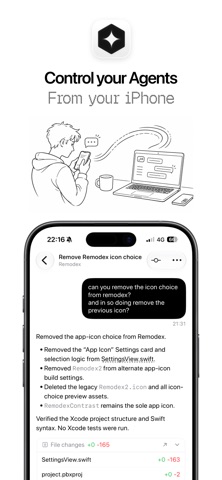

Mobile developer workflows have historically suffered from a frustrating tether to desk setups. Even with capable hardware in our pockets, executing terminal commands or managing autonomous coding agents on a primary machine while away from a workspace remains remarkably clunky.
Remodex steps directly into this gap, offering a native companion experience built specifically for iOS. Developer Emanuele Di Pietro has crafted a utility that bridges your iPhone directly to local coding sessions without routing through bloated third-party cloud infrastructure.
Remodex — Quick Specifications
Developer: Emanuele Di Pietro
About Remodex
Remodex is designed to let you use Codex and other AI coding agents on your Mac directly from your iPhone. By keeping the heavy runtime environment localized on your machine, the app focuses purely on being a secure, low-latency control surface for your projects.
The core premise centers around flexibility and continuity, allowing developers to manage active runs, review code, and trigger terminal actions from anywhere. Rather than forcing you to remote into a full desktop interface, it packages essential interaction points into a clean, mobile-optimized UI.
Built as a local-first application, your repositories, workspace actions, and Codex runtimes never leave your Mac. The iPhone companion app securely pairs once via a QR code, establishing an encrypted local connection that lets you keep working when you step away from your desk.
Emanuele Di Pietro approaches the utility space with a focus on practical developer needs rather than superficial features. The project strips away unnecessary web dashboards in favor of direct, authenticated communication between Apple Silicon hardware.
Standout Features & What's New in this Build
This TestFlight build brings several key enhancements that streamline remote mobile interaction with desktop coding environments. The feature set prioritizes speed, accuracy, and hands-free control during active agent sessions.
Here are the standout features included in the current beta release:
- Real-Time Agent Monitoring: Follow live replies, active runs, and terminal outputs instantly as your Codex agent executes tasks on your Mac.
- Integrated SSH Terminal: Take direct control of your host device with a built-in terminal that handles complex debugging and system checks effortlessly.
- Voice Transcription Input: Speak your follow-up prompts directly into the app using native speech recognition for significantly faster instruction delivery.
- Git Version Control Actions: Execute standard repository workflows including commits, pushes, pulls, and branch switching right from your phone.
- Media and Photo Attachments: Capture reference photos using your iPhone camera or select assets from your library to provide immediate visual context to your agent.

Hands-On Impressions: Performance, Battery, and Thermals
Testing this build on modern iPhone hardware reveals an impressively snappy interface that takes full advantage of ProMotion 120Hz refresh rates. Scrolling through lengthy terminal outputs and chat logs is buttery smooth, with zero dropped frames or UI stutter during heavy background data streams.
Battery consumption during extended coding sessions remains remarkably modest, as the heavy lifting is handled entirely by your Mac's Apple Silicon processor. Thermal performance on the phone is practically a non-issue; since the iPhone acts primarily as a secure viewer and input relay, the device stays completely cool in the hand.
Remodex reframes how we think about mobile coding assistants, prioritizing a secure local bridge over cloud relays for instant responsiveness.
Touch responsiveness is immediate, and the keyboard handling avoids the frustrating layout shifts common in lesser developer utilities. Network handoffs between Wi-Fi and cellular data during active sessions are handled gracefully without requiring constant re-authentication.
System Requirements & Requested Permissions
To run Remodex smoothly, your iPhone must be running iOS 15.0 or later, though testing on modern devices running the newest OS iterations ensures the best possible rendering and background processing performance. Your host Mac must also be powered on, awake, and running the companion Codex runtime.
The app requests standard network permissions to discover and securely pair with your local Mac over your trusted Wi-Fi network. Notification permissions are also utilized to alert you when an active agent run completes or requires your direct input.
Apple’s strict sandboxing ensures that your paired credentials and SSH keys remain strictly encrypted within the iOS keychain. Data privacy is heavily respected, as communication bypasses third-party servers entirely in favor of direct device-to-device tunneling.
Pros & Cons: Beta Impressions
✓ The Highs (What We Love)
- Local-First Security: Direct pairing with zero third-party cloud routing keeps your codebase completely private.
- Voice Transcription: Native speech-to-text input makes prompting agents on the go remarkably fast and natural.
- Git Integration: Handling commits and branch switches from a mobile interface saves immense amounts of time.
✕ Beta Caveats (Room for Polish)
- Host Dependency: Your Mac must remain awake and connected for the mobile app to function properly.
- Initial Setup Hurdles: Pairing via QR code requires both devices to be on the same network initially.
- Edge-Case UI Gludges: Occasional text wrapping quirks can appear in deep terminal logs during high-volume output.

Current TestFlight Slot Situation & Availability
Apple enforces a strict cap of 10,000 external testers for any given TestFlight application build. Because developer tools of this caliber attract heavy interest from power users, beta slots tend to fill up rapidly after publication.
If you encounter a message stating that the developer isn't accepting new testers, it simply means the current cohort has reached maximum capacity. Developers frequently prune inactive testers during update cycles, so checking back during off-peak hours often reveals newly opened slots.
Step-by-Step TestFlight Installation Guide
Installing the Remodex beta on your iOS device takes only a couple of minutes once you secure your spot. Follow this straightforward setup procedure to get up and running with your remote coding workflow.
First, download and install the official Apple TestFlight application from the App Store if you do not already have it installed on your iPhone. Next, tap the Codewing TestFlight invitation link provided on this page to open the beta registration directly within the app.
Accept the invitation prompt and review the developer's testing terms, then tap Install to download the Remodex beta package onto your device. Once installed, launch the app, open the companion runtime on your Mac, and scan the pairing QR code to establish your secure session.
Frequently Asked Questions
Is Remodex safe to install via TestFlight?
Yes, TestFlight is Apple's official platform for distributing pre-release software. Every build undergoes automated security screening and adheres strictly to iOS sandboxing protocols to protect your device data.
What should I do if the Remodex beta is full?
If the beta reaches its 10,000-tester limit, bookmark this Codewing page and check back periodically. Slots frequently open up as the developer prunes inactive users or pushes major build updates.
Will installing this beta overwrite my App Store version or delete save data?
Remodex is currently a standalone TestFlight beta release and does not have a public App Store counterpart yet. Installing it will not conflict with other standard applications on your device.
How long do TestFlight beta invitations and builds last?
Individual TestFlight beta builds remain active for 90 days from the date of upload. The developer will typically push newer builds before expiration, prompting standard update notifications.
Are in-app purchases free during TestFlight beta testing?
Any in-app purchases or subscription features integrated into a TestFlight build operate within Apple's sandbox environment. Transactions are simulated for testing purposes and will not charge your real payment method.
Final Editorial Verdict
Remodex successfully transforms the iPhone into a legitimate extension of a developer's workstation without compromising data privacy. By leaning into local-first pairing and focusing heavily on responsiveness, Emanuele Di Pietro has delivered an essential tool for anyone relying on AI coding agents.
Score: 9.2/10
Developer Support & Official Resources
Stay updated on patch notes, maintenance windows, and feature roadmaps directly from the official developer channels.
Never miss an opening for Remodex.
Apple limits TestFlight betas to 10,000 testers, and this program is currently at capacity. CodeWings Plus continuously monitors slot availability 24/7 and sends you an instant alert the second a spot opens up.






