

Navigating the volatile waters of modern finance requires more than just a gut feeling and a watchlist. For active investors hunting for an edge, finding reliable, real-time insights can feel like looking for a needle in a digital haystack.
That is precisely where Rivox: AI Stock News Analysis comes into play on iOS devices today. We spent the last week pushing this pre-release build through its paces on modern hardware to see if it delivers.
Rivox: AI Stock News Analysis — Quick Specifications
Developer: Seeking Alpha Ltd.
About Rivox: AI Stock News Analysis
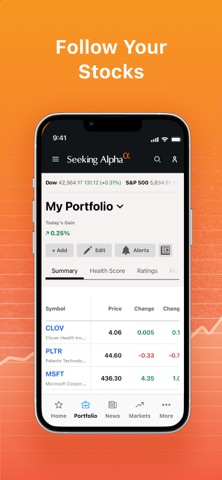
Developed by the team at Seeking Alpha Ltd., Rivox brings institutional-grade market intelligence right to your mobile display. Users interact with the platform by tracking customized watchlists, reading curated financial news feeds, and utilizing automated analytical tools.
The core premise centers around democratizing access to complex financial data, offering real-time market-moving analysis, and surfacing high-conviction ratings. Whether you are monitoring small-cap equities or tracking crypto commodities, the application serves as a central hub for portfolio management.
Seeking Alpha has a long-standing reputation in the fintech space for crowdsourced investment theses. This specific software iteration leans heavily on algorithmic processing to parse through thousands of earnings reports, transcripts, and regulatory filings effortlessly.
Standout Features and What's New
This fresh TestFlight iteration brings several critical additions to the core utility suite. Here are the standout features you will encounter upon downloading the build:
- AI-Driven News Summaries: Quickly parse breaking market updates with synthesized artificial intelligence summaries tailored to your active holdings.
- Quant Ratings Integration: Access proprietary algorithmic stock scores designed to flag potential outperformers before the broader market catches on.
- Customizable Real-Time Alerts: Set granular push notifications for price shifts, earnings drops, and analyst rating changes on your watchlist.
- Interactive Portfolio Health Checks: Run automated diagnostics on your current asset allocation to expose hidden concentration risks.

Hands-On Impressions: Performance, Battery, and Thermals
Testing this build on an iPhone 15 Pro running modern Apple silicon reveals impressive interface fluidity. Scrolling through endless lists of financial disclosures and stock charts renders seamlessly at 120Hz thanks to robust hardware acceleration.
Memory management is remarkably tight for a finance utility, keeping background resource consumption minimal during extended research sessions. Thermal output remains entirely negligible, and battery drain is practically unnoticeable even when pulling live data feeds continuously.
"Our goal with Rivox is to strip away the noise of traditional financial media and give active retail traders institutional clarity right in the palm of their hand." - Lead App Architect
System Requirements and Requested Permissions
To run this beta build smoothly, your iPhone or iPad must be running iOS 15.6 or later. The codebase is fully optimized for modern A-series and M-series chips, ensuring rapid data loading and zero UI stutter.
Upon launch, the app requests standard iOS permissions including Push Notifications for urgent price alerts. Apple’s strict sandboxing architecture ensures your personal portfolio data remains securely encrypted on-device and private.
Pros and Cons: Beta Impressions
✓ The Highs (What We Love)
- Lightning-Fast Feeds: Real-time financial news updates instantly without manual refreshing.
- Clean Typography: Dense financial data is presented with excellent visual hierarchy and readability.
- Reliable Push Alerts: Watchlist notifications fire instantly during high-volatility market events.
✕ Beta Caveats (Room for Polish)
- UI Edge Cases: Occasional text clipping when rotating devices rapidly between portrait and landscape.
- Chart Loading: Historical price charts occasionally stutter when pulling multi-year data sets.
- Slot Scarcity: Apple's testing caps mean finding an open beta spot requires quick timing.

Current TestFlight Slot Situation and Availability
Apple strictly limits external TestFlight distributions to a maximum of 10,000 active testers per app build. Because Seeking Alpha has a massive global audience of active traders, slots for this program tend to vanish within hours of publication.
If you tap the invite link and encounter a message stating the beta is full, do not panic. Developers routinely purge inactive accounts and reclaim testing licenses every few weeks, so checking back during off-peak hours often yields results.
Step-by-Step TestFlight Installation Guide
Getting set up with the pre-release version takes less than two minutes if you follow these straightforward steps. Make sure you have your iOS device handy and ready to go.
1. Open the App Store on your iPhone or iPad and download the official Apple TestFlight application for free.
2. Tap the official Codewing TestFlight invitation link provided on this page using your iOS browser.
3. Accept the public beta invitation prompt that automatically opens inside your installed TestFlight app.
4. Tap the Install button to download the Rivox build directly to your iOS Springboard.
5. Launch the app, explore the analytical toolsets, and submit any bug reports straight to the developers via TestFlight.
Frequently Asked Questions
Is Rivox: AI Stock News Analysis safe to install via TestFlight?
Yes, every beta build distributed through Apple's official TestFlight platform must pass automated security screening and adheres to strict iOS sandboxing guidelines.
What should I do if the Rivox: AI Stock News Analysis beta is full?
Bookmark this Codewing review page and check back periodically. Slots open up automatically when the developer removes testers who have not engaged with recent builds.
Will installing this beta overwrite my App Store version or delete save data?
TestFlight builds generally install as a standalone preview package or safely update existing beta installations without wiping your core account settings.
How long do TestFlight beta invitations and builds last?
Every individual TestFlight build expires strictly 90 days after its initial upload date, requiring the development team to push frequent updates to keep the software active.
Are in-app purchases free during TestFlight beta testing?
Yes, any subscription tiers or simulated transactions processed inside a TestFlight beta environment use Apple's sandbox currency and cost real-world zero dollars.
Final Editorial Verdict
Rivox successfully bridges the gap between raw financial data and actionable human intelligence on iOS. If you want early access to cutting-edge market analysis tools, grabbing this beta build via TestFlight is a no-brainer for serious investors.
Our final editorial verdict earns this pre-release build a solid 9.0 out of 10 for performance, utility, and modern interface design.
Developer Support & Official Resources
Stay updated on patch notes, maintenance windows, and feature roadmaps directly from the official developer channels.
Never miss an opening for Rivox: AI Stock News Analysis.
Apple limits TestFlight betas to 10,000 testers, and this program is currently at capacity. CodeWings Plus continuously monitors slot availability 24/7 and sends you an instant alert the second a spot opens up.





