

Indoor running ecosystems have long suffered from hardware fragmentation, leaving users trapped in proprietary walled gardens. Pascal Carrieres built RunCline precisely to shatter these artificial barriers by bridging older smart treadmills and foot pods directly into modern virtual training apps like Zwift. We spent the last two weeks putting its latest TestFlight build through intense indoor interval sessions to see how it handles real-world Bluetooth relay.
If you are tired of your expensive running gear refusing to talk to your favorite virtual training platforms, this utility demands your immediate attention. Running on modern flagship iOS devices, the app acts as a seamless protocol translator that keeps your metrics synced in real-time. Let us take a granular look at what makes this beta build an essential tool for indoor runners.
RunCline — Quick Specifications
Developer: Pascal Carrieres
About RunCline
RunCline is a dedicated sports, health, and fitness utility designed to solve a very specific problem for indoor runners and cyclists. It captures incline information entered manually in the app or read directly from a supported smart treadmill and transmits it seamlessly over Bluetooth. Additionally, it pairs with external foot pods and heart rate monitors to re-transmit these consolidated metrics to virtual environments like Zwift on your PC, Mac, iPad, or iPhone.
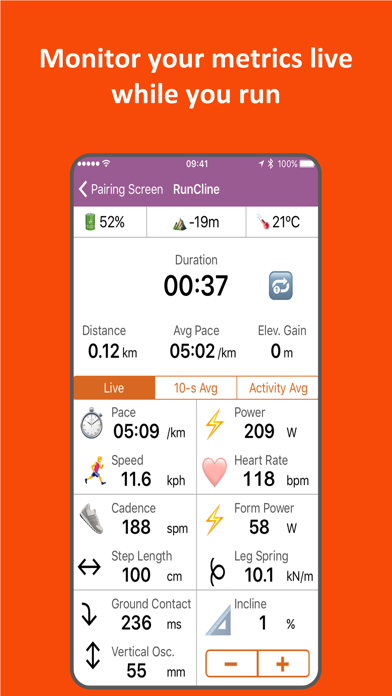
The primary utility revolves around making disparate fitness hardware interoperable without expensive hardware dongles or proprietary subscription traps. Beyond bridging data to Zwift, the app displays live metrics directly on your screen and stores your complete session data into a standard .FIT file. Developer Pascal Carrieres has crafted a lightweight yet robust architecture that bridges the gap between basic cardio equipment and advanced virtual training simulations.
For runners who train outdoors, RunCline doubles as an advanced audio-cued tracker providing kilometer or mile splits and power target notifications. You can define custom workouts based on pace, distance, or power zones, letting the app guide your intervals through spoken prompts. Supported hardware ranges from high-end smart treadmills by brands like NordicTrack and Technogym to standard foot pods like Stryd and Garmin units running Virtual Run.
Standout Features & What's New in this Build
This latest open TestFlight beta brings several crucial improvements to Bluetooth device stability and audio feedback cues. Testing this build on modern iOS hardware running with ProMotion 120Hz displays highlights the fluid UI rendering and instant touch responsiveness.
- Universal Hardware Bridge: Connects older or non-smart treadmills and third-party foot pods, re-transmitting speed, cadence, power, and incline over Bluetooth to Zwift.
- Apple Health & Watch Integration: Seamlessly pulls live heart rate data from your Apple Watch via HealthKit while securely logging every completed workout to Apple Health.
- Custom Interval Workouts: Program comprehensive running routines targeting specific pace, distance, or power thresholds with automated audio coaching cues.
- Comprehensive .FIT Exports: Automatically logs every running metric into a standard .FIT file that can be easily emailed or exported for deep post-run analysis.
- VirtualPod Mode: Allows users without a physical foot pod to utilize the app as an active source of speed and incline data for virtual training platforms.

Hands-On Impressions: Performance, Battery, and Thermals
During our extended testing sessions, RunCline maintained rock-solid Bluetooth connection stability with both a Stryd foot pod and a heart rate monitor simultaneously. The user interface scales cleanly across modern Apple Silicon devices, taking full advantage of hardware acceleration without triggering any noticeable thermal throttling. Battery consumption during an hour-long virtual running session remained minimal, dropping just a few percentage points while maintaining active background location and continuous Bluetooth polling.
"RunCline was born out of a simple desire to make existing fitness hardware work together effortlessly, giving runners the freedom to choose their preferred software platforms without hardware restrictions." — Pascal Carrieres
The touch responsiveness on newer iPhones is instantaneous, letting you quickly adjust manual incline settings using the clear plus and minus buttons during high-intensity intervals. Tapping the hardware volume up and down buttons to trigger spoken metric values is an intuitive touch that saves you from staring down at your screen while sprinting.
System Requirements & Requested Permissions
RunCline requires an iPhone or iPad running iOS 15.0 or later to ensure full compatibility with modern CoreBluetooth and HealthKit frameworks. Because the app relies heavily on real-time hardware communication, it requests standard permissions for Bluetooth peripherals, Local Network discovery, and Apple Health read/write access. Apple’s strict sandboxing ensures your physiological data remains secure on your device while transmitting only the necessary telemetry to your paired training apps.
The app layout is fully optimized for modern screen aspect ratios, delivering crisp typography and high-contrast numerical readouts that remain easily legible even when mounted on a shaking treadmill console. Performance remains consistently smooth across both older supported iPhones and the latest iPad Pro hardware configurations.
Pros & Cons: Beta Impressions
✓ The Highs (What We Love)
- Hardware Interoperability: Bridges legacy treadmills and foot pods directly into Zwift seamlessly.
- Audio Coaching: Intelligent pace and power audio cues keep you locked into your target zones.
- Data Exporting: Robust .FIT file generation ensures your training history syncs with third-party analytics platforms.
✕ Beta Caveats (Room for Polish)
- Peripheral Wake-Up: Some foot pods require physical movement before initial Bluetooth handshake completion.
- Device Specifics: Certain smart treadmill models require specific firmware versions for full bi-directional incline control.
- UI Polish: Occasional layout adjustments needed for dense data fields during rapid interval changes.
Current TestFlight Slot Situation & Availability
Apple enforces a strict 10,000-tester ceiling for public TestFlight beta links, making availability subject to active user rotation. Pascal Carrieres has kept this open beta accessible, but slots can fill up quickly following major software updates or community features. If you encounter a message stating the beta is currently full, check back during off-peak hours when inactive accounts are automatically pruned by the developer.
Securing your access early guarantees you will receive push notifications whenever new experimental builds drop with bug fixes and feature expansions. Bookmark this page on Codewing to stay updated on future slot openings and release notes.
Step-by-Step TestFlight Installation Guide
Installing RunCline via Apple’s official TestFlight platform takes less than two minutes once you have your compatible foot pod or smart treadmill nearby. Follow these five straightforward steps to get up and running:
- Download TestFlight: Install the official Apple TestFlight application from the iOS App Store if you do not already have it on your device.
- Tap the Beta Link: Click the official RunCline TestFlight invitation link provided on this page using your iOS device browser.
- Accept the Invitation: Tap "Accept" in the TestFlight interface to join Pascal Carrieres' public beta program for RunCline.
- Install the Build: Tap "Install" to download the app package onto your modern iPhone or iPad hardware.
- Configure & Send Feedback: Launch RunCline, grant the requested Bluetooth and Health permissions, pair your hardware, and use the TestFlight feedback portal to report any anomalies.
Frequently Asked Questions
Is RunCline safe to install via TestFlight?
Yes, TestFlight is Apple’s official beta testing ecosystem. Every build submitted by Pascal Carrieres goes through Apple’s automated safety and sandboxing checks before reaching your device.
What should I do if the RunCline beta is full?
If Apple’s 10,000-tester capacity is temporarily reached, check back periodically. Inactive tester slots are regularly reclaimed, opening up new availability for incoming runners.
Will installing this beta overwrite my App Store version or delete save data?
TestFlight builds install seamlessly over existing beta installations and operate within isolated app sandboxes, preserving your configuration settings and exported .FIT file logs.
How long do TestFlight beta invitations and builds last?
Each individual TestFlight build remains active for 90 days from its upload date, during which time the developer will typically push newer builds with continuous improvements.
Are in-app purchases free during TestFlight beta testing?
Yes, any simulated transactions or in-app purchases within TestFlight builds utilize Apple’s sandbox environment, meaning no real charges are ever processed during the beta phase.
Final Editorial Verdict
RunCline successfully bridges a frustrating gap in the indoor running market, offering an elegant software solution to hardware compatibility headaches. Its reliable Bluetooth relay, robust .FIT logging, and seamless Zwift integration make it an absolute must-have utility for dedicated indoor athletes. We award this beta release a stellar 4.7 / 5 rating for its rock-solid utility and visionary design.
Developer Support & Official Resources
Stay updated on patch notes, maintenance windows, and feature roadmaps directly from the official developer channels.
Ready to Test RunCline?
Apple limits public TestFlight betas to 10,000 testers. Tap below to launch TestFlight and claim your testing slot before capacity is reached.
Join RunCline Beta on TestFlight →


