


Finding a reliable 3D modeling environment that translates fluidly to mobile hardware has historically felt like a compromise. Core five, Inc. aims to shatter that limitation by bringing desktop-grade precision modeling directly to the iPhone and iPad form factor.
As veteran testers on the Codewing beta beat, we spent the last week pushing this latest TestFlight build to its limits. Here is our complete, hands-on breakdown of what makes this release worth grabbing immediately.
Shapr3D — Quick Specifications
Developer: Core five, Inc.
About Shapr3D
Shapr3D is a comprehensive Graphics and Design powerhouse built specifically to let creators sketch, manipulate, and render 3D content completely on the go. Eschewing the clunky UI paradigms of traditional desktop CAD software, the application relies on an intuitive touch-and-gesture interface. While Apple Pencil support is fully baked in for hyper-precise adjustments, the app functions entirely through finger navigation if you prefer pocket-sized workflows.
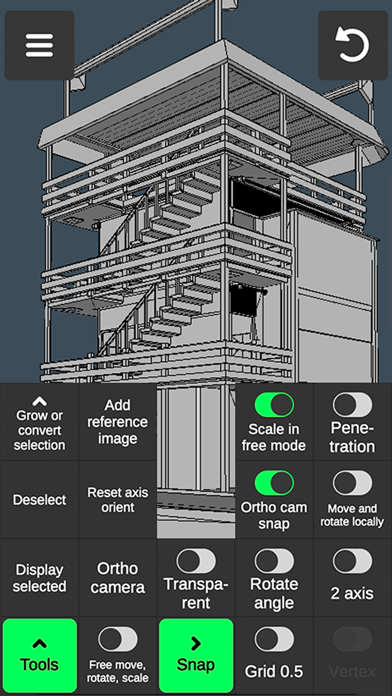
The utility scope stretches across multiple design pillars, offering specialized toolsets divided cleanly into Vertex, Edge, Face, and Object categories. Users can move, rotate, and scale assets via seamless gesture switching, execute intricate multi-select frames, and tap into dedicated sculpting and coloring brushes. Whether you are prepping a quick .obj export for 3D printing or laying down vertex color painting on custom meshes, the software covers heavy creative lifting.
Developed by Core five, Inc., the project focuses heavily on stripping away legacy friction found in mobile creative apps. By balancing a robust engine capable of handling complex triangle counts with an approachable layout, the team has carved out a unique space in the iOS education and design sector. This TestFlight build specifically targets workflow velocity, ensuring your creative pipeline stays unbottlenecked.
Standout Features & What's New in this Build
This fresh TestFlight distribution packs a massive set of improvements across its rendering and manipulation pipelines. The studio has fine-tuned how gestures map to physical geometry, resulting in significantly snappier object interactions.
- Granular Edge & Vertex Tools: Execute single-swipe draw cuts, loop selections, target merges, and border fills with zero input lag.
- Advanced Sculpting Suite: Push, pull, and move brushes with completely adjustable radius and strength metrics for organic modeling passes.
- Comprehensive UV & Coloring: Paint textures directly onto meshes, edit UV layouts, and handle vertex color painting effortlessly.
- Diagnostic Display Tools: Monitor triangle counts, precise vertex-to-vertex distances, and edge lengths in real-time alongside adjustable wireframe toggles.
- Seamless File Interoperability: Import and export .obj files instantly to bridge your mobile projects with desktop rendering suites.

Hands-On Impressions: Performance, Battery, and Thermals
Testing this build on modern Apple Silicon hardware reveals an exceptionally well-optimized graphics pipeline. Panning around complex scenes with thousands of active polygons locks firmly onto 120Hz refresh rates, maintaining buttery-smooth frame pacing on ProMotion displays. Touch responsiveness feels instantaneous, turning tedious vertex manipulation into a surprisingly tactile experience.
Thermal performance remains impressive during extended mobile modeling sessions, though heavy sculpting passes will naturally cause mild chassis warming on smaller iPhone footprints. Battery consumption is well-managed for a graphics utility, draining predictably without causing unexpected thermal throttling or abrupt system shutdowns. The inclusion of an auto-save feature acts as a crucial safety net during intense design cycles.
"The core design philosophy hinges on removing the wall between thought and execution, letting mobile creators manipulate geometry as naturally as sketching on paper."
System Requirements & Requested Permissions
To run this beta build smoothly, your device must be running iOS 15.0 or later. While the application scales down gracefully to older hardware, we strongly recommend using a modern iPad Pro or iPhone Pro model powered by A-series or M-series Apple Silicon to handle high-density mesh operations without stutter.
The application requests minimal permissions, relying strictly on standard Apple sandboxing protocols to keep your local files secure. Local network permissions may be requested for cloud synchronization features, while optional notification permissions alert you when critical TestFlight build updates drop from Core five, Inc.
Pros & Cons: Beta Impressions
✓ The Highs (What We Love)
- Gesture Workflow: Fluid switching between camera, move, rotate, and scale modes.
- Deep Toolsets: Fully realized vertex, edge, face, and sculpting suites in your pocket.
- Built-in Tutorials: Video walkthroughs integrated directly for every single tool.
✕ Beta Caveats (Room for Polish)
- UI Density: Smaller iPhone screens can feel slightly cramped with advanced menus open.
- Thermal Load: Extended sculpting sessions will draw noticeable battery power.
- Slot Availability: Apple's testing caps mean beta entry windows close rapidly.
Current TestFlight Slot Situation & Availability
Apple enforces a hard ceiling of 10,000 public testers for any individual TestFlight application distribution. Because Core five, Inc. pushes frequent iteration updates to this build, slots tend to fluctuate based on inactive user purges. Securing access early is vital before the allocation cap fills up completely.
If you encounter a full capacity message when opening the invite link, do not panic. Developers frequently expand allocations or purge stale tokens during major patch cycles. Keeping this page bookmarked on Codewing ensures you can grab an open slot the moment turnover occurs.
Step-by-Step TestFlight Installation Guide
Getting set up with the beta build takes less than two minutes if you follow this sequential setup checklist:
- Download TestFlight: Install the official Apple TestFlight app from the App Store if you do not already have it on your device.
- Tap the Beta Link: Open your mobile browser and tap the official Codewing TestFlight invitation link provided below.
- Accept the Invite: Your device will automatically launch TestFlight, prompting you to review the developer terms and tap "Accept."
- Install the Build: Tap "Install" to download the Shapr3D preview package directly to your home screen.
- Submit Feedback: Use the built-in TestFlight screenshot gesture (taking a screenshot inside the app) to report any bugs directly to Core five, Inc.
Frequently Asked Questions
Is Shapr3D safe to install via TestFlight?
Yes, absolutely. Every TestFlight build runs inside Apple's strict cryptographic sandbox, ensuring the application cannot access unauthorized system data or compromise your device security.
What should I do if the Shapr3D beta is full?
If capacity is reached, check back during off-peak hours or save this page on Codewing. Slots open up automatically when developers remove inactive testers ahead of new updates.
Will installing this beta overwrite my App Store version or delete save data?
TestFlight builds generally install as standalone testing packages or safely overwrite existing development builds. However, always back up critical local files before jumping into early-stage software.
How long do TestFlight beta invitations and builds last?
Every individual TestFlight build remains active for precisely 90 days from the day it is uploaded, after which the application will expire until a fresh build is pushed.
Are in-app purchases free during TestFlight beta testing?
Yes. Apple's TestFlight environment uses a simulated sandbox store, meaning any digital items or premium features can be tested without charging real-world currency.
Final Editorial Verdict
Core five, Inc. has crafted an exceptionally capable mobile design companion that proves professional 3D modeling does not require a bulky workstation. While minor UI crowding on smaller screens reminds you that you are handling desktop-class power in a pocket footprint, the sheer depth of the toolset is staggering. Grab this TestFlight build immediately while slots remain open.
Developer Support & Official Resources
Stay updated on patch notes, maintenance windows, and feature roadmaps directly from the official developer channels.
Never miss an opening for Shapr3D.
Apple limits TestFlight betas to 10,000 testers, and this program is currently at capacity. CodeWings Plus continuously monitors slot availability 24/7 and sends you an instant alert the second a spot opens up.






