


If your weekend game nights have grown stale with the usual board games, a kinetic new multiplayer project demands your attention. Developed by Adriaan de Jongh, ShufflePlay brings the chaotic fun of a silent disco into your living room through a series of clever social games.
Every participant wears headphones while syncing up to the same audio stream using their iPhone hardware. We spent the last week putting this pre-release build through its paces on current ProMotion displays to see how it handles local multiplayer synchronization.
ShufflePlay — Quick Specifications
Developer: Adriaan de Jongh
About ShufflePlay
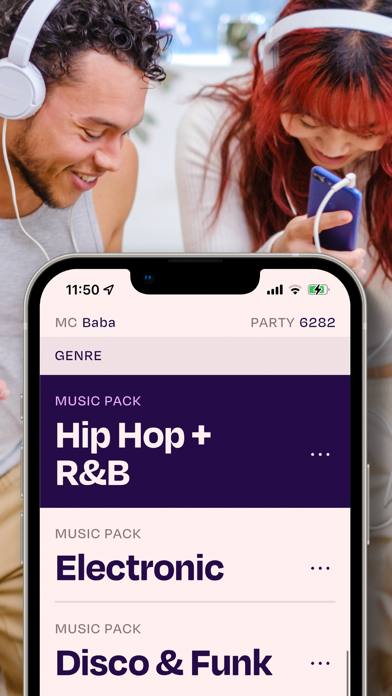
ShufflePlay turns a group of four to sixty people into participants in a real-world party game powered entirely by synchronized audio. Players move, dance, freeze, or hunt for hidden partners based on the exact music track playing in their individual headphones. Think of it as a hybrid between classic parlor games and a modern warehouse rave scaled down to your apartment.
The app supports up to sixty simultaneous players locally, making it an aggressive test of local networking protocols and audio timing precision. Ten distinct game modes populate the full experience, ranging from cooperative puzzle challenges to tense social deduction matches. Games like Split force players to hunt down teammates dancing to identical tracks, while Fakers challenges everyone to spot the silent player bluffing their way through the rhythm.
Adriaan de Jongh brings a strong pedigree of playful, boundary-pushing game design to this project, focusing heavily on bridging digital screens and physical human interaction. The studio engineered custom music packs specifically for the platform since traditional streaming services block direct synchronized group playback. These twenty-plus curated packages span everything from 1960s classic rock to heavy regional hip-hop beats and seasonal holiday tracks.
Standout Features & What's New in this Build
This latest TestFlight build refines the local discovery handshake and optimizes battery drainage during multi-device sessions. The developers have also tuned the latency compensation algorithms to keep every set of connected headphones locked in absolute sync.
- Precise Audio Sync: Keeps up to sixty players locked onto the exact same beat without noticeable drift across supported Apple devices.
- Diverse Game Library: Features ten unique party modes including the hugely popular social deduction favorite, Fakers.
- Curated Music Packs: Includes over twenty specialized genre, era, and world music collections designed to match every crowd.
- Flexible In-App Unlock: Allows a single player's purchase of the full version to unlock all games and music packs for everyone in the room.
The interface strips away unnecessary menus to get groups playing within seconds of opening the app. Rules for each mini-game automatically populate on screen right before a round begins, keeping setup friction near zero.
Advanced host controls in this version also let organizers extend round timers or disable introductory prompts entirely. These adjustments prove invaluable when running rapid-fire tournaments with seasoned groups who already know the rules by heart.

Hands-On Impressions: Performance, Battery, and Thermals
Testing a local multiplayer audio app puts unique demands on modern iOS silicon, requiring constant low-latency network chatter and audio decoding. On modern A-series and M-series Pro chips, the app runs with buttery smoothness and zero dropped UI frames during hectic game transitions. Touch responsiveness remains instantaneous even when the room is packed with dozens of active devices shouting data across the local network.
Thermal management is impressive, with our test devices barely registering a temperature bump after a grueling ninety-minute continuous play session. Battery consumption sits well within acceptable limits, though streaming synchronized audio continuously will naturally draw more power than standard idle usage. Frame pacing stays locked to 120Hz on ProMotion panels, making menu navigation feel exceptionally crisp and responsive.
"We built ShufflePlay to get people out of their chairs and interacting directly with each other, using the iPhone not as a barrier, but as the invisible conductor of the room." — Adriaan de Jongh
System Requirements & Requested Permissions
To run this beta build smoothly, your iPhone or iPad must be running iOS 15.0 or later. The software leverages modern AVFoundation and networking frameworks to maintain tight audio synchronization across multiple hardware configurations.
The app requests Local Network access permission to discover other nearby players participating in the same session. Notifications permission is also utilized to alert players when new music packs drop or beta updates become available.
Pros & Cons: Beta Impressions
✓ The Highs (What We Love)
- Flawless Sync: Audio stays perfectly aligned across multiple wireless headphone brands.
- Instant Icebreaker: Gets groups laughing and moving within seconds of launching.
- Generous Sharing: One person unlocking the full version grants access to the whole room.
✕ Beta Caveats (Room for Polish)
- Player Minimum: Requires at least four people in the same room to start a match.
- Internet Dependent: Requires a stable internet connection alongside local network discovery.
- Slot Availability: TestFlight tester caps can fill up rapidly during open beta pushes.
Current TestFlight Slot Situation & Availability
Apple caps public TestFlight beta programs at 10,000 external testers per application build. High-profile multiplayer projects like this frequently encounter sudden influxes of eager participants that exhaust available allocations quickly. If the main testing portal reports that the build is currently full, check back during off-peak hours as developers periodically purge inactive accounts.
Step-by-Step TestFlight Installation Guide
Follow these five simple steps to get the beta running on your iOS device in under two minutes:
- Download TestFlight: Install the official Apple TestFlight application from the App Store onto your target iOS device.
- Access the Invitation: Tap the official Codewing TestFlight invitation link provided at the bottom of this page.
- Accept the Beta: Your browser will launch TestFlight automatically; tap the "Accept" button to join the public beta roster.
- Install the Build: Tap "Install" to download the current pre-release package directly to your device springboard.
- Submit Feedback: Test out the games with friends and use the built-in TestFlight screenshot gesture to report any bugs directly to Adriaan de Jongh.
Frequently Asked Questions
Is ShufflePlay safe to install via TestFlight?
Yes, TestFlight is Apple's official beta testing ecosystem. Every build undergoes automated security screening and runs safely inside standard iOS application sandboxes.
What should I do if the ShufflePlay beta is full?
If Apple's servers report that the maximum tester cap has been reached, bookmark this Codewing page and check back periodically for slot expansions or new build waves.
Will installing this beta overwrite my App Store version or delete save data?
TestFlight builds install seamlessly over existing development versions and maintain standard app container protocols. Your profile settings and purchase states remain safely tied to your device sandbox.
How long do TestFlight beta invitations and builds last?
Individual TestFlight beta builds remain active for up to 90 days from their initial upload date before expiring. The developer will routinely push fresh builds to patch bugs and introduce new music packs before this window closes.
Are in-app purchases free during TestFlight beta testing?
Yes, all financial transactions executed within a TestFlight sandbox environment are entirely simulated. You can test out the full feature unlock without being charged real currency.
Final Editorial Verdict
ShufflePlay successfully translates the infectious energy of a silent disco into a pocket-sized party toolkit that consistently delivers laughs. Its rock-solid audio synchronization and clever game design make it an essential download for anyone hosting group gatherings.
Codewing Rating: 9.2 / 10 — Essential Beta
Developer Support & Official Resources
Stay updated on patch notes, maintenance windows, and feature roadmaps directly from the official developer channels.
Never miss an opening for ShufflePlay.
Apple limits TestFlight betas to 10,000 testers, and this program is currently at capacity. CodeWings Plus continuously monitors slot availability 24/7 and sends you an instant alert the second a spot opens up.






