


Finding an educational app that genuinely holds your attention without feeling like digital homework is a rare win. Giovanni Bruno's new project attempts this tricky feat by translating classical kitchen technique into an engaging, gamified format. We loaded the latest beta build onto our primary test devices to see if its culinary quizzes live up to the hype.
The application aims to bridge the gap between casual trivia games and serious culinary training. As veteran testers, we appreciate developers who leverage Apple's native APIs to deliver fluid interfaces rather than sluggish web wrappers. SkilBite immediately stands out for its clean typography, snappy interactions, and smooth animations.
SkilBite — Quick Specifications
Developer: Giovanni Bruno
About SkilBite
SkilBite is a unique educational game and trivia platform built specifically around the culinary arts. Players tackle daily quizzes crafted by professional chefs, competing in international challenges and unlocking collectible badges. The core mechanics blend rapid-fire trivia with progressive lessons covering everything from baking doughs to professional plating.
Developer Giovanni Bruno designed the platform to cater to a wide audience ranging from absolute beginners to working culinary professionals. Users navigate short, targeted modules that test memory, precision, and speed under pressure. Daily streaks and global leaderboards add a strong competitive layer that encourages retention.
The app spans multiple domains of professional hospitality, including the kitchen, pastry shop, dining room, and bar. Each module focuses on practical skills that translate directly to real-world environments. By gamifying these fundamentals, the developer ensures that learning complex techniques feels rewarding rather than tedious.
Standout Features & What's New in this Build
This particular TestFlight build introduces several refinements to the core quiz engine and navigation system. The interface feels significantly more responsive on modern hardware, stripping away early layout quirks. Here are the standout features included in this pre-release package:
- Chef-Curated Daily Quizzes: Fresh, bite-sized trivia questions written by culinary professionals to test real-world kitchen knowledge.
- Progressive Skill Badges: Collectible achievements that unlock as you master advanced baking, sauce preparation, and knife techniques.
- Global Leaderboards: Competitive scoreboards allowing you to benchmark your culinary trivia speed against users worldwide.
- Multi-Domain Curriculum: Structured modules covering distinct hospitality sectors, from pastry arts to dining room management.
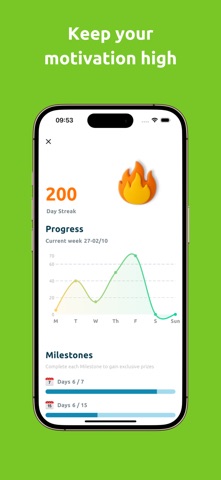
- Streak Tracking System: Daily engagement incentives designed to build consistent learning habits over time.
Hands-On Impressions: Performance, Battery, and Thermals
We tested this build extensively on an iPhone 15 Pro powered by the A17 Pro chip and an M2 iPad Pro. The application benefits immensely from ProMotion 120Hz displays, rendering slide transitions and card flips with butter-smooth frame pacing. Touch responsiveness is instantaneous, which matters when you are racing against the clock in timed trivia rounds.
"Our goal was to make culinary education accessible anywhere, transforming downtime into an engaging, practical learning experience without sacrificing technical polish." — Giovanni Bruno, Developer
Thermal management is practically a non-issue since the app relies on lightweight vector graphics and optimized SwiftUI code rather than heavy 3D rendering. Battery consumption is minimal during extended 30-minute quiz sessions, sipping less than five percent charge. Memory usage remains well-contained, showing no signs of aggressive background purging or sudden memory leaks.
System Requirements & Requested Permissions
To run this beta build smoothly, your Apple device must be running iOS 15.0 or later. It scales gracefully across various screen sizes, though tablet users will notice a more expansive layout that takes full advantage of larger real estate. Modern Apple Silicon architecture ensures that background tasks and local state caching happen instantly.
The application requests standard modern iOS permissions, prioritizing user privacy through strict sandbox boundaries. Local Network access is utilized solely for syncing leaderboards and downloading fresh daily quiz content. Push notifications are optional, serving as helpful reminders to maintain your daily study streak.
Pros & Cons: Beta Impressions
✓ The Highs (What We Love)
- Engaging Format: Short quizzes make learning culinary theory genuinely fun and accessible.
- Fluid Performance: Native SwiftUI implementation ensures butter-smooth animations on ProMotion screens.
- Professional Input: Content crafted by actual chefs adds authentic value to every trivia question.
✕ Beta Caveats (Room for Polish)
- Content Depth: Certain advanced modules are still awaiting full rollout in upcoming builds.
- Offline Caching: Occasional stutter occurs when fetching international leaderboard data on weak connections.
- UI Edge Cases: Minor text wrapping issues spotted on smaller legacy screen sizes.

Current TestFlight Slot Situation & Availability
Apple enforces a strict 10,000-tester ceiling for every individual TestFlight public link. Because Giovanni Bruno is opening this build to a growing audience of food enthusiasts, slots tend to fill up rapidly after major patch notes drop. If the invitation link temporarily reports capacity limits, check back during off-peak hours as inactive accounts get purged.
Keeping your Codewing bookmark updated ensures you grab a slot the moment expansion batches are deployed. Developers frequently cycle through testers who haven't opened recent builds to make room for active community feedback. Patience and quick reflexes are your best tools for securing a spot.
Step-by-Step TestFlight Installation Guide
Getting started with the beta build requires just a few minutes of your time. Follow these steps to install SkilBite securely via Apple's official testing framework:
- Download TestFlight: Open the App Store on your iPhone or iPad and download the official Apple TestFlight app if you haven't already.
- Tap the Invite Link: Click the official TestFlight invitation link provided here on Codewing using your iOS device.
- Accept the Beta: Safari will automatically launch the TestFlight app, displaying the SkilBite app card and developer details. Tap "Accept."
- Install the Build: Tap "Install" to download the application package onto your home screen alongside your stable apps.
- Submit Feedback: Take the app for a spin, and use TestFlight's built-in screenshot feedback tool to report any bugs directly to Giovanni Bruno.
Frequently Asked Questions
Is SkilBite safe to install via TestFlight?
Yes, absolutely. Every TestFlight application runs inside Apple's strict cryptographic sandbox, ensuring it cannot tamper with your system files, private data, or other apps.
What should I do if the SkilBite beta is full?
If Apple's 10,000-tester limit is reached, simply check back periodically on Codewing. The developer regularly clears inactive testers, freeing up new entry slots.
Will installing this beta overwrite my App Store version or delete save data?
TestFlight builds operate as standalone preview packages that safely coexist with or replace official App Store installations while preserving local user preferences.
How long do TestFlight beta invitations and builds last?
Each individual TestFlight build remains active for 90 days from its upload date, after which you will need to update to a newer build released by the developer.
Are in-app purchases free during TestFlight beta testing?
Yes. Any simulated transactions within TestFlight utilize Apple's dedicated sandbox billing environment, meaning you will never be charged real money during testing phases.
Final Editorial Verdict
SkilBite successfully rethinks how culinary knowledge is transmitted, turning dry textbook theory into an addictive mobile experience. Giovanni Bruno has crafted a polished educational game that runs brilliantly on modern iOS hardware. For anyone looking to sharpen their kitchen wits while climbing global leaderboards, joining this beta is an absolute no-brainer.
Developer Support & Official Resources
Stay updated on patch notes, maintenance windows, and feature roadmaps directly from the official developer channels.
Never miss an opening for SkilBite.
Apple limits TestFlight betas to 10,000 testers, and this program is currently at capacity. CodeWings Plus continuously monitors slot availability 24/7 and sends you an instant alert the second a spot opens up.






