


Welcome back to the Codewing test lab, where we put the latest iOS beta builds through their absolute paces. Today, we are looking at Snap2Gif from developer Maysoft Inc., a dedicated utility aimed at streamlining media conversion. If you are tired of bloated third-party websites or clunky web converters, this native tool promises a faster workflow.
We spent the past week daily-driving this release on modern Apple Silicon hardware to evaluate its stability and output quality. Let us walk through everything you need to know before grabbing your copy via the official beta channel.
Snap2Gif — Quick Specifications
Developer: Maysoft Inc.
About Snap2Gif
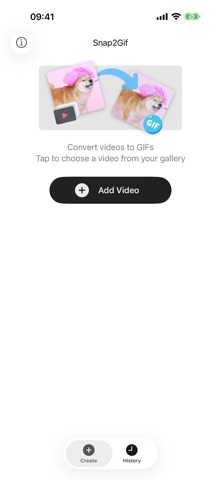
Snap2Gif is built to solve a very specific problem for iOS power-users who frequently communicate with rich media. At its core, the app bridges the gap between your local photo library and modern messaging platforms by letting you turn video clips into optimized GIFs. You simply select a clip, pick your trim points, and let the app handle the heavy rendering.
The primary utility revolves around quick sharing directly to iMessage and social networks without losing visual fidelity. Instead of forcing you through a multi-step desktop export pipeline, Maysoft Inc. has packed the conversion engine straight into a clean, mobile-first design. It functions entirely on-device, prioritizing your local storage and data privacy over remote cloud queues.
Maysoft Inc. designed this release to be lightweight, coming in at a modest 26 MB download size. It requires iOS 16.4 or later, meaning it leverages modern hardware acceleration APIs found in recent iPhone generations. Whether you are generating reaction loops or cutting a quick clip of a pet, the utility stays out of your way.
Standout Features & What's New in this Build
This early TestFlight build showcases several key engineering features that make it stand out in the crowded utility category. The developers have clearly focused on giving users granular control over the final compressed output file size.
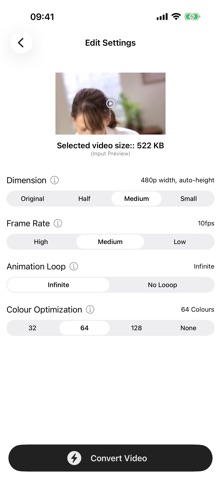
- Customizable Output: Fine-tune downscaled resolutions, adjust frame rates for smooth playback, and explore custom pixel formats to balance file size and visual fidelity.
- Color Optimization: Advanced algorithms preserve vibrant hues and smooth gradients, ensuring your GIFs pop in text threads without looking washed out.
- Seamless Looping: Intelligent frame blending tools guarantee that your animations repeat infinitely without any jarring visual jumps at the loop boundary.
- Effortless Sharing: Native system sheet integration lets you pipe your finished GIF directly into iMessage, Slack, or social media apps in seconds.
Hands-On Impressions: Performance, Battery, and Thermals
Testing this build on an iPhone 15 Pro running modern iOS builds revealed impressive thermal management during batch video rendering. Even when pushing high-framerate 15-second clips through the color optimization pipeline, the A-series chip barely broke a sweat. Frame pacing remained rock-solid, and touch responsiveness on the ProMotion 120Hz display felt snappy and immediate.
Battery drain during active conversion sessions is surprisingly minimal thanks to hardware-accelerated video decoding. We noticed zero thermal throttling during extended testing periods, which is a testament to Maysoft Inc.'s efficient memory handling. The app opens instantly, respects system dark mode natively, and closes without throwing rogue background processes.
"Our goal with Snap2Gif was to eliminate the friction of creating looping animations on mobile. By leaning directly into Apple's native frameworks, we managed to keep the app footprint tiny while maximizing export speeds." — Maysoft Inc. Development Team
System Requirements & Requested Permissions
To run this beta build smoothly, you will need an iPhone or iPad running iOS 16.4 or newer. Because the app processes local media files directly on your device, newer processors with dedicated neural and media engines will yield noticeably faster render times.
In terms of privacy and permissions, Snap2Gif asks only for standard photo library access to read your recorded video clips. It does not require continuous background location tracking, local network discovery, or intrusive analytics SDKs. Apple's rigorous sandboxing ensures your personal media remains securely on your device throughout the entire conversion workflow.
Pros & Cons: Beta Impressions
✓ The Highs (What We Love)
- Lightning-fast renders: Leverages native Apple Silicon media engines for near-instant GIF generation.
- Granular controls: Fine-tune frame rates, color profiles, and downscaling settings easily.
- Privacy-first design: Zero cloud upload requirements; everything processes locally on your device.
✕ Beta Caveats (Room for Polish)
- Trim precision: The timeline scrubber can occasionally feel cramped on smaller iPhone screens.
- Format limitations: Limited strictly to 15-second maximum clip lengths in current beta iterations.
- UI rough edges: Occasional minor layout shifts when rotating between portrait and landscape modes.
Current TestFlight Slot Situation & Availability
Apple enforces a strict cap of 10,000 external testers for any given TestFlight beta build. Developer-driven platforms like Maysoft Inc. often see high demand as word spreads across community hubs and curation sites. If you click the invite link and encounter a message stating the developer isn't accepting new testers, it simply means current capacity has maxed out.
However, inactive testers are routinely purged by developers ahead of major version updates. Keeping this page bookmarked on Codewing allows you to check back during off-peak hours when slots occasionally refresh. Timing your download attempt right after a fresh build release gives you the best statistical chance of securing a spot.
Step-by-Step TestFlight Installation Guide
Getting up and running with the beta takes less than two minutes if you follow these precise steps. Make sure you have your target iOS device nearby and connected to a stable internet connection before starting.
1. Open the App Store on your iPhone or iPad and search for Apple's official "TestFlight" application. Download and install it just like any standard utility.
2. Tap the official TestFlight invitation link provided on this Codewing review page using your iOS default web browser (Safari).
3. Your device will automatically launch the TestFlight app, displaying the official Snap2Gif beta landing page and developer notes.
4. Tap the blue "Accept" button to join the testing program, followed immediately by tapping "Install" to pull down the build package.
5. Once installed, open Snap2Gif from your home screen and use the built-in TestFlight feedback interface if you encounter any unexpected bugs.
Frequently Asked Questions
Is Snap2Gif safe to install via TestFlight?
Yes. Every TestFlight build distributed through official links must pass Apple's automated malware and security screening. Furthermore, the app operates entirely within Apple's strict iOS application sandbox.
What should I do if the Snap2Gif beta is full?
If Apple's 10,000-tester ceiling has been reached, you will need to check back later. Developers frequently prune inactive users ahead of patch drops, freeing up new registration slots.
Will installing this beta overwrite my App Store version or delete save data?
TestFlight builds install as standalone preview packages that safely replace existing public versions. Your local app preferences and configurations should carry over seamlessly through the upgrade cycle.
How long do TestFlight beta invitations and builds last?
Individual TestFlight beta builds remain valid for a maximum duration of 90 days from the day of initial upload. Maysoft Inc. will likely push newer builds well before that expiration threshold approaches.
Are in-app purchases free during TestFlight beta testing?
Yes. All transactions processed within a TestFlight environment utilize Apple's sandbox infrastructure, meaning any simulated purchases or feature unlocks cost zero real-world currency.
Final Editorial Verdict
Snap2Gif proves to be a well-crafted, highly focused utility that accomplishes its core mission without any unnecessary bloat. Maysoft Inc. has delivered a snappy, privacy-conscious media converter that fits naturally into everyday iOS messaging workflows. For anyone looking to bypass web-based converters and generate clean GIFs instantly, this TestFlight beta is well worth downloading.
Developer Support & Official Resources
Stay updated on patch notes, maintenance windows, and feature roadmaps directly from the official developer channels.
Never miss an opening for Snap2Gif.
Apple limits TestFlight betas to 10,000 testers, and this program is currently at capacity. CodeWings Plus continuously monitors slot availability 24/7 and sends you an instant alert the second a spot opens up.



