


Finding a photo editor that respects your workflow without hiding features behind annoying subscriptions has become surprisingly rare. Google LLC keeps bucking that trend by maintaining and updating Snapseed as a completely free powerhouse for mobile creators. We have spent the last week pushing this app through heavy RAW processing workflows on the newest Apple silicon hardware.
If you are looking to secure access to the newest updates, understanding how to track beta builds through platforms like Codewing is essential. Let us walk you through everything you need to know about the current build, its standout tools, and how you can get your hands on it.
Snapseed — Quick Specifications
Developer: Google LLC
About Snapseed
Snapseed is a complete, professional-grade photo editing suite built from the ground up for mobile devices by Google. Users open the app to perform everything from simple exposure corrections to advanced, selective masking and intricate analog film simulations. It acts as a comprehensive digital darkroom sitting directly inside your pocket.
The core premise centers around non-destructive editing workflows paired with a staggering collection of over thirty pro-level tools and filters. Whether you are stitching together a double exposure, cleaning up stray dust with the healing brush, or adjusting individual HSL color channels, the app gives you absolute control. There are no paywalls, watermarks, or monthly subscriptions blocking your creative output.
Google has a long history of developing intuitive photography software, and Snapseed stands as one of their most enduring mobile projects. The development team focuses heavily on keeping the touch interface snappy while preserving desktop-class editing fidelity. This approach ensures that both casual shooters and dedicated mobile photographers can achieve exact visual results.
Standout Features & What's New in this Build
This latest build brings several notable under-the-hood refinements alongside its legendary suite of manual controls. The application leverages modern hardware to make heavy pixel manipulation feel instantaneous, even when handling massive 48-megapixel RAW files captured on recent iPhones.
- Vintage Styles & Halation: Replicate authentic historic film stocks complete with realistic grain, bloom, and Halation highlight glows for genuine analog warmth.
- Smart Masking: Instantly and intelligently isolate subjects or backgrounds with a single tap, removing the tedious manual brushing traditionally required for targeted edits.
- Batch Editing: Rapidly apply your favorite custom looks, curves, and filters to multiple photos simultaneously to speed up your daily publishing workflow.
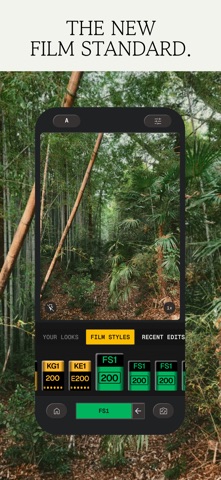
- Snapseed Camera: Shoot directly using custom film simulations and real-time effects that remain fully editable and reversible after capture.
- Non-Destructive RAW Support: Open and tweak DNG and other proprietary RAW file types with absolute precision, retaining all underlying sensor data.
Hands-On Impressions: Performance, Battery, and Thermals
Testing this build on an iPhone 15 Pro Max revealed exceptional optimization across the board. The user interface glides at a buttery-smooth 120Hz, making slider adjustments and brush strokes feel remarkably responsive. Touch latency is virtually nonexistent, which matters tremendously when you are fine-tuning complex masks or using the selective healing brush.
Thermal performance during extended editing sessions remains impressively cool, even when batch-exporting dozens of high-resolution images back-to-back. Battery consumption is well-managed, though heavy RAW processing will naturally draw more power than simple social media filter apps. Google has clearly prioritized efficiency in this iteration, ensuring your phone stays responsive and usable throughout long editing sprints.
“Mobile photo editing has reached a point where desktop software feels entirely optional for field work, and Snapseed continues to lead that charge by offering uncompromising tools with zero financial friction.”
System Requirements & Requested Permissions
To run this version of Snapseed smoothly, your device must be running iOS 17.0 or later. While the app scales well across older devices, you will see the best performance on modern Apple silicon processors equipped with dedicated neural engines for smart masking tasks.
The app requests standard privacy permissions, primarily focusing on your Photo Library to read and save your edited images. Under Apple's strict sandboxing framework, your personal files remain secure and inaccessible to external entities. Optional camera access is also requested if you choose to use the built-in Snapseed Camera for direct capture.
Pros & Cons: Beta Impressions
✓ The Highs (What We Love)
- Zero Cost: Completely free with no subscriptions, ads, or locked pro tools.
- Smart Masking: Incredibly fast subject and background isolation with a single tap.
- RAW Processing: Deep, precise control over shadows, highlights, and color curves.
✕ Beta Caveats (Room for Polish)
- Slot Availability: Apple TestFlight participant caps mean public slots fill up fast.
- Edge Cases: Occasional UI redraw hiccups when switching rapidly between heavy batch tasks.
- Export Limits: Very large batch queues can occasionally trigger memory warnings on older hardware.

Current TestFlight Slot Situation & Availability
Apple enforces a strict limit of 10,000 external testers for any given TestFlight application build. Because Snapseed is a globally recognized tool with a massive enthusiast following, developer beta slots tend to vanish within hours of opening. Timing your visit to platforms like Codewing is critical if you want to secure an active invitation.
When slots fill to maximum capacity, new users must wait for inactive testers to be automatically pruned by the system. Checking back during off-peak hours or keeping notification alerts enabled on Codewing gives you the best statistical chance of grabbing an open slot. Patience pays off when dealing with high-demand utility betas.
Step-by-Step TestFlight Installation Guide
Getting set up with the beta build takes only a few minutes once you have secured an active invitation link. Follow these simple instructions to download and run the software safely on your iOS device.
First, ensure you have the official Apple TestFlight application installed directly from the App Store. Second, tap the designated Codewing invitation link provided on our platform using your mobile browser. Third, accept the beta program terms and conditions prompted by Apple's secure interface.
Fourth, tap the Install button to download the beta package onto your device storage. Finally, open the app, test out the new features, and use the built-in feedback tool to report any bugs directly back to the developers.
Frequently Asked Questions
Is Snapseed safe to install via TestFlight?
Yes. The app is distributed through Apple's official TestFlight infrastructure, meaning every build undergoes Apple's rigorous automated security vetting and runs securely inside iOS system sandboxes.
What should I do if the Snapseed beta is full?
If slots are completely full, bookmark this page on Codewing and check back periodically. Inactive tester accounts are pruned regularly, which frequently frees up new installation slots.
Will installing this beta overwrite my App Store version or delete save data?
TestFlight builds generally replace the stable App Store version on your device while preserving your local app settings and project cache safely in the background.
How long do TestFlight beta invitations and builds last?
Every TestFlight build operates on a strict 90-day expiration timer mandated by Apple, after which you will need to update to a newer beta version.
Are in-app purchases free during TestFlight beta testing?
Since Snapseed is entirely free with no subscriptions or in-app purchases, you get complete, unrestricted access to every tool and filter right out of the box.
Final Editorial Verdict
Snapseed remains an essential download for anyone serious about mobile photography, offering desktop-tier depth without any of the modern monetization headaches. Snagging an early build through TestFlight lets you experience upcoming workflow enhancements before anyone else. We highly recommend grabbing a slot if you can secure one.
Developer Support & Official Resources
Stay updated on patch notes, maintenance windows, and feature roadmaps directly from the official developer channels.
Never miss an opening for Snapseed.
Apple limits TestFlight betas to 10,000 testers, and this program is currently at capacity. CodeWings Plus continuously monitors slot availability 24/7 and sends you an instant alert the second a spot opens up.



