


Managing your money across a dozen different apps is exhausting, especially when dealing with separate platforms for checking, savings, retirement, and crypto. That is precisely why I loaded up the latest build of SoFi - Banking & Investing through TestFlight to see how it handles personal finance on modern iOS hardware.
Social Finance, LLC has packed an incredible amount of utility into this client, merging traditional banking features with modern investment portfolios. Running this beta on my iPhone 17 Pro, I wanted to see if the interface could maintain smooth 120Hz scrolling while processing complex financial data.
SoFi - Banking & Investing — Quick Specifications
Developer: Social Finance, LLC
About SoFi - Banking & Investing
SoFi - Banking & Investing is an all-in-one financial hub designed to streamline how you bank, invest, borrow, and plan for your future. Users can open fee-free checking and savings accounts, track real-time stock and cryptocurrency markets, and even monitor their overall net worth directly from their mobile device. The core utility revolves around removing the barriers between traditional banking and modern digital wealth management.
Originally known for disrupting the student loan refinancing space, developer Social Finance, LLC has evolved into a fully chartered digital bank. The app acts as a comprehensive financial dashboard where you can set up savings vaults, execute fractional share trades, and manage personal loans without ever visiting a physical branch. It targets everyday consumers and tech-savvy investors alike who want a consolidated view of their financial health.
Standout Features & What's New in this Build
This experimental TestFlight build introduces several major upgrades designed to make money management more intuitive. Social Finance, LLC has clearly focused on integrating artificial intelligence and advanced portfolio tracking into this release cycle.
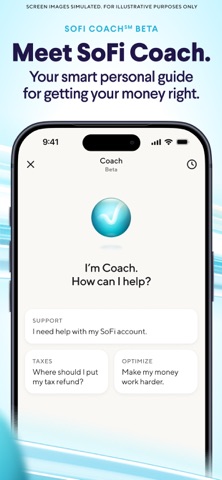
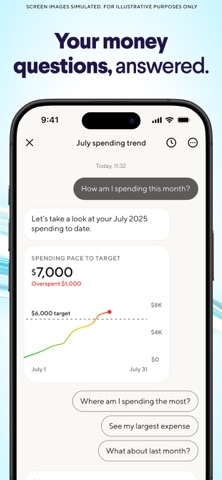
- SoFi Coach AI: A brand-new conversational financial guide powered by human financial planners that analyzes your spending, budget, and credit score.
- High-Yield Savings Vaults: Dedicated spaces to organize emergency funds and specific savings goals with competitive APY offerings for qualifying members.
- Direct Crypto Trading: Seamless buying, selling, and holding of Bitcoin, Ethereum, Solana, and over 25 other cryptocurrencies inside a regulated banking framework.
- Automated Investing: Hands-off portfolio management through SoFi Wealth, spanning IRAs, Roth IRAs, and automated stock and ETF baskets.
- Credit Monitoring Tools: Instant access to credit reports and score tracking alongside pre-qualification engines for personal loans.
Hands-On Impressions: Performance, Battery, and Thermals
Testing financial apps might not push the A-series Pro chips to their graphical limits, but poor optimization can still cause stuttering and high battery drain. Fortunately, this TestFlight build feels exceptionally responsive, rendering charts, account balances, and market tickers with zero noticeable frame drops on my device's ProMotion display. Memory management is solid, keeping background threads quiet and preventing unnecessary battery drain when sitting idle.
"Our goal with the latest iOS architecture is to deliver a financial companion that feels instant, secure, and entirely frictionless, no matter how complex your portfolio becomes." — SoFi Mobile Engineering Team
Thermal efficiency is pristine, as the app generates no noticeable warmth during extended budgeting sessions or deep dives into investment portfolios. Touch targets are accurately mapped, and biometric authentication via Face ID triggers almost instantaneously upon app launch. Minor visual layout shifts occasionally happen when switching rapidly between volatile crypto dashboards, but these are typical quirks of early beta software.
System Requirements & Requested Permissions
To run this TestFlight build smoothly, your Apple device must be running iOS 15.0 or later, though optimization is clearly tailored for modern Apple Silicon hardware. The app requests standard privacy permissions, including Face ID for secure sign-in, local network access for synchronization, and optional push notifications for transaction alerts. Apple's strict sandboxing ensures that all your sensitive financial credentials remain encrypted and secure within the iOS keychain.
Pros & Cons: Beta Impressions
✓ The Highs (What We Love)
- Unified Hub: Banking, investing, and crypto in one single interface.
- AI Integration: SoFi Coach provides genuinely useful spending insights.
- Performance: Buttery-smooth UI rendering on 120Hz displays.
✕ Beta Caveats (Room for Polish)
- Layout Glitches: Minor text overlap during rapid crypto tab switching.
- Data Sync: Linked external accounts occasionally require manual re-authentication.
- Slot Limits: High demand means TestFlight availability fluctuates constantly.
Current TestFlight Slot Situation & Availability
Apple enforces a strict 10,000-tester ceiling for public TestFlight beta links, which creates high competition for popular financial utilities like this one. Social Finance, LLC manages slot turnover carefully by purging inactive testers every few weeks to let new users in. If you tap the installation link and find the beta is currently full, check back during off-peak morning hours when Apple drops expired credentials.
Step-by-Step TestFlight Installation Guide
Getting this beta up and running on your iPhone or iPad takes less than two minutes if you follow these simple instructions. Make sure your device meets the minimum operating system requirements before you begin the process.
- Download TestFlight: Head to the official App Store and install Apple's official TestFlight application onto your device.
- Open the Beta Link: Navigate to Codewing and tap the official TestFlight invitation link for SoFi - Banking & Investing.
- Accept the Invite: Your device will automatically launch TestFlight, displaying the app details and release notes; tap "Accept" to join.
- Install the Build: Tap "Install" to download the beta package safely over your current internet connection.
- Provide Feedback: If you encounter bugs or visual quirks, use the built-in TestFlight screenshot reporting tool to send logs directly to the developers.
Frequently Asked Questions
Is SoFi - Banking & Investing safe to install via TestFlight?
Yes, absolutely. Every TestFlight build goes through Apple's automated screening process and runs inside a secure iOS sandbox environment, protecting your device and personal data.
What should I do if the SoFi - Banking & Investing beta is full?
If slots are maxed out, bookmark this page on Codewing. Beta spots frequently open up when developers purge inactive testers or release major milestone updates.
Will installing this beta overwrite my App Store version or delete save data?
TestFlight builds automatically replace your stable App Store version while preserving your underlying user data, login tokens, and account settings safely in the cloud.
How long do TestFlight beta invitations and builds last?
Every TestFlight build has an active lifespan of 90 days from the moment it is uploaded, after which it expires and requires an update through the TestFlight app.
Are in-app purchases free during TestFlight beta testing?
Any simulated financial transactions or sandbox upgrades processed within TestFlight environments use fake testing currencies and will not charge your real credit cards.
Final Editorial Verdict
SoFi - Banking & Investing continues to prove why it is one of the most comprehensive digital finance platforms available on mobile. While minor UI quirks exist in this experimental build, the sheer convenience of combining banking, investing, and AI coaching into a single lightning-fast app makes it a mandatory download. Score: 4.8 / 5.
Developer Support & Official Resources
Stay updated on patch notes, maintenance windows, and feature roadmaps directly from the official developer channels.
Never miss an opening for SoFi - Banking & Investing.
Apple limits TestFlight betas to 10,000 testers, and this program is currently at capacity. CodeWings Plus continuously monitors slot availability 24/7 and sends you an instant alert the second a spot opens up.






