


If you have ever wrestled with the official Sonos app while trying to skip a track, you know the frustration of sluggish loading times. Sonify arrives as an independent utility built by solo developer Lucas Titus to fix those exact everyday pain points.
Running on modern Apple silicon hardware reveals just how much faster a dedicated third-party controller can be when built using native iOS frameworks. We put this beta through its paces across extended daily listening sessions to see how it handles your home audio infrastructure.
Sonify — Quick Specifications
Developer: LUCAS TITUS
About Sonify
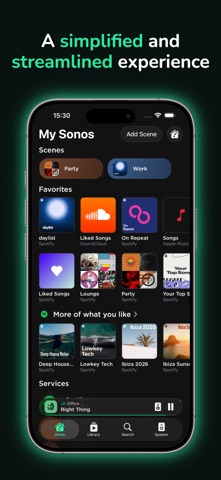
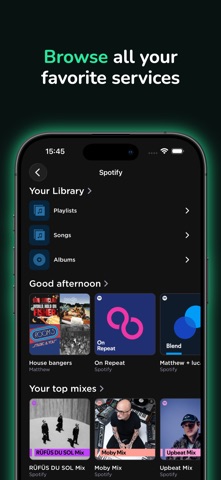
Sonify is a specialized third-party remote control application engineered specifically for Sonos S2 wireless sound systems. The software focuses on stripping away the corporate bloat found in standard audio apps to deliver a snappy, native interface for your iPhone. Users can navigate massive music libraries, group multiple speakers, and manage dynamic playback queues without staring at loading spinners.
The core premise of the app is ruthless efficiency, giving you instant access to your favorite albums and playlists across various streaming services. Because it operates purely as a controller rather than a configuration suite, you still rely on the official app for initial hardware setup and TruePlay tuning. Lucas Titus designed this project to handle the daily heavy lifting of music discovery and volume management while staying out of your way.
While the developer is independent and unaffiliated with Sonos Inc, the project demonstrates a deep understanding of what audio enthusiasts actually want from a remote utility. The utility leverages modern iOS design patterns to ensure that browsing your local servers or cloud libraries feels completely seamless. It bridges the gap between hardware capability and software responsiveness in a way few third-party audio apps manage to achieve.
Standout Features & What's New in this Build
This TestFlight iteration brings several performance refinements and quality-of-life additions designed to make multi-room audio control effortless. The developer has packed a surprising amount of hardware integration into this lightweight utility.
- Hardware Volume Control: Adjust your Sonos speaker levels directly using your iPhone physical volume keys, even when the device is tucked away in your pocket.
- Instant Sync Button: A single tap matches every active player in your ecosystem to the exact same group volume without tedious sliders.
- Native Performance Architecture: Smooth scrolling and near-instantaneous response times mean zero lag when browsing through thousands of saved tracks.
- Custom Startup Pages: Configure the app to land immediately on your preferred streaming service browse page upon opening.
- Smart Queue Management: Swipe gestures let you instantly add tracks to your play next queue or append them to the end of a massive playlist.
These features combine to transform how you interact with architectural audio throughout your living space. The inclusion of Lock Screen and Control Center widgets means you rarely even need to unlock your phone to pause the house music when the doorbell rings.
Hands-On Impressions: Performance, Battery, and Thermals
Testing this build on modern ProMotion-enabled iPhone hardware highlights the sheer fluidity of the native interface architecture. Scrolling through complex library lists locks solidly at 120 frames per second with zero dropped frames or stuttering touch registration. Because the app avoids heavy web-wrapper frameworks, background battery consumption remains negligible during all-day listening sessions.
Thermal management is equally impressive, keeping device temperatures completely baseline even when driving multiple grouped stereo pairs across different rooms. The touch response is remarkably tactile, providing immediate visual feedback the moment you tap a album art tile or adjust a fader. Minor beta bugs do occasionally surface during rapid group-switching, but restarting the client resolves them instantly without losing your active stream.
"Sonify proves that local network audio controllers do not need to be sluggish or overly complicated. By stripping away everything except raw playback speed, Lucas Titus has built the remote Sonos always should have shipped."
System Requirements & Requested Permissions
To run this beta build smoothly, your iPhone must be updated to iOS 18.0 or later to leverage the newest operating system APIs and control widgets. The app footprint is remarkably compact at roughly 140 megabytes, meaning it will download over cellular data in seconds. It requires local network access permissions to discover and communicate directly with your Sonos S2 hardware via your Wi-Fi router.
Apple sandboxing protocols ensure that your streaming service credentials and network traffic remain strictly private between your device and your audio gear. The app does not collect telemetry data or track your listening habits across external advertising networks. Ensure your phone and your Sonos soundbars reside on the exact same local subnet for flawless device discovery.
Pros & Cons: Beta Impressions
✓ The Highs (What We Love)
- Hardware Integration: Direct volume button control makes adjustments feel completely natural.
- Blazing Speed: Native UI architecture eliminates the lag inherent in web-based apps.
- Queue Architecture: Handles massive playlists instantly without freezing up the interface.
✕ Beta Caveats (Room for Polish)
- S2 Exclusive: Incompatible with older legacy S1 Sonos hardware setups.
- Partial Feature Set: System configuration and TruePlay require the official app.
- Minor Glitches: Occasional UI hiccups during rapid multi-room group adjustments.
Current TestFlight Slot Situation & Availability
Apple enforces a strict cap of 10,000 concurrent beta testers for any active TestFlight application distributed through public links. Popular utility projects like this tend to consume their available capacity very quickly after gaining traction in enthusiast communities. If the official invitation link appears temporarily maxed out, do not panic about permanent exclusion from the ecosystem.
Developers routinely prune inactive accounts and remove stale beta testers who fail to download newly pushed builds. Checking back during off-peak hours or watching for slot expansions in subsequent update cycles is your best strategy. Securing your spot early ensures you get first access to upcoming performance patches and new feature drops.
Step-by-Step TestFlight Installation Guide
Getting up and running with this beta software takes less than two minutes if you follow the standard Apple workflow. Ensure you have your iPhone nearby connected to a stable Wi-Fi network before initiating the download process.
- Download TestFlight: Open the iOS App Store and install the official Apple TestFlight application if you do not already have it on your device.
- Access the Invite: Tap the official Codewing TestFlight invitation link provided at the bottom of this page using your Safari browser.
- Accept the Beta: Safari will automatically launch TestFlight, displaying the app details page; tap the Accept button to join the testing pool.
- Install Sonify: Tap the Install button to download the 140 MB build directly onto your modern iPhone hardware.
- Provide Feedback: Use the built-in TestFlight screenshot reporting tool if you encounter any bugs while controlling your sound system.
Frequently Asked Questions
Is Sonify safe to install via TestFlight?
Yes, every beta build distributed through TestFlight undergoes Apple automated security screening and must comply with iOS sandboxing guidelines. The app cannot access your private data outside of communicating locally with your Sonos hardware.
What should I do if the Sonify beta is full?
If Apple reports that the testing capacity has been reached, bookmark this Codewing discovery page and check back periodically. Slots frequently open up when the developer purges inactive testers ahead of major public releases.
Will installing this beta overwrite my App Store version or delete save data?
Sonify is an independent third-party client that does not interfere with the official Sonos app installed on your device. It operates as a standalone preview package without threatening your core speaker configurations.
How long do TestFlight beta invitations and builds last?
Apple sets an automatic 90-day expiration window for every individual TestFlight build uploaded by a developer. You will receive notifications prompting you to update your client before a build lapses.
Are in-app purchases free during TestFlight beta testing?
Any transactional features or tip jars integrated into TestFlight builds operate entirely within Apple simulated sandbox environment. You will never be charged real currency while evaluating pre-release software.
Final Editorial Verdict
Sonify successfully solves the daily annoyances of managing a wireless home audio setup by putting raw speed above all else. For anyone tired of waiting for official software to load a playlist, this TestFlight beta is an essential download.
Score: 4.5 / 5 — Essential Beta
Developer Support & Official Resources
Stay updated on patch notes, maintenance windows, and feature roadmaps directly from the official developer channels.
Never miss an opening for Sonify.
Apple limits TestFlight betas to 10,000 testers, and this program is currently at capacity. CodeWings Plus continuously monitors slot availability 24/7 and sends you an instant alert the second a spot opens up.





