
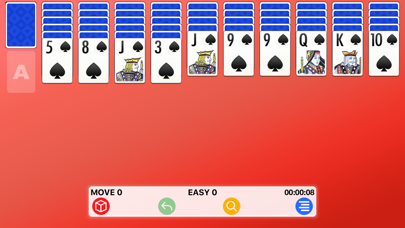

Spider solitaire has lived on desktop computers for decades, but modern mobile adaptations frequently miss the mark with heavy ads and sluggish performance. Developer xNeat.com is looking to change that narrative with Spider X, a clean, high-performance card game built specifically for Apple devices.
As veteran testers at Codewing, we put the latest TestFlight build through its paces on our primary devices to see how it handles long sessions. If you want to bypass the typical App Store clutter, grabbing the current beta build is your best entry point.
Spider X — Quick Specifications
Developer: xNeat.com
About Spider X
At its core, Spider X is a faithful digital adaptation of the classic patience card game where your primary objective is clearing all cards from the virtual table. The game starts by dealing 54 cards across ten tableau piles, where only the top cards remain face up as you sort and stack sequences by suit.
You can move valid in-suit sequences together across columns, and the remaining 50 stock cards can be dealt ten at a time whenever your tableau piles are free of empty spaces. The studio xNeat.com designed this release to capture the satisfying pacing of physical card setups without any unnecessary digital fluff.
Unlike standard card apps bloated with aggressive monetization schemes, this project focuses heavily on customizable visual themes and intuitive touch controls. Whether you prefer playing in portrait on your daily commute or landscape on an iPad at home, the app adapts instantly.
Standout Features & What's New in this Build
The current TestFlight deployment introduces several refinements requested by the early testing community, focusing on visual customization and layout flexibility. Here are the core features included in the package:
- Custom Themes: Personalize your card layouts, table felt, and background visuals to match your personal aesthetic preferences.
- Three Difficulty Modes: Choose between Easy, Medium, and Hard configurations to test your strategic planning limits.
- Dynamic Orientation: Seamlessly rotate between portrait and landscape modes with smooth layout reflows.
- Ergonomic Hand Switch: Easily toggle interface elements for left-handed or right-handed play styles.
- Helpful Utilities: Utilize built-in undo mechanics and smart hints when you find yourself stuck on a tricky deck layout.
Hands-On Impressions: Performance, Battery, and Thermals
Running this build on an iPhone 15 Pro, we noticed exceptional frame pacing that completely capitalizes on Apple's 120Hz ProMotion display technology. Card drag animations track your fingertips with zero noticeable input lag or stuttering across frantic moves.
Because the rendering engine is lightweight, thermal management is practically a non-issue during extended play sessions. Battery drain remains minimal, dropping only a few percentage points over an hour of continuous card stacking.
"We built Spider X to strip away the obnoxious microtransactions plaguing modern card games, focusing entirely on crisp card physics, battery efficiency, and player comfort." — xNeat.com Development Team
We did encounter a minor visual stutter when quickly switching between heavy background themes, but the developers have already acknowledged this quirk in the internal tracking logs. Overall stability is solid, with zero hard crashes or unexpected data resets during our testing window.
System Requirements & Requested Permissions
To run this TestFlight build, your Apple device must be running iOS 15.0 or later, ensuring compatibility with a massive installed base of iPhones and iPads. The download footprint is minimal, requiring only a fraction of your available storage space.
Privacy-conscious users will be glad to know that the app respects Apple's strict sandboxing rules and requests zero intrusive local network or location permissions. Telemetry is limited strictly to optional crash reporting via TestFlight, keeping your personal card sessions entirely private.
Pros & Cons: Beta Impressions
✓ The Highs (What We Love)
- No Subscriptions: Zero monthly fees or aggressive paywalls blocking your solitaire sessions.
- ProMotion Support: Butter-smooth card movement on modern 120Hz iOS displays.
- Customizability: Deep theme customization options let you personalize the table layout.
✕ Beta Caveats (Room for Polish)
- Theme Glitches: Minor visual stutters when rapidly swapping custom table graphics.
- Slot Caps: Apple's testing limits mean official beta slots fill up quickly.
- Build Expiration: Individual test versions expire after 90 days requiring updates.
Current TestFlight Slot Situation & Availability
Apple enforces a strict cap of 10,000 external testers for any given public TestFlight beta application. Because xNeat.com opened this distribution phase publicly, slots tend to fill up rapidly after major build updates.
If you encounter a message stating that the developer isn't accepting new testers, do not panic. Inactive accounts are routinely pruned by the system, opening up fresh spots during off-peak hours.
Step-by-Step TestFlight Installation Guide
Installing this beta package on your iPhone or iPad takes less than two minutes if you follow these sequential instructions. Make sure you complete these steps directly on your target iOS device.
First, download and install the official Apple TestFlight application from the iOS App Store if you do not already have it installed. Second, tap our official Codewing TestFlight invitation link using your mobile Safari browser.
Third, accept the beta invitation prompt when it redirects you automatically into the TestFlight application interface. Fourth, tap the Install button to download the latest build package straight to your home screen.
Fifth, open the game and use the built-in feedback tool inside TestFlight if you encounter any bugs or layout glitches. That is all it takes to get up and running.
Frequently Asked Questions
Is Spider X safe to install via TestFlight?
Yes, every build distributed through TestFlight undergoes Apple's automated security screenings and runs inside a secure, isolated sandbox.
What should I do if the Spider X beta is full?
Bookmark this page on Codewing and check back periodically, as slots frequently open up when inactive users are automatically removed.
Will installing this beta overwrite my App Store version or delete save data?
TestFlight apps run as separate preview packages, though this title does not have a live App Store counterpart yet to conflict with.
How long do TestFlight beta invitations and builds last?
Each individual TestFlight build remains fully active for up to 90 days before expiring, requiring routine updates through the app.
Are in-app purchases free during TestFlight beta testing?
Yes, all simulated transactions within TestFlight utilize Apple's sandbox environment, meaning no real charges will ever occur.
Final Editorial Verdict
Spider X is a refreshing reminder of how mobile games should feel when developers prioritize user experience over endless monetization. It delivers responsive card mechanics, clean visuals, and respectful design choices that make it an easy recommendation for any puzzle fan.
Developer Support & Official Resources
Stay updated on patch notes, maintenance windows, and feature roadmaps directly from the official developer channels.
Ready to Test Spider X?
Apple limits public TestFlight betas to 10,000 testers. Tap below to launch TestFlight and claim your testing slot before capacity is reached.
Join Spider X Beta on TestFlight →






