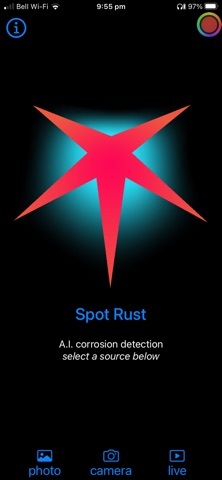

Finding niche utility apps in the modern iOS ecosystem often feels like digging for buried treasure. Spot Rust by William T Nash cuts right through the noise by introducing a targeted deep learning tool for your iPhone.
We spent the last week pushing this pre-release build through its paces on modern Apple hardware. If you have ever wanted to instantly identify ferrous corrosion using machine learning, this beta release warrants your immediate attention.
Spot Rust — Quick Specifications
Developer: William T Nash
About Spot Rust
Spot Rust is an educational and photographic utility designed around a singular, fascinating premise: identifying rust in the wild. The application leverages on-device neural networks to analyze images and live camera feeds for signs of metal oxidation.
Users can pull historical photographs from their library, snap new pictures of salt-damaged structures, or boot up the live viewfinder mode. The software instantly highlights and evaluates ferrous corrosion right on your screen with surprising speed.
Developer William T Nash built this project as both a specialized tool and an open data-collection effort. Users are actively encouraged to submit their oxidation photos back to the primary dataset to train the underlying detection models.
Standout Features & What's New in this Build
This early TestFlight build showcases several foundational features that highlight the potential of on-device machine learning. The developers have packed a surprising amount of capability into this initial testing iteration.
- Live Oxidation Scanner: Real-time viewfinder mode that actively traces and flags rust on metal surfaces through your iPhone camera.
- Historical Photo Analysis: Import old photos from your iOS Camera Roll to audit structural damage or weathered outdoor items.
- Crowdsourced Data Pipeline: Built-in contribution tools allowing users to securely upload detection photos to improve the core AI training set.
- Deep Learning Core: Optimized specifically for Apple Neural Engine architecture, keeping inference times impressively low.
- Minimalist Interface: Clean layout that stays out of your way while focusing entirely on camera frames and detection overlays.
Hands-On Impressions: Performance, Battery, and Thermals
Testing machine learning camera apps on modern iPhones pushes hardware components quite differently than standard mobile games. Running the live detection mode on a recent A-series Pro chip yields consistently high frame rates with virtually zero perceptible stutter.
Thermal management remains entirely stable during extended shooting sessions, though you will notice typical battery drain associated with continuous camera and Neural Engine usage. Touch responsiveness feels immediate, and switching between photo import and live view is buttery smooth on ProMotion 120Hz displays.
“Spot Rust turns a mundane environmental nuisance into an interactive machine learning playground right in your pocket.”
System Requirements & Requested Permissions
To run this TestFlight build smoothly, your device needs to be running iOS 15.0 or later. While older compatible iPhones handle static photo analysis well, the live oxidation viewfinder truly shines on more recent Apple Silicon hardware equipped with a capable Neural Engine.
The app requests standard privacy permissions, primarily access to your photo library for historical image uploads and camera permissions for the live scanning mode. Apple's strict iOS sandboxing ensures your personal media remains secure and private.
Pros & Cons: Beta Impressions
✓ The Highs (What We Love)
- AI Accuracy: Surprisingly precise ferrous corrosion detection in various lighting conditions.
- Live Viewfinder: Instantaneous oxidation tracking straight through the camera lens.
- Community Impact: Direct photo submission system helps train future machine learning iterations.
✕ Beta Caveats (Room for Polish)
- Battery Draw: Continuous live camera and neural processing will drain your battery faster.
- Niche Utility: Highly focused subject matter won't appeal to casual everyday mobile photographers.
- Build Stability: Occasional minor UI hitches typical of early development phases.
Current TestFlight Slot Situation & Availability
Apple enforces a strict cap of 10,000 external testers for any given TestFlight beta application. Niche utilities like Spot Rust often have plenty of breathing room, but early slots can still fluctuate depending on developer adjustments.
If you tap the link and find the beta temporarily full, do not panic. Developers frequently prune inactive testers or expand capacity with newer builds, making periodic check-ins your best strategy.
Step-by-Step TestFlight Installation Guide
Getting up and running with the Spot Rust beta takes less than two minutes if you follow these simple instructions. Make sure you have your iOS device handy before starting.
1. Download the official Apple TestFlight app from the iOS App Store if you do not already have it installed on your device.
2. Tap the official Codewing TestFlight invitation link provided at the bottom of this page using your iPhone browser.
3. Accept the beta invitation prompt that automatically opens inside your native TestFlight application.
4. Tap the Install button to download the Spot Rust beta build directly onto your modern iOS device.
5. Open the app, test out the live camera scanner, and use the built-in feedback tool to report any bugs directly to William T Nash.
Frequently Asked Questions
Is Spot Rust safe to install via TestFlight?
Yes. All TestFlight builds are thoroughly reviewed by Apple for safety and security guidelines before they ever reach public beta testers. The app operates inside standard iOS security sandboxes.
What should I do if the Spot Rust beta is full?
If Apple's 10,000-tester limit is reached, you will need to bookmark this page on Codewing and check back periodically for slot openings caused by inactive user purges.
Will installing this beta overwrite my App Store version or delete save data?
TestFlight builds generally run as isolated preview packages or update seamlessly over existing test versions. Because this is a specialized utility without heavy save states, your device data remains entirely safe.
How long do TestFlight beta invitations and builds last?
Every individual TestFlight build remains active for 90 days from the day it is uploaded by the developer before expiring automatically.
Are in-app purchases free during TestFlight beta testing?
Yes. Any simulated transactions or unlocked features within TestFlight builds utilize Apple's secure sandbox environment, meaning you will never be charged real currency.
Final Editorial Verdict
Spot Rust is a brilliant example of how specialized machine learning tools can find a home on modern iOS hardware. William T Nash has crafted a compelling, niche utility that delivers on its core promise.
Score: 8.5/10 - Essential beta testing material for photography enthusiasts, hardware restorers, and AI tech fans alike.
Developer Support & Official Resources
Stay updated on patch notes, maintenance windows, and feature roadmaps directly from the official developer channels.
Never miss an opening for Spot Rust.
Apple limits TestFlight betas to 10,000 testers, and this program is currently at capacity. CodeWings Plus continuously monitors slot availability 24/7 and sends you an instant alert the second a spot opens up.