
Every parent knows the exhausting daily struggle of trying to get kids through morning routines, homework, and bedtime without losing their patience. Traditional paper sticker charts are messy, easily misplaced, and entirely impractical when you are trying to manage multiple children on the fly. Starly arrives on the modern iOS scene to completely digitize and streamline this familiar domestic workflow.
Developed by Sam Keys, this application bridges the gap between old-school fridge motivation and modern digital convenience without resorting to annoying video game tropes. We loaded up the latest TestFlight build onto an iPhone 15 Pro and an M2 iPad Pro to test its responsiveness, visual clarity, and everyday usability.
Starly - Behavior Chart — Quick Specifications
Developer: Sam Keys
About Starly - Behavior Chart
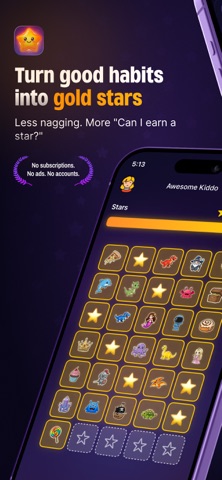
Starly serves as a focused, calm behavior tracking utility designed specifically to turn everyday chores like brushing teeth and potty training into rewarding moments. Instead of overwhelming parents with complex point formulas or distracting mini-games, the application concentrates purely on streamlined habit reinforcement. You simply assign a star, log the reason, and instantly watch your child build positive daily momentum.
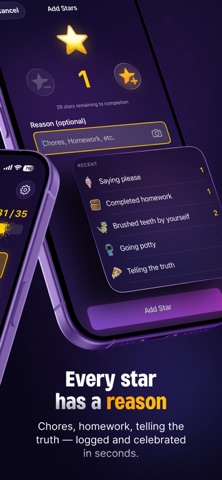
The core premise centers around a zero-friction experience where adults can award progress markers in a single gesture without navigating deep nested menus. It completely eliminates the tedious setup chore lists usually demanded by productivity apps. Sam Keys designed the platform to respect parent schedules, featuring a lightweight interface that remembers recent reasons and keeps daily tracking swift.
Beyond solo habit tracking, the utility scales effortlessly across the entire family household through a unified multi-kid dashboard. Parents can reward multiple children simultaneously with a single tap or swipe across individual profile cards. Furthermore, younger users can securely view read-only versions of their personal progress boards directly on their own devices.
Standout Features & What's New in this Build
This recent pre-release distribution introduces several clever additions that elevate the user experience well beyond standard utility frameworks. The development cadence has focused heavily on aesthetic personalization and frictionless family sharing capabilities.
- Photo-Powered Stickers: Snap any real-world object, family pet, or child's drawing, and the app automatically removes the background to generate custom stickers instantly.
- Extensive Asset Library: Access over 150 built-in sticker assets spanning dinosaurs, space themes, sea creatures, pirates, and holiday categories.
- Complete Customization: Tailor nebula color schemes, progress bar aesthetics, and custom rewards ranging from movie nights to special toys.
- One-Tap Family Dashboard: Award progress stars to individual children or the entire household instantly via fluid card swiping.
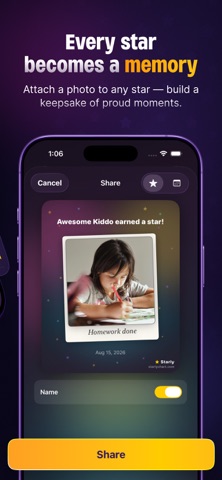
- Exportable Keepsakes: Transform completed charts or individual milestones into beautiful shareable cards for family group chats and grandparents.
Hands-On Impressions: Performance, Battery, and Thermals
Testing this build across Apple Silicon hardware reveals an application that runs with exceptional fluidity and zero perceivable latency. Thanks to native SwiftUI architecture, scrolling through custom sticker libraries and switching between child profiles utilizes 120Hz ProMotion displays smoothly. Battery draw is remarkably minimal, keeping thermal levels entirely stable even during extended family routine management sessions.
"Starly is engineered to look at together side by side, stripping away the algorithmic clutter of modern child apps to focus purely on positive reinforcement."
Touch responsiveness is immediate, and background syncing operates seamlessly the moment your device reconnects to local Wi-Fi networks. Visual rendering of custom photo cutouts happens almost instantly, demonstrating clean local processing power without bogging down device resources.
System Requirements & Requested Permissions
To run this beta build smoothly, your Apple device must be running iOS 26.0 or later, ensuring full compatibility with modern spatial and UI frameworks. The app is universal, offering tailored layouts optimized for both iPhone form factors and larger iPad displays. Privacy is handled entirely through local Apple sandboxing, with family data residing strictly in your personal iCloud account rather than developer servers.
Permissions are kept remarkably lean, requesting only standard local network access for cross-device family synchronization and optional push notifications for daily reminders. Because there are no user accounts or passwords to configure, setup takes less than thirty seconds right out of the box.
Pros & Cons: Beta Impressions
✓ The Highs (What We Love)
- Custom Cutouts: Automatic background removal for personal photo stickers is delightfully magical for kids.
- Frictionless Logging: Pressing and holding any empty star awards recognition in a single effortless gesture.
- Privacy First: Zero cloud servers or accounts required; everything syncs privately via your own iCloud storage.
✕ Beta Caveats (Room for Polish)
- Build Stability: Occasional minor UI layout shifts when rotating between portrait and landscape modes on iPad.
- Device Spread: Read-only client syncing occasionally requires a manual pull-to-refresh during poor network conditions.
- Asset Caching: Large imported photo libraries can temporarily inflate local cache sizes before optimization runs.
Current TestFlight Slot Situation & Availability
Apple enforces a strict limit of 10,000 concurrent testers for any public TestFlight beta distribution. Because this utility addresses a universal parenting pain point with high polish, slots tend to fill up rapidly after major patch drops. If the invitation link initially reports that the build is full, do not panic; developers periodically purge inactive testers to free up testing capacity.
Checking back during off-peak hours or bookmarking this discovery portal provides the best chance to secure an active allocation. Early access grants you direct communication channels with Sam Keys to report bugs and suggest workflow improvements.
Step-by-Step TestFlight Installation Guide
Getting up and running with the beta version requires just a few straightforward steps using Apple's official testing application. Follow this numbered guide to install the build safely onto your flagship iPhone or iPad:
- Open the App Store on your iOS device and download the official Apple TestFlight application if you have not already installed it.
- Tap the official Codewing TestFlight invitation link provided on this page to launch the registration portal directly.
- Accept the beta invitation prompt within the TestFlight interface to acknowledge terms and preview requirements.
- Tap the Install button to download Starly onto your modern Apple hardware.
- Launch the app, test out the custom sticker builder, and use the built-in feedback button in TestFlight to report any anomalies directly to the developer.
Frequently Asked Questions
Is Starly - Behavior Chart safe to install via TestFlight?
Yes, every beta distributed through Apple's TestFlight framework undergoes automated security screening and runs safely within iOS system sandboxes, isolating it from your personal data.
What should I do if the Starly - Behavior Chart beta is full?
If current tester capacity is reached, check back periodically for slot turnover, or save this page on Codewing to catch the next capacity expansion immediately.
Will installing this beta overwrite my App Store version or delete save data?
TestFlight builds operate as standalone pre-release packages that safely coexist with or replace existing installations while preserving your local iCloud container records.
How long do TestFlight beta invitations and builds last?
Each individual TestFlight build remains active for 90 days from its upload date, after which time you will need to update to a newer beta version.
Are in-app purchases free during TestFlight beta testing?
Yes, all simulated transactions executed inside TestFlight use Apple's sandbox environment, meaning you can test premium theme packs and multi-kid features at zero financial cost.
Final Editorial Verdict
Starly succeeds by keeping its core focus sharp, elegant, and entirely free of intrusive subscription paywalls or distracting gamified bloat. It provides a genuinely calming digital workspace that parents and children can happily navigate side by side. For any household looking to gamify chores without the digital chaos, securing a testing slot is an absolute no-brainer.
Beta Test Verdict Score: 4.8 / 5 Stars
Developer Support & Official Resources
Stay updated on patch notes, maintenance windows, and feature roadmaps directly from the official developer channels.
Never miss an opening for Starly - Behavior Chart.
Apple limits TestFlight betas to 10,000 testers, and this program is currently at capacity. CodeWings Plus continuously monitors slot availability 24/7 and sends you an instant alert the second a spot opens up.