
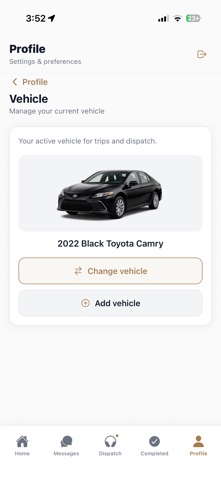

Professional transportation workflows on iOS have long needed a modernization overhaul. Austin Premier Rides LLC looks to fix this with Swary, a dedicated utility for livery drivers.
We put the latest beta build through its paces on an iPhone 15 Pro. Here is our complete look at the app's utility, stability, and installation steps.
Swary — Quick Specifications
Developer: Austin Premier Rides LLC
About Swary
Swary is designed specifically for professional chauffeurs and black car operators managing complex daily itineraries. Drivers use the interface to review active routes, accept assigned jobs, and update dispatch in real time.
The platform replaces disjointed text messages and radio calls with a structured digital trip sheet. Core functions include step-by-step progress logging from initial routing to final passenger drop-off.
Austin Premier Rides LLC developed this software out of firsthand industry experience. The studio built the ecosystem to handle the rigorous demands of executive transportation companies.
Standout Features & What's New in this Build
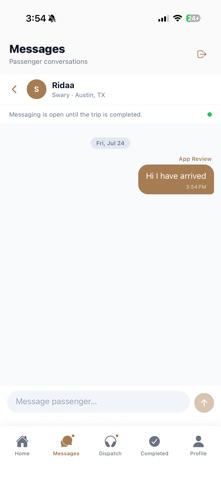
This TestFlight release refines dispatch communication and adds offline synchronization safeguards. Drivers can now log trip states seamlessly even when cellular reception drops.
- IR, OL, POB, DO Workflow: Fast swipe mechanics let drivers confirm passenger pickup and drop-off states instantly.
- Overflow Job Board: Browse unassigned trips posted by dispatch, review pay rates, and accept jobs with a single tap.
- Apple Maps Integration: Launch turn-by-turn navigation directly from active route cards without leaving the app ecosystem.
- Offline Sync Engine: Continue managing active trips underground or in dead zones with automatic cloud sync upon reconnection.
- Secure Authentication: Sign in via phone verification codes and secure your shift access using Face ID.
Hands-On Impressions: Performance, Battery, and Thermals
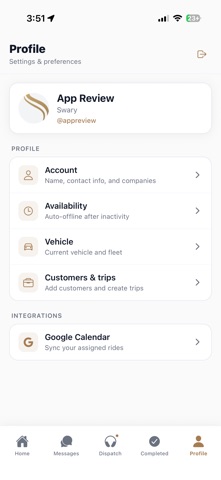
Running the latest build on Apple Silicon hardware yields snappy touch response and instant screen transitions. The interface scales gracefully across modern OLED panels, keeping battery consumption remarkably low during long shifts.
Thermal performance remains stable throughout extended navigation sessions on ProMotion displays. Dispatch chat notifications push through instantly without causing background frame drops or stuttering.
"Swary streamlines executive transport management by cutting out administrative friction and letting drivers focus entirely on the road ahead."
System Requirements & Requested Permissions
Swary requires an iPhone or iPad running iOS 15.1 or later. The download package sits at around 120 MB, leaving plenty of breathing room on standard device storage tiers.
The app requests precise location permissions for live route tracking and geofencing. Push notification access is essential for receiving instant dispatch assignments and live chat updates.
Pros & Cons: Beta Impressions
✓ The Highs (What We Love)
- Workflow Speed: Swipe-to-confirm trip steps reduce driver distraction.
- Offline Support: Local data caching prevents data loss in cellular dead zones.
- UI Clarity: High-contrast text remains legible in bright daylight conditions.
✕ Beta Caveats (Room for Polish)
- Account Gate: Requires an active corporate administrator login to function.
- GPS Draw: Continuous background tracking impacts older battery capacities.
- Sync Latency: Occasional delays when reconnecting to weak cellular networks.
Current TestFlight Slot Situation & Availability
Apple enforces a strict 10,000-tester ceiling on all public TestFlight distribution channels. Popular utility releases often hit capacity within hours of going live on discovery platforms.
Beta slots open and close dynamically as Austin Premier Rides LLC adjusts testing cohorts. Checking back frequently on Codewing gives you the best chance to secure an incoming testing slot.
Step-by-Step TestFlight Installation Guide
First, install the official Apple TestFlight application from the App Store on your supported iOS device. Make sure your device runs iOS 15.1 or newer.
Next, tap the official Codewing TestFlight invitation link provided at the bottom of this page. This action automatically launches the TestFlight client on your iPhone.
Tap the Accept button to join the beta program and acknowledge developer pre-release terms. Choose Install to download the 120 MB build onto your home screen.
Sign in using your corporate credentials and verify your account via the secure one-time passcode. Submit bug reports directly through the TestFlight feedback interface if you encounter unexpected behavior.
Frequently Asked Questions
Is Swary safe to install via TestFlight?
Yes. Every TestFlight build undergoes Apple's automated malware and security screening. The app runs inside iOS secure sandboxing to protect your personal data.
What should I do if the Swary beta is full?
If tester slots are maxed out, bookmark this Codewing page and check back periodically. Developers frequently prune inactive testers to open up fresh testing capacity.
Will installing this beta overwrite my App Store version or delete save data?
TestFlight installs run as isolated beta packages alongside or replacing standard retail versions. Your account settings sync directly to cloud servers via your corporate login.
How long do TestFlight beta invitations and builds last?
Apple sets an expiration window of 90 days for every TestFlight build. Austin Premier Rides LLC will push regular updates before this window closes to keep your app active.
Are in-app purchases free during TestFlight beta testing?
Swary operates as a free enterprise utility requiring a company-issued login rather than consumer microtransactions. All sandbox features are unlocked for authorized testers.
Final Editorial Verdict
Swary delivers a polished, responsive mobile workflow for professional drivers operating within corporate fleets. Its robust offline syncing and clear trip steps make it an essential utility for modern chauffeurs.
Developer Support & Official Resources
Stay updated on patch notes, maintenance windows, and feature roadmaps directly from the official developer channels.
Never miss an opening for Swary.
Apple limits TestFlight betas to 10,000 testers, and this program is currently at capacity. CodeWings Plus continuously monitors slot availability 24/7 and sends you an instant alert the second a spot opens up.


