
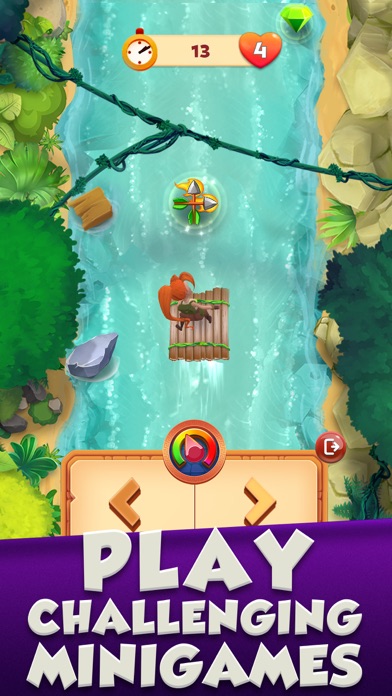

The iconic endless runner universe that defined mobile gaming history is undergoing a massive genre pivot with a fresh beta release. Scopely, Inc. has officially opened testing channels for their latest iOS project, transforming a high-octane escape into a tactical brain-teaser.
As a veteran TestFlight tester tracking major studio shifts, I spent the past week putting this unreleased build through its paces on an iPhone 15 Pro. This comprehensive review breaks down the gameplay loop, hardware performance metrics, and everything you need to claim your beta spot.
Temple Run: Adventure — Quick Specifications
Developer: Scopely, Inc.
About Temple Run: Adventure
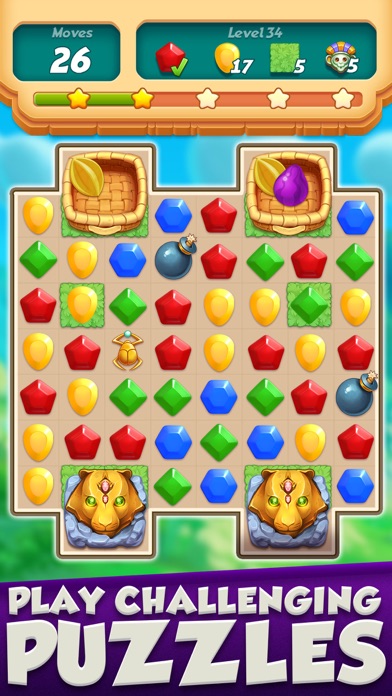
Scopely, Inc. is taking their signature production values and applying them to a grid-based puzzle format that trades adrenaline sprints for calculated moves. Players are tasked with clearing match-3 puzzle boards to systematically uncover the hidden mysteries of an ancient temple realm. Instead of swiping left or right to dodge fire traps, you are matching relic pieces to clear obstacles from your path.
The core premise leans heavily on puzzle-solving mechanics where matches generate special pieces, explosive area-of-effect combos, and board-clearing power-ups. Every successful board clear directly advances your journey deeper into the structural ruins of the sacred site. There are no frantic tilting mechanics here, but rather strategic planning designed to test your spatial awareness and problem-solving speed.
You play alongside franchise icon Scarlett Fox, the veteran adventurer and archaeologist who anchors the narrative campaign. Scarlett acts as your companion throughout the expedition, reacting to cleared obstacles and guiding you through successive chapters of the temple map. The studio history behind this release shows a clear intent to expand casual IP appeal into deeper puzzle engagement loops.
Standout Features & What's New in this Build
This early TestFlight build introduces several foundational gameplay systems and experimental mechanics designed to test server stability and touch responsiveness. The development team has packed this version with specific features aimed at modern mobile hardware capabilities.
- Relic Match-3 Mechanics: Core puzzle boards built around ancient artifact themes, featuring distinct tile-clearing rules and progressive layout complications.
- Character Guidance Integration: Scarlett Fox provides contextual voice lines and visual cues directly on the game board to help navigate tricky puzzle configurations.
- Special Combo Pieces: Advanced tile matching mechanics that trigger cascading board wipes, lightning strikes, and row clearers.
- Progressive Level Design: A sprawling campaign map mapping out multiple temple zones with unique environmental hazards and distinct puzzle objectives.
- Optimized Asset Loading: Streamlined texture compression implemented specifically for this beta build to minimize initial download sizes and memory overhead.
Hands-On Impressions: Performance, Battery, and Thermals
Running this puzzle build on an A17 Pro chip reveals a silky-smooth experience that makes great use of high-refresh-rate touch inputs. Board swipes register instantly without a single frame of perceptible input latency, which is critical for maintaining rhythm during fast puzzle sequences. Thermal output remains completely flat, causing zero noticeable warmth on the chassis even after extended, multi-hour puzzle marathons.
Battery consumption is remarkably conservative compared to heavy 3D action titles, draining roughly five to six percent of total capacity per hour of active play. Scopely has clearly tuned the rendering engine to scale efficiently, preventing background battery drain when pushing notifications are idle. There are minor asset-swapping flickers when transitioning between the world map and active puzzle boards, but nothing that detracts from the core loop.
“Transitioning an endless runner into a structured puzzle adventure is a massive gamble, but the fluid touch response and crisp board animations in this beta prove the framework has solid bones.”
System Requirements & Requested Permissions
To run this TestFlight beta smoothly, your iOS device must be running iOS 15.0 or later as a baseline requirement. While older devices like the iPhone 11 handle the puzzle mechanics well, the build is heavily optimized for modern Apple Silicon architectures including the A-series and M-series Pro processors. You will need a stable internet connection for initial asset synchronization and progress cloud-saving.
Permission requests are refreshingly minimal, sticking strictly to standard Apple sandboxing protocols and local notification delivery for energy recovery alerts. The app does not request unwarranted access to your photo library, camera, or local network peripherals. This streamlined permission footprint highlights a clean engineering approach that respects user privacy right out of the gate.
Pros & Cons: Beta Impressions
✓ The Highs (What We Love)
- Touch Responsiveness: Instantaneous board swipes and combo triggers with zero input lag.
- Thermal Efficiency: Zero device heating during prolonged puzzle sessions, preserving battery health.
- IP Integration: Familiar characters and lore adapted naturally into a fresh genre format.
✕ Beta Caveats (Room for Polish)
- Transition Flickers: Minor visual stutter when shifting between world maps and active levels.
- Slot Scarcity: Apple's testing limits mean access caps fill up extremely quickly.
- Content Depth: Early builds feature a restricted number of chapters awaiting future expansion.

Current TestFlight Slot Situation & Availability
Apple enforces a strict cap of 10,000 active testers per public TestFlight link, creating a high-demand environment for major studio betas. Scopely titles traditionally draw massive crowds, meaning these beta slots fill up within hours of public distribution. Timing your download is crucial to securing access before the developer closes the build queue.
If you encounter a message stating that the developer is not accepting any more testers, do not panic. Developers frequently purge inactive user profiles or expand their testing tiers as new milestone builds drop. Keeping this page bookmarked and checking back during off-peak hours is your best bet for catching an opened slot.
Step-by-Step TestFlight Installation Guide
Getting set up with this beta build takes less than two minutes if you follow a few straightforward preparation steps. Ensure your device is connected to Wi-Fi and running a supported iOS version before jumping into the process.
- Download TestFlight: Open the App Store on your iPhone or iPad and download the official Apple TestFlight application if you haven't already.
- Access the Beta Link: Tap the official Codewing TestFlight invitation link provided at the bottom of this page.
- Accept the Invite: Your device will automatically launch TestFlight, displaying the app details and terms of agreement. Tap "Accept."
- Install the Build: Tap "Install" to download the package directly to your iOS springboard alongside your standard applications.
- Submit Feedback: Play through the puzzles, and use the built-in screenshot feedback tool in TestFlight to report any visual bugs directly to Scopely.
Frequently Asked Questions
Is Temple Run: Adventure safe to install via TestFlight?
Yes, every build distributed through TestFlight is formally reviewed by Apple's automated and manual security pipelines. The app runs inside Apple's strict sandbox environment, preventing unauthorized access to your personal system files.
What should I do if the Temple Run: Adventure beta is full?
If slots are exhausted, check back periodically on Codewing. Developers routinely purge inactive accounts or raise their testing caps, opening fresh registration windows without warning.
Will installing this beta overwrite my App Store version or delete save data?
TestFlight builds run as standalone preview packages that can peacefully coexist with official App Store releases depending on bundle configurations. However, beta save states are experimental and may not carry over to the final public launch.
How long do TestFlight beta invitations and builds last?
Every individual TestFlight build features a strict 90-day expiration window enforced by Apple. Once that period lapses, the build disables itself until the studio pushes an updated beta package.
Are in-app purchases free during TestFlight beta testing?
Yes, any transactional prompts within a TestFlight sandbox build use simulated currency endpoints. You will never be charged real money while testing unreleased features.
Final Editorial Verdict
Scopely has crafted a surprisingly refreshing spin on a classic franchise that translates surprisingly well to touch-driven puzzle mechanics. While early beta quirks like transition flickers remind you that this is an unreleased build, the core performance is rock solid. If you love casual puzzle titles and want an early look at how a legendary IP evolves, grab the beta link immediately.
Developer Support & Official Resources
Stay updated on patch notes, maintenance windows, and feature roadmaps directly from the official developer channels.
Never miss an opening for Temple Run: Adventure.
Apple limits TestFlight betas to 10,000 testers, and this program is currently at capacity. CodeWings Plus continuously monitors slot availability 24/7 and sends you an instant alert the second a spot opens up.






