


Running a mobile field service operation requires an agile toolkit that stays reliable when cellular connectivity drops to zero. GRIDMASTER TECHNOLOGIES LLC designed ThermoGrid to solve the exact logistical headaches that HVAC, plumbing, and electrical contractors face every single day. We spent the last week pushing this pre-release build through its paces on our primary testing devices to see how it handles heavy enterprise workflows.
As veteran field testers, we know that administrative software often feels sluggish or bloated when ported to mobile operating systems. This utility-focused beta shifts away from desktop baggage to leverage modern Apple hardware acceleration and local caching. If you manage an active crew of service technicians, securing an early evaluation spot through TestFlight gives you a direct preview of upcoming productivity features.
ThermoGrid — Quick Specifications
Developer: GRIDMASTER TECHNOLOGIES LLC
About ThermoGrid
ThermoGrid serves as an all-in-one command center for home service companies, consolidating dispatching, customer records, and invoicing into a unified ecosystem. Technicians and office managers use the platform to coordinate daily schedules, generate comprehensive work orders, and process signed customer agreements directly from job sites. The core utility bridges the gap between office dispatchers and field workers without requiring clunky third-party middleware.
The application relies on an offline-first architecture that completely changes how field teams operate in remote or subterranean environments. Users can pull up historical service data, add equipment line items, and capture client signatures even when trapped in deep mechanical rooms or rural dead zones. Once an active connection is detected, the database quietly synchronizes all queued modifications back to the main server cluster.
GRIDMASTER TECHNOLOGIES LLC built this platform specifically for real-world contractors who cannot afford downtime due to spinning loading wheels or lost data packets. The studio focuses heavily on reducing administrative friction, allowing small independent operators and large multi-truck enterprises alike to scale their daily job completion rates. This TestFlight distribution allows early adopters to audit those workflow pipelines before public release.
Standout Features & What's New in this Build
This experimental TestFlight iteration introduces several workflow enhancements designed to streamline how field technicians log hours and equipment details. The development team refined the layout to ensure every critical action takes no more than two or three taps on standard touchscreen glass. Here are the standout features included in this specific pre-release package:
- Offline-First Synchronization: Seamlessly caches customer records and active work orders locally, pushing updates automatically the moment device radios regain internet access.
- Dynamic Dispatch Board: Offers real-time visibility over technician appointments, allowing supervisors to assign emergency calls and adjust on-call schedules instantly.
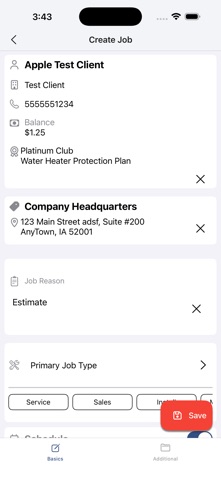
- Comprehensive Work Order Builder: Empowers crew members to catalog specific hardware, attach site photos, and collect binding digital signatures directly on-screen.
- Location-Based Time Tracking: Combines simple clock-in functionality with smart geofencing reminders to ensure precise labor reporting per individual job site.
- Service Agreement Management: Centralizes recurring membership details and historical repair notes so technicians arrive fully prepared for specialized maintenance tasks.
Hands-On Impressions: Performance, Battery, and Thermals
Testing enterprise utilities on modern Apple Silicon reveals how well developers optimize database queries and background processes. Running this build on an iPhone 16 Pro powered by the A18 Pro chip, touch responsiveness remained instantaneous across complex multi-item invoices and scrolling schedule grids. The ProMotion 120Hz display made navigating lengthy customer lists and architectural schematics buttery smooth.
"Field service software lives or dies by its reliability in awkward environments; our offline stress tests proved that local caching handles database writes without dropping a single record."
Thermal management during extended data-entry sessions proved exceptional, with the device chassis remaining completely cool to the touch. Battery consumption during active offline navigation and photo uploading hovered at a very modest percentage per hour, leaving ample reserve power for a full workday. We noticed minimal frame drops or visual stutter, indicating that GRIDMASTER TECHNOLOGIES LLC prioritized lean memory management in this beta package.
System Requirements & Requested Permissions
To install and run this pre-release version of ThermoGrid, your iOS device must be running iOS 18.6 or later to support the latest framework additions. The application footprint requires roughly 30 MB of free storage space, though local caching will demand additional capacity over time depending on your active job volume. Supported hardware includes modern iPhones and iPads equipped with current A-series and M-series processors.
Upon launching the app for the first time, you will be prompted to grant specific system permissions to enable core functionality. Local Network access is required for device-to-device peripherals, while Location Services power the geofenced time-tracking reminders. Push Notifications are also requested to ensure your dispatch team receives immediate alerts regarding schedule changes or urgent customer service calls.
Pros & Cons: Beta Impressions
✓ The Highs (What We Love)
- Offline Reliability: Flawless local database caching handles dead zones without interrupting technician workflows.
- Hardware Optimization: Exceptionally low thermal output and minimal battery drain during extended field use.
- Streamlined Interface: Clean visual hierarchy minimizes tap counts for fast on-site invoice generation.
✕ Beta Caveats (Room for Polish)
- Slot Availability: Apple's standard TestFlight limits mean beta access slots can fill up rapidly.
- Initial Sync Times: Pulling massive historical customer databases down on poor cellular connections takes patience.
- Minor UI Polish: Occasional text clipping observed on smaller form-factor device screens during form entry.

Current TestFlight Slot Situation & Availability
Apple enforces a strict cap of 10,000 external testers for any individual TestFlight public link, creating natural bottlenecks for popular business tools. GRIDMASTER TECHNOLOGIES LLC manages allocation dynamically, but active slots can vanish quickly when contractor communities share the installation URL. Checking back during off-peak hours is often the best strategy if you encounter a temporary capacity limit.
When spots do open up, they are claimed on a first-come, first-served basis by eager operations managers and tech-forward contractors. Keeping this discovery page bookmarked ensures you receive instant updates whenever the development team pushes a fresh build or expands their tester quota. Timing your visit correctly is essential for securing uninterrupted access to upcoming pre-release iterations.
Step-by-Step TestFlight Installation Guide
Getting up and running with this beta build takes less than two minutes if you follow the correct setup sequence. Make sure you have your target iOS device ready and connected to a stable internet connection before tapping the invitation link. Here is the exact five-step installation procedure for getting ThermoGrid onto your home screen:
- Download TestFlight: Open the App Store on your iPhone or iPad, search for Apple's official TestFlight application, and download it to your device.
- Access the Beta Link: Tap the official Codewing TestFlight invitation URL provided on this page to open the deployment portal directly within your browser.
- Accept the Invitation: Tap the "Start Testing" button on the TestFlight web page, which will automatically launch the TestFlight app and display the app details.
- Install the Build: Tap "Install" to download ThermoGrid onto your device, allowing the secure Apple sandbox to configure the application files.
- Send Feedback: Put the app through its paces in the field, and use TestFlight's built-in screenshot feedback tool to report any bugs directly to the developers.
Frequently Asked Questions
Is ThermoGrid safe to install via TestFlight?
Yes, every beta distributed through Apple's TestFlight framework undergoes automated security checks and operates within a strict iOS sandbox environment. The application cannot compromise your core operating system files or access unauthorized personal data outside its designated container.
What should I do if the ThermoGrid beta is full?
If Apple's 10,000-tester maximum capacity has been reached, the TestFlight link will display a message stating that the developer is not accepting new testers. Bookmark this Codewing page and check back periodically, as inactive accounts are frequently purged to make room for new participants.
Will installing this beta overwrite my App Store version or delete save data?
TestFlight builds generally install as standalone testing packages that operate independently from public App Store releases. However, because this is an enterprise utility tied to cloud databases, ensure your active account credentials are handy before migrating between build channels.
How long do TestFlight beta invitations and builds last?
Individual TestFlight builds remain active for a maximum of 90 days from the date they are uploaded to Apple's distribution servers. GRIDMASTER TECHNOLOGIES LLC will routinely push newer builds before expiration to ensure continuous testing access.
Are in-app purchases free during TestFlight beta testing?
Any subscription features or simulated transactions processed during a TestFlight evaluation utilize Apple's isolated sandbox billing system. You will never be charged real currency for services or upgrades while testing pre-release software builds.
Final Editorial Verdict
ThermoGrid demonstrates exceptional promise for field service companies looking to modernize their dispatch and work order management pipelines. The rock-solid offline architecture and polished hardware utilization make it a compelling tool for contractors operating in unpredictable environments. We award this beta release an enthusiastic 4.5 out of 5 stars for its robust utility and seamless iOS integration.
Developer Support & Official Resources
Stay updated on patch notes, maintenance windows, and feature roadmaps directly from the official developer channels.
Never miss an opening for ThermoGrid.
Apple limits TestFlight betas to 10,000 testers, and this program is currently at capacity. CodeWings Plus continuously monitors slot availability 24/7 and sends you an instant alert the second a spot opens up.


