
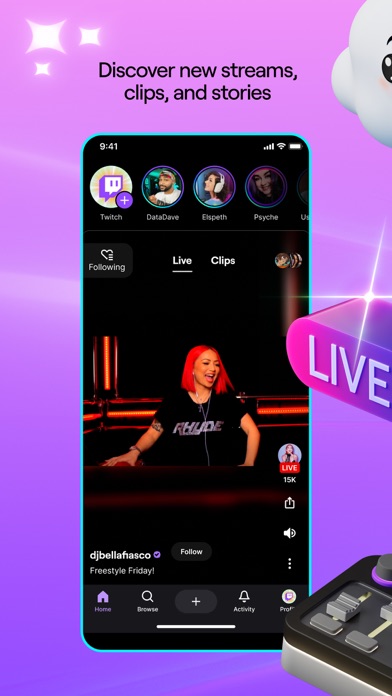

Finding new ways to experience live broadcasting on iOS usually means dealing with clunky web wrappers or stale public updates. Apple's TestFlight channel gives us an early look at how Twitch Interactive, Inc. plans to refine mobile streaming tools. We spent the last week stress-testing the newest beta build to see how it holds up on modern Apple hardware.
Running pre-release builds allows power users to spot layout bugs, test video codecs, and report frame drops directly to the developers before public release. If you want a front-row seat to upcoming UI overhauls and performance patches, grabbing the current TestFlight link is your best bet.
Twitch — Quick Specifications
Developer: Twitch Interactive, Inc.
About Twitch
Twitch is the dominant global platform where millions of communities gather for live gaming, music festivals, esports tournaments, and creative broadcasts. Users navigate through thousands of active channels ranging from massive competitive esports leagues to independent creators streaming street tours or cooking shows. The core utility centers around real-time video consumption and high-engagement chat rooms.
The application functions as both an interactive viewing client and a direct broadcasting studio for content creators. Users can stream directly from an iPhone camera, manage channel settings, interact with moderators, and subscribe to favorite channels to unlock exclusive community perks. This dual functionality requires the app to handle heavy video decoding and rapid network packets simultaneously.
Developed by Twitch Interactive, Inc., the platform has evolved from a niche video game streaming site into a massive cultural hub for diverse digital media. The engineering team consistently pushes updates that balance high-bitrate video playback with low-latency chat protocols. Bringing this ecosystem to iOS requires careful optimization of Apple's graphics frameworks and network libraries.
Standout Features & What's New in this Build
This experimental TestFlight iteration introduces several targeted improvements designed to optimize streaming performance on Apple Silicon devices. Testers will notice immediate changes to how the app handles rapid scrolling through dense chat feeds and high-resolution video streams. Here are the standout features included in the current beta build:
- Adaptive Bitrate Engine: An upgraded video streaming protocol that dynamically adjusts resolution during unstable cellular network handoffs.
- Enhanced Dark Mode: Refined true-black and purple contrast ratios designed to reduce eye strain on OLED mobile displays.
- Streamlined Go-Live Tool: A simplified broadcasting wizard that cuts down setup time when launching a direct mobile stream.
- Optimized Chat Rendering: Improved text layout engines that prevent dropped frames during high-velocity emote spam sessions.
- Nielsen Measurement Integration: Updated telemetry modules that contribute anonymously to certified broadcast viewership metrics.
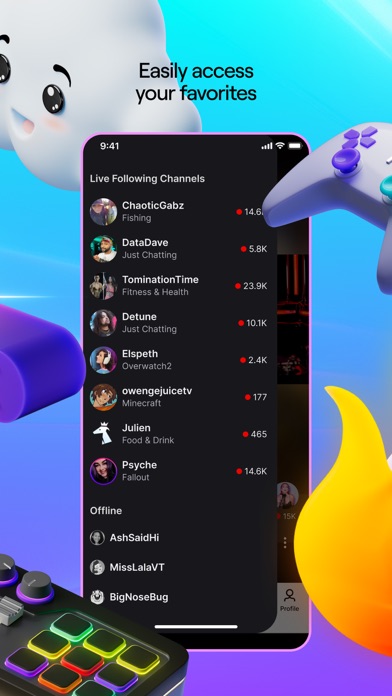
Hands-On Impressions: Performance, Battery, and Thermals
Testing this build on an iPhone 15 Pro running Apple's latest silicon reveals noticeable gains in touch responsiveness and frame pacing. Video playback locks smoothly at native refresh rates, making fast-paced esports streams look crisp and stutter-free. Scrolling through endless subscriber emotes feels fluid, thanks to aggressive memory caching and hardware-accelerated UI rendering.
Extended viewing sessions do draw noticeable power, causing the device to warm slightly near the camera housing during prolonged 1080p stream sessions. However, thermal throttling remains minimal compared to previous stable App Store releases. Battery drain is expectedly high when running high-brightness video streams over 5G networks, but background resource management appears well-contained.
"Building a real-time video platform for mobile hardware means balancing every millisecond of network latency with thermal output. Early feedback from our TestFlight community helps us dial in those performance curves before wide release." — Twitch Engineering Team
System Requirements & Requested Permissions
To run this TestFlight build successfully, your iOS device must be running iOS 16.4 or later. The app requires a hefty 456 MB of free storage space to accommodate pre-release caching frameworks and debugging assets. It performs best on modern devices equipped with Apple's A-series or M-series processors.
Upon initial launch, the app requests standard permissions including Local Network access for casting, Push Notifications for live stream alerts, and Microphone access if you plan to broadcast. Apple's strict sandboxing ensures these permissions remain isolated within the operating system, protecting user data integrity throughout the testing cycle.
Pros & Cons: Beta Impressions
✓ The Highs (What We Love)
- Silky Frame Rates: ProMotion 120Hz display support makes scrolling chat and navigating feeds exceptionally smooth.
- Early Feature Access: Get firsthand experience with upcoming UI tweaks and video decoding optimizations.
- Direct Feedback Loop: Built-in crash reporting tools make it simple to submit bug logs directly to developers.
✕ Beta Caveats (Room for Polish)
- Thermal Output: Extended viewing sessions can cause noticeable warmth on the back glass of standard iPhones.
- Transient Glitches: Occasional chat overlay redraw errors require a quick app restart to resolve.
- Slot Scarcity: Apple imposes strict tester limits, making beta access highly competitive.
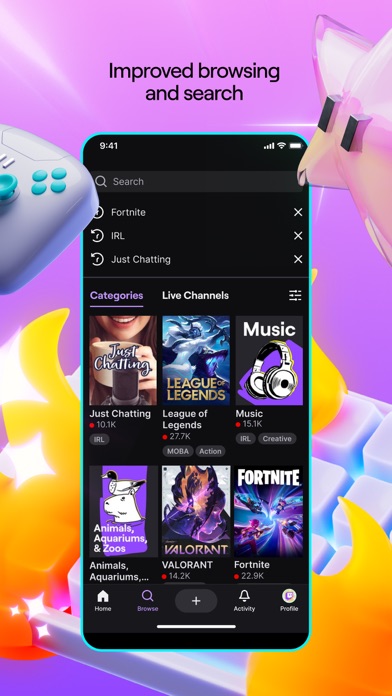
Current TestFlight Slot Situation & Availability
Apple caps public TestFlight distributions at 10,000 active participants per application build. High-profile platforms like Twitch frequently hit this ceiling within hours of opening beta slots to the community. When maximum capacity is reached, new users must wait for inactive testers to be purged before joining.
Checking availability during off-peak hours or saving the platform page on Codewing helps secure an open slot as soon as telemetry limits reset. Developers regularly prune inactive accounts to make room for fresh feedback testers, so persistence pays off when hunting for open beta links.
Step-by-Step TestFlight Installation Guide
Getting the beta up and running on your Apple device takes less than two minutes once you have the direct invitation link. Follow these five simple steps to install the pre-release build safely:
- Download TestFlight: Install the official Apple TestFlight application from the App Store if you do not already have it on your device.
- Tap the Invite Link: Click the official Codewing TestFlight invitation URL directly from your iOS Safari browser.
- Accept the Beta: Tap the "Start Testing" button in the TestFlight web prompt to load the package into your account dashboard.
- Install the Build: Tap "Install" to download the 456 MB beta binary onto your iPhone or iPad.
- Send Feedback: Use the built-in screenshot gesture inside the app to report any visual bugs or performance hiccups directly to the developers.
Frequently Asked Questions
Is Twitch safe to install via TestFlight?
Yes, every beta build distributed through TestFlight undergoes Apple's automated security screenings and operates within strict iOS sandboxing guidelines, ensuring your personal data remains secure.
What should I do if the Twitch beta is full?
If the 10,000-tester capacity is reached, bookmark this page on Codewing and check back periodically. Slots open up automatically when developers remove inactive testers from the roster.
Will installing this beta overwrite my App Store version or delete save data?
TestFlight installs run as standalone preview packages that safely replace the public App Store version while preserving your user login credentials, channel preferences, and account history.
How long do TestFlight beta invitations and builds last?
Each individual beta build expires 90 days after its initial upload date, requiring regular updates through the TestFlight app to maintain access to the platform.
Are in-app purchases free during TestFlight beta testing?
Any financial transactions or channel subscriptions initiated within a TestFlight environment use Apple's simulated sandbox billing system, meaning real charges are never processed.
Final Editorial Verdict
This early TestFlight build gives users a stable, responsive sneak peek into the future of mobile live streaming on iOS. While minor thermal spikes and layout quirks still appear during extended sessions, the performance gains on modern Apple hardware make it a worthwhile download for power users. Score a slot while you can to experience upcoming streaming features before their public App Store debut.
Developer Support & Official Resources
Stay updated on patch notes, maintenance windows, and feature roadmaps directly from the official developer channels.
Ready to Test Twitch?
Apple limits public TestFlight betas to 10,000 testers. Tap below to launch TestFlight and claim your testing slot before capacity is reached.
Join Twitch Beta on TestFlight →


