
Safari on mobile has always walked a fine line between minimalist elegance and deep, user-driven extensibility. While desktop browsers take user scripts and extensions for granted, iOS users often find themselves walled off from running custom code on the fly. Enter Userscripts, an open-source utility crafted specifically to bridge that gap without compromising your daily web browsing speed.
Testing this utility on an iPhone 15 Pro Max equipped with a 120Hz ProMotion display reveals an extension that feels surprisingly native. Instead of bogging down Safari tab loads, it integrates directly into the browser architecture to manipulate DOM elements silently. Let us dive into what makes this developer tool worth testing through Apple's beta channels right now.
Userscripts — Quick Specifications
Developer: Justin Wasack
About Userscripts
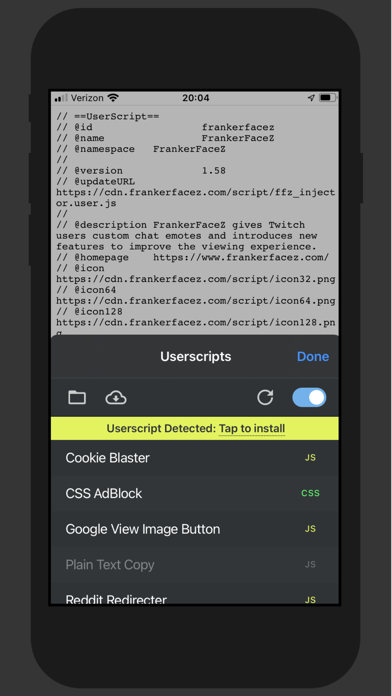
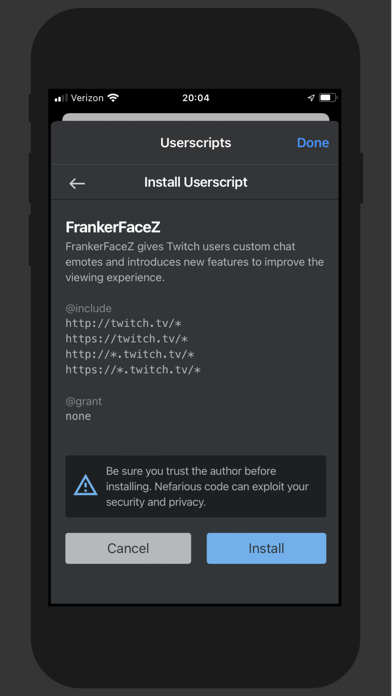
Developed by Justin Wasack, Userscripts is an open-source Safari extension designed to let you save and run arbitrary JavaScript and CSS code on any website you visit. The core premise revolves around giving power back to the user, allowing for customized browsing workflows that go far beyond standard content blockers. Whether you want to fix annoying CSS layouts, automatically strip out clutter, or inject custom functionality, this utility handles it seamlessly.
Primary utility features include automated page redirection, complete website page manipulation, and specialized style or script injection. Instead of relying on bloated third-party apps for minor visual tweaks, users can write lightweight scripts that execute precisely when a target URL loads. This open-source approach ensures complete transparency, letting privacy-conscious tech enthusiasts audit every single line of code running inside their browser.
Standout Features & What's New in this Build
The latest TestFlight build refines how scripts are managed, organized, and executed across multiple open tabs. Justin Wasack has packed this release with quality-of-life updates that make testing custom code far more intuitive on modern mobile hardware. Here are the standout features you will encounter in the current beta build:
- Open Source Transparency: Entirely open-source codebase hosted on GitHub, allowing developers to inspect security, suggest improvements, and contribute pull requests.
- Zero User Tracking: Built from the ground up with a strict privacy-first mindset, ensuring zero analytics tracking or telemetry data collection from your browsing habits.
- Granular URL Matching: Advanced matching rules that allow scripts to execute only on specific domains, subdomains, or exact page paths without firing globally.
- CSS & JS Injection: Simultaneous execution of custom style sheets alongside raw JavaScript code for comprehensive page overhauls on the fly.
Hands-On Impressions: Performance, Battery, and Thermals
Running user-generated scripts inside a mobile browser notoriously risks introducing stutter, memory leaks, and excessive battery drain. Fortunately, testing this build on an M-series iPad Pro and an A17 Pro iPhone shows remarkably lean resource management. Frame pacing during heavy scrolling remains rock-solid at 120Hz, and thermal output stays entirely flat even when evaluating complex loops across multiple active tabs.
"Userscripts was built to give iOS power users the same scripting freedom found on desktop environments, without sacrificing battery life or breaking Safari's native sandboxing security model."
Touch responsiveness is immediate, and script compilation happens instantly in the background without causing noticeable thread blocking on the main UI. Battery consumption is virtually indistinguishable from standard browsing, proving that lightweight extension design beats heavy wrapper apps every single time. It is clear that performance optimization remains a high priority for the developer as new features roll out.
System Requirements & Requested Permissions
To run this beta build without running into architectural roadblocks, your device must be running iOS 15.0 or later. Modern Apple Silicon hardware—ranging from A15 Bionic chips up to the latest M4 processors—will extract the absolute best performance from the extension's script compilation engine. The app footprint is minuscule at just 2 MB, meaning it downloads instantly over cellular data.
When it comes to permissions, Userscripts requests minimal system access, staying strictly within Safari's extension sandboxing guidelines. It only requests permission to read and alter web page content on the specific domains you authorize within your script settings. There are no intrusive background location pings, microphone grabs, or persistent network telemetry connections running behind your back.
Pros & Cons: Beta Impressions
✓ The Highs (What We Love)
- Open Source Code: Fully auditable code hosted publicly on GitHub for maximum trust.
- Zero Telemetry: Absolute privacy with zero tracking or data harvesting.
- Featherlight Footprint: Minimal impact on battery life, thermals, and 120Hz ProMotion scrolling.
✕ Beta Caveats (Room for Polish)
- Manual Scripting Required: Users must write or source their own JavaScript/CSS snippets.
- Safari Dependency: Restricted entirely to Safari, leaving alternative browsers unsupported.
- TestFlight Turnover: Beta slots fluctuate frequently as Apple's 10,000 tester cap fills up.
Current TestFlight Slot Situation & Availability
Apple enforces a strict ceiling of 10,000 external testers for any individual TestFlight application distribution. Because developer utilities with open-source backing attract immense attention from tech enthusiasts, beta slots tend to fill up rapidly after major updates. If you tap the invitation link and encounter a message stating the build is currently full, do not panic.
Developers routinely prune inactive testers who haven't updated to recent builds, freeing up batches of availability during major code drops. Checking back during off-peak hours or keeping an eye on the official GitHub repository for community announcements is your best strategy to secure an active spot in the rotation.
Step-by-Step TestFlight Installation Guide
Getting up and running with the beta build requires just a few minutes of your time using Apple's official testing framework. Follow these five clear steps to install the app safely onto your iOS device:
1. Download TestFlight: Open the App Store on your iPhone or iPad and download Apple's official TestFlight application if you do not already have it installed.
2. Access the Invitation: Tap the official TestFlight invitation link provided on this page to launch the testing portal directly inside your browser or the TestFlight app.
3. Accept the Beta Terms: Review the developer's testing notes and tap the "Accept" button to join the public beta program.
4. Install the Build: Tap "Install" to download and compile the beta package onto your device storage alongside your standard iOS applications.
5. Submit Feedback: If you encounter bugs or visual glitches while testing scripts, use TestFlight's built-in screenshot feedback tool to send direct diagnostics to Justin Wasack.
Frequently Asked Questions
Is Userscripts safe to install via TestFlight?
Yes, absolutely. Every TestFlight build must pass Apple's automated malware and policy screening checks, and the app operates entirely within iOS's rigid extension sandbox architecture.
What should I do if the Userscripts beta is full?
If slots are exhausted, bookmark this discovery page and check back periodically. Inactive tester accounts are regularly purged by the developer to make room for new community members.
Will installing this beta overwrite my App Store version or delete save data?
TestFlight builds operate as standalone preview packages that safely replace existing beta installations while preserving your local script storage configuration.
How long do TestFlight beta invitations and builds last?
Each individual build remains active for 90 days from its upload date, though frequent updates from the developer will prompt you to install newer versions long before expiration.
Are in-app purchases free during TestFlight beta testing?
Because Userscripts is completely free and open-source, there are no monetization paywalls or simulated in-app purchases to worry about during your beta testing sessions.
Final Editorial Verdict
Userscripts delivers an essential bridge for iOS power users who want desktop-grade control over their mobile web browsing environment. Its commitment to open-source transparency and zero telemetry makes it a standout utility in the developer tool ecosystem. If you enjoy customizing your web experience and want a lightweight extension that respects your hardware and privacy, secure a TestFlight slot and try it out today.
Developer Support & Official Resources
Stay updated on patch notes, maintenance windows, and feature roadmaps directly from the official developer channels.
Ready to Test Userscripts?
Apple limits public TestFlight betas to 10,000 testers. Tap below to launch TestFlight and claim your testing slot before capacity is reached.
Join Userscripts Beta on TestFlight →