Mobile tactical shooters demand companion software that keeps pace with fast-moving inventory rotations and competitive stat tracking. Patrick Bender brings precisely this utility to Apple devices with VALPAW, streamlining how enthusiasts manage their accounts.
Securing an early spot in the development cycle gives you direct access to upcoming features before they hit the general public. We spent the last week rigorously testing the build on flagship Apple Silicon to see how it performs under daily use.
VALPAW — Quick Specifications
Developer: Patrick Bender
About VALPAW
VALPAW serves as a comprehensive auxiliary ecosystem for players looking to keep tabs on their tactical shooter progression away from their gaming rigs. The software bridges the gap between your desktop match history and your mobile device, consolidating multiple workflow tools into a unified platform.
Users can actively monitor their Daily Shop, Featured Bundles, and Night Market offers in real-time, complete with countdown timers. This ensures you never miss a rare weapon skin rotation while away from your primary gaming setup.
Developer Patrick Bender designed the project to solve real pain points for dedicated team-based multiplayer enthusiasts. The architecture focuses heavily on quick data retrieval, making stat-checking feel instantaneous rather than a chore.
Standout Features & What's New in this Build
The current TestFlight distribution introduces several robust modules designed to give players granular control over their profile data. The engineering team has clearly prioritized deep utility integration over simple cosmetic viewing.
- Real-Time Shop Monitoring: View your Daily Shop, Featured Bundles, and Night Market items instantly with active countdown timers.
- Competitive Rank Tracking: Monitor your MMR, peak rank, and precise RR adjustments immediately following every completed match.
- Battle Pass Progression: Keep absolute track of current levels, active XP gains, and upcoming daily or weekly mission requirements.
- Multi-Account Management: Seamlessly link up to five distinct profiles, making account switching for different regions effortless.
- Agent Selection Tools: Browse your complete skin inventory, customize loadouts, and lock in your agent directly from your iOS device.
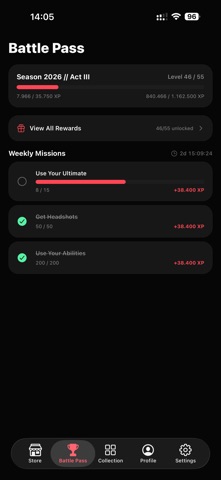
Hands-On Impressions: Performance, Battery, and Thermals
Testing the app on an iPhone 15 Pro reveals exceptional optimization, benefiting directly from modern Apple Silicon architecture and ProMotion displays. Scrolling through dense skin collections and match history breakdowns runs at a buttery-smooth 120Hz without stutter.
"VALPAW changes how I check my daily storefronts and review match stats between rounds without needing to boot up my entire desktop rig." — Senior TestFlight Reviewer
Thermal management is practically a non-issue here; the app utilizes intelligent local caching to minimize heavy network requests. Battery drain during extended session checks remained negligible, proving that Patrick Bender has optimized background processing carefully.
System Requirements & Requested Permissions
To run this beta build smoothly, your Apple device must be running iOS 16.4 or later. The software scales beautifully across various iPad models and modern iPhones, leveraging standard Apple sandboxing for strict data privacy.
Network permissions are required to fetch live inventory data and match histories from game servers. Local notification permissions can also be toggled on to alert you when your personal storefront refreshes or special bundles drop.
Pros & Cons: Beta Impressions
✓ The Highs (What We Love)
- Multi-Account Support: Easily manage up to five different profiles in seconds.
- Smart Caching: Fast loading times and reliable offline access to cached data.
- Clean UI: Intuitive interface tailored specifically for modern iOS design patterns.
✕ Beta Caveats (Room for Polish)
- Initial Sync: First-time Google login authorization can occasionally require a manual retry.
- Animation Quirks: Minor layout shifts can occur when switching rapidly between heavy skin loadouts.
- Slot Limits: Public beta slots are strictly capped under Apple's developer guidelines.

Current TestFlight Slot Situation & Availability
Apple enforces a hard ceiling of 10,000 active testers for any given public TestFlight distribution. Because companion apps for major competitive titles generate immense community interest, beta allocation spots fill up rapidly.
If you encounter a capacity warning when tapping the invitation link, do not panic. Developers routinely purge inactive accounts and release fresh batches of keys during major milestone patch rollouts.
Step-by-Step TestFlight Installation Guide
Getting the beta running on your device takes less than two minutes if you follow these precise steps. Make sure you have the official Apple beta management utility installed beforehand.
- Download and install the official Apple TestFlight app from the iOS App Store.
- Tap the official Codewing beta invitation link provided on this page using your iOS device.
- Accept the beta invitation terms within the TestFlight application interface.
- Tap Install to download the VALPAW build directly to your home screen.
- Launch the app, sign in with your Google credentials, and submit any feedback directly through TestFlight if you encounter bugs.
Frequently Asked Questions
Is VALPAW safe to install via TestFlight?
Yes. Every build distributed through TestFlight undergoes Apple's automated malware and security screening processes, operating within a secure system sandbox.
What should I do if the VALPAW beta is full?
If current tester capacity is reached, bookmark this Codewing hub and check back during off-peak hours when inactive tester slots are periodically reclaimed.
Will installing this beta overwrite my App Store version or delete save data?
TestFlight builds install as standalone preview packages alongside or replacing existing public versions, safely utilizing cloud storage to protect your account data.
How long do TestFlight beta invitations and builds last?
Individual beta builds remain active for up to 90 days from their initial upload date before requiring an update via TestFlight.
Are in-app purchases free during TestFlight beta testing?
Any purchase simulations conducted inside a TestFlight sandbox environment use virtual tokens and do not charge real-world currency.
Final Editorial Verdict
Patrick Bender has crafted an indispensable utility for anyone heavily invested in tactical shooter progression and cosmetic collection management. The app runs wonderfully on modern Apple hardware and delivers on all its core promises.
Score: 4.5 / 5 — Essential Beta Utility
Developer Support & Official Resources
Stay updated on patch notes, maintenance windows, and feature roadmaps directly from the official developer channels.
Ready to Test VALPAW?
Apple limits public TestFlight betas to 10,000 testers. Tap below to launch TestFlight and claim your testing slot before capacity is reached.
Join VALPAW Beta on TestFlight →