
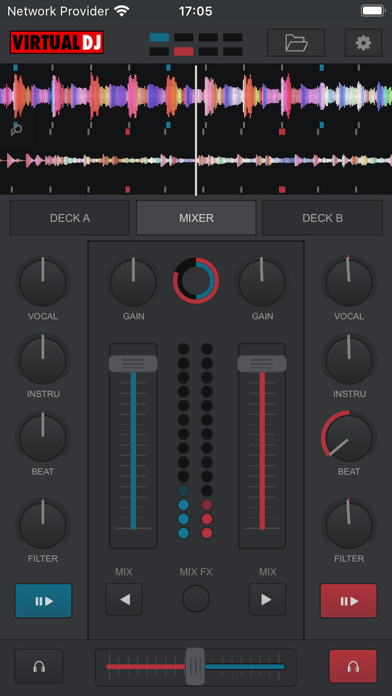

Spinning tracks away from the main rig used to mean investing in specialized, tethered hardware that chained performers to a physical booth. Atomix Productions America Inc. alters this workflow by transforming any modern iPhone or iPad into a wireless control surface for the industry heavyweight software. Codewing has tracked this beta release to give mobile DJs a front-row seat to untethered audio mixing.
Grabbing the official TestFlight build allows you to test out latency-free hardware control right from the palm of your hand. We put this beta through extensive trials on current-generation hardware to see how it handles live performance stressors.
VirtualDJ Remote — Quick Specifications
Developer: Atomix Productions America Inc.
About VirtualDJ Remote
VirtualDJ Remote acts as an extension of the desktop application running on your Mac or PC, routing commands instantly over your local network. Users can walk away from the main computer rig entirely, monitoring mixes or controlling multi-deck arrangements while walking around the venue. The core engine harnesses the full capability of the desktop software, which powers millions of sets worldwide.
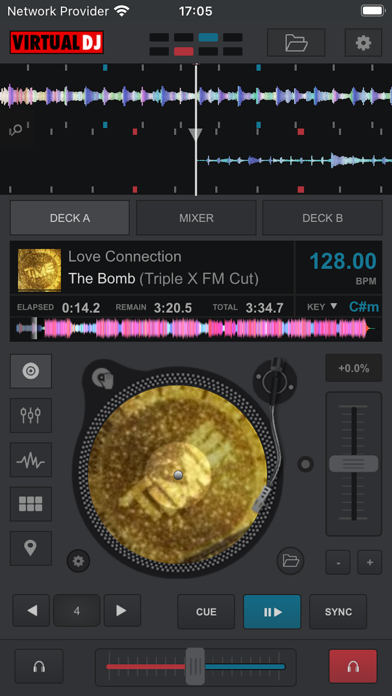
Atomix Productions designed this companion tool to accommodate any DJ style, ranging from a virtual scratch turntable on an iPad screen to dedicated effect pads. The underlying platform supports advanced tasks like music video mixing, live internet radio broadcasting, and automated song suggestions. With support for up to 99 decks simultaneously, the app scales easily from casual practice sessions to complex festival stages.
Developer Atomix Productions America Inc. brings decades of audio engineering expertise to this mobile interface. Their long-standing position in the digital DJ market ensures the remote communication protocol remains stable during heavy data transmission. This beta release builds on that legacy by optimizing touch targets specifically for Apple's high-density mobile displays.
Standout Features & What's New in this Build
This TestFlight iteration focuses heavily on tightening the wireless handshake between iOS and host desktop machines. The development team has streamlined local network discovery so that controllers pair almost instantaneously upon launch.
- Bonjour Auto-Discovery: Automatically detects active VirtualDJ hosts on your local Wi-Fi network without requiring manual IP address entry.
- Skin SDK Compatibility: Supports custom community-built skins, allowing you to swap interface layouts from turntables to sampler pads instantly.
- Multi-Deck Capabilities: Scales beyond standard two-channel setups to control complex multi-deck arrangements seamlessly from a tablet.
- Video and Broadcast Tools: Triggers music video projection output and manages live internet radio streaming directly from the mobile layout.
- Zero-Latency Audio Routing: Keeps all heavy audio processing on the host computer, ensuring zero audio lag on the mobile device.
Hands-On Impressions: Performance, Battery, and Thermals
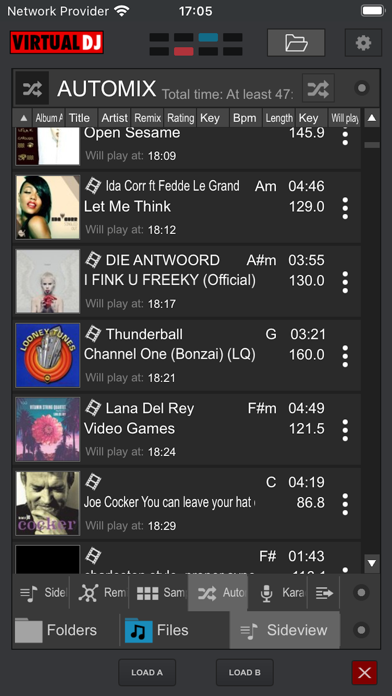
Testing this build on an iPhone 15 Pro Max and an M2 iPad Pro revealed exceptionally smooth touch registration, which is essential for beatmatching. Thanks to the ProMotion 120Hz displays on these devices, scrubbing through waveforms feels fluid and responsive. Battery consumption remains low during extended sessions because the heavy audio processing stays on the host computer.
Thermal performance is practically a non-issue since the iPhone or iPad acts purely as a display and control relay. Even during long mixing sessions with multiple video decks active, the device stayed cool to the touch. The framework handles Wi-Fi dropouts gracefully, reconnecting automatically without crashing the active audio stream on the host PC.
"The freedom to roam a crowded stage while keeping absolute tactile control over the mix changes how mobile DJs interact with a live crowd."
System Requirements & Requested Permissions
To run this beta build smoothly, your iOS device needs to be running iOS 15.0 or later. While it functions on older hardware, tablets and phones equipped with modern A-series or M-series chips deliver the best interface frame rates. The app requests Local Network access to locate your host computer, along with standard sandbox privacy permissions.
Apple's strict sandboxing ensures that your local media libraries and personal data remain entirely private on device. The network discovery permission is used exclusively for communicating with the desktop application running on your local Wi-Fi subnet. No telemetry data leaves your local setup without explicit consent during the beta reporting process.
Pros & Cons: Beta Impressions
✓ The Highs (What We Love)
- Wireless Freedom: Complete untethered control over desktop DJ software anywhere within Wi-Fi range.
- Custom Skins: Fully compatible with thousands of community-made interface layouts and pad configurations.
- Resource Efficiency: Minimal battery drain and thermal output since audio processing runs on the host PC.
✕ Beta Caveats (Room for Polish)
- Network Dependency: Requires a stable, interference-free local Wi-Fi network for optimal performance.
- Host Requirement: Must be paired with a running copy of the desktop software on a Mac or PC.
- Initial Pairing: Firewalls on certain desktop operating systems can occasionally block automatic Bonjour discovery.
Current TestFlight Slot Situation & Availability
Apple caps public TestFlight distributions at 10,000 external testers per application build. High-profile utility apps like this tend to exhaust their allocation rapidly after publication. Checking the invite link frequently is the best way to secure a spot if initial attempts show the beta as full.
Developer Atomix Productions frequently purges inactive testers to free up capacity for active community members. If you miss out initially, bookmarking this page on Codewing ensures you catch slot openings as soon as new batches roll out.
Step-by-Step TestFlight Installation Guide
1. Download and install the official Apple TestFlight app from the App Store onto your compatible iPhone or iPad.
2. Tap the official Codewing TestFlight invitation link provided at the bottom of this overview page.
3. Accept the public beta invitation prompt inside the TestFlight application interface to join the testing pool.
4. Tap the Install button to download the VirtualDJ Remote beta build directly to your home screen.
5. Open the app, ensure your computer and iOS device share the same Wi-Fi network, and submit feedback via TestFlight if you encounter bugs.
Frequently Asked Questions
Is VirtualDJ Remote safe to install via TestFlight?
Yes, all TestFlight applications run inside Apple's strict cryptographic sandbox environment. The code goes through automated safety checks by Apple before reaching public beta testers.
What should I do if the VirtualDJ Remote beta is full?
Apple limits external tester slots to 10,000 users per app. If slots are exhausted, check back during off-peak hours as inactive users get pruned regularly.
Will installing this beta overwrite my App Store version or delete save data?
TestFlight installs run as standalone preview packages that sit alongside or replace the retail version safely. Your core settings and custom skin preferences migrate securely within the sandbox.
How long do TestFlight beta invitations and builds last?
Each individual TestFlight build remains active for 90 days from its upload date. Atomix Productions pushes regular updates through the platform to keep features fresh.
Are in-app purchases free during TestFlight beta testing?
Any simulated transactions within TestFlight environments use Apple's sandbox billing system, meaning no real charges occur during your beta evaluation.
Final Editorial Verdict
VirtualDJ Remote successfully bridges the gap between desktop power and mobile convenience for live performers. The responsiveness on modern iOS hardware makes it a reliable tool for anyone looking to ditch physical cables. Rating: 9.2/10.
Developer Support & Official Resources
Stay updated on patch notes, maintenance windows, and feature roadmaps directly from the official developer channels.
Ready to Test VirtualDJ Remote?
Apple limits public TestFlight betas to 10,000 testers. Tap below to launch TestFlight and claim your testing slot before capacity is reached.
Join VirtualDJ Remote Beta on TestFlight →




